Yes, you can schedule posts to Facebook groups you've joined as a member, but not with standard social media schedulers. Tools like Hootsuite, Buffer, and similar API-based schedulers are all API-based, and the Facebook API doesn't allow posting to joined groups. The only tools that support scheduled posting to joined groups are browser-based, specifically tools using a Chrome extension to post through your real session. PilotPoster is built for exactly this: scheduling posts to your joined groups with configurable timing, randomized delays, and AI content variation.
Scheduling posts to joined Facebook groups sounds like a basic feature. In practice, almost every scheduler gets this wrong. This guide explains why, and gives you the full setup walkthrough for making it work.
Why Facebook Doesn't Let You Schedule to Joined Groups Natively #
If you open a group you've joined (not one you admin) and try to schedule a post, you won't find a scheduler. Facebook's built-in tools are built around Pages and creator workflows, not member posting across dozens of communities.
That gap isn't an oversight. Meta treats member-level group posts as something you do deliberately in the moment. Pre-scheduling the same promotional message across many joined groups is exactly the spam pattern they want to discourage. So the native product never offered a "queue this to 40 groups next Tuesday" button, and third-party tools that use the official API inherit the same limit: they can reach Pages and groups you manage, not the joined groups where most marketers actually spend their time.
Browser-based scheduling sidesteps that design choice by running in your real Chrome session, the same access you already have when you post manually.
Why Standard Schedulers Don't Work for Joined Groups #
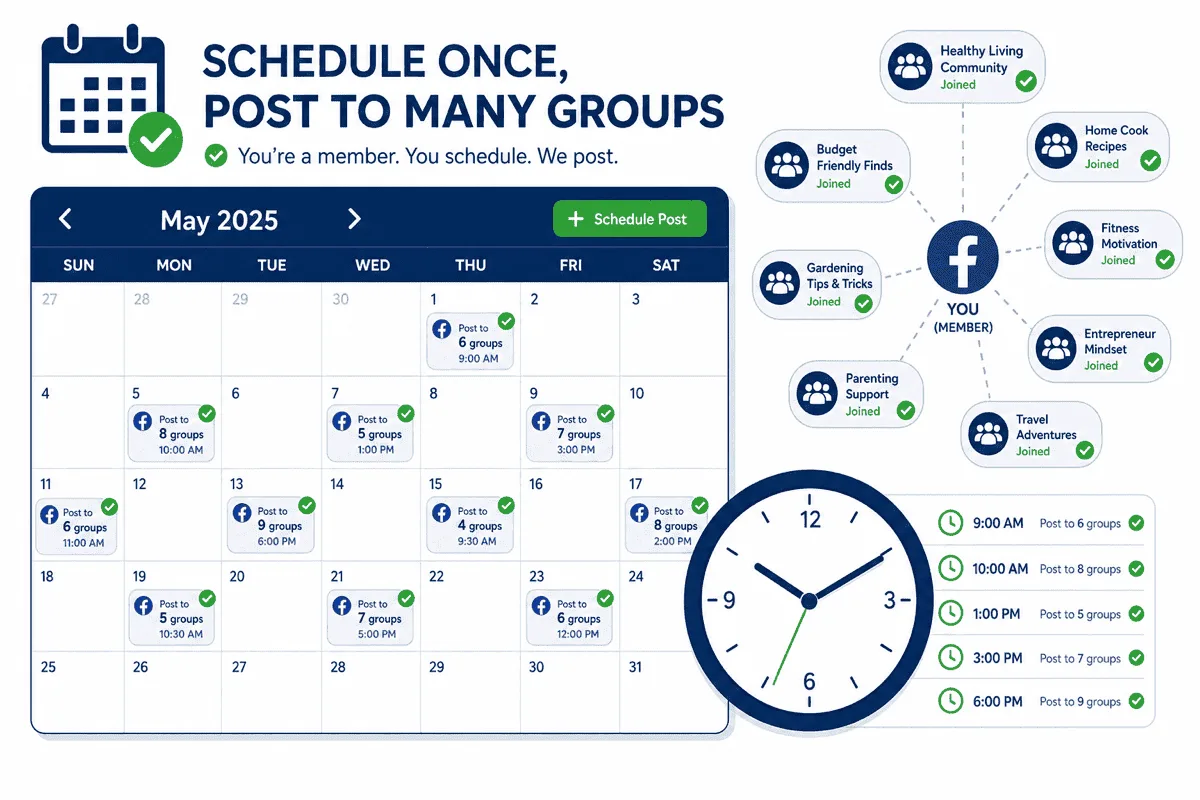
When you connect Hootsuite, Buffer, Later, or any other mainstream scheduler to your Facebook account, it connects via OAuth using the Facebook Graph API. The Graph API has a permission scope called publish_to_groups, which sounds like what you'd need. The problem is that this permission is restricted to groups where you are an admin or moderator.
For groups you've joined as a regular member, there is no equivalent permission. Meta's API design treats member-level posting as a manual, intentional action by the user, not something that should be pre-authorized to apps. Every standard scheduler hits the same wall when you try to schedule to a joined group.
Some schedulers will show your joined groups in a group picker but fail silently or error out when you try to post. Others won't show joined groups at all. Neither outcome is what you need.
The workaround isn't a workaround: it's a different architectural approach entirely. Browser-based tools don't call the API for posting. They automate your Chrome browser, using your active session to navigate to groups and post as if you were doing it manually. With that approach, your membership status in the group is all that matters, just as it would be for a manual post.
What Browser-Based Scheduling Actually Looks Like #
Browser-based scheduling for joined groups works through two components: a web app where you manage everything, and a Chrome extension that handles the actual posting. The scheduling logic lives in the web app. The execution happens in your browser.
Here's what a typical setup looks like with PilotPoster:
- You've joined a portfolio of groups in your niche: 50, 100, maybe more.
- You sync your groups into PilotPoster, which reads your full group list from your browser session.
- You organize those groups into categories: local groups, niche interest groups, buy/sell groups, professional groups.
- You create a campaign: content (3-5 post variations or an AI-generated set), target group category, time window (post between 10am and 1pm on weekdays), and delay range (3 to 6 minutes between groups).
- When the window opens, the Chrome extension activates and works through the queue: navigate to Group 1, post, wait a randomized delay, navigate to Group 2, post, and so on.
- The posting log records what went out, to which groups, and at what times.
The "scheduling" here is more like "campaign execution windows" than fixed post times. You're defining when posting happens and at what pace, rather than pinning each post to a specific minute. This is actually more useful for group campaigns, where you want consistent coverage without over-posting to any single group.
Content Variation: The Other Piece That Matters #
How Content Variation Prevents Duplicate-Content Flags #
Even perfect timing fails if every group gets the same paragraph. Facebook fingerprints identical text posted across many groups in a short window. Members who overlap across communities report it. Admins remove it.
Variation doesn't have to mean writing 50 unique posts by hand. Options that work at scale:
- AI rewriting: one base post, unique phrasing per group before publish
- Spintax: rotate synonyms and openings so posts aren't byte-for-byte identical
- 3–5 manual variants rotated across groups when you're starting small
The goal is simple: anyone scrolling one group should see a normal post, not a broadcast copy-pasted everywhere else. Pair variation with smart intervals and you cover the two triggers that catch most bulk group campaigns.
Scheduling posts to joined groups requires solving a second problem that standard schedulers also don't address: content uniqueness per group.
When you post the same content to 50 groups, members who belong to multiple groups see the same post appearing over and over. Group admins who are members of several groups in the same niche notice this pattern. Facebook's duplicate content detection flags identical posts appearing across many groups in a short window.
A scheduler that posts identical content to 50 groups on a schedule is better than doing it manually, but it introduces risks that negate some of the benefit. The solution is per-group content variation.
PilotPoster handles this with AI rewriting: before each post goes out, the AI generates a unique version of that post for that group. The message is the same; the phrasing, sentence structure, and opening line are different. From the perspective of any individual who sees the post in their group, it reads as a natural post, not a distributed broadcast. For the full case for why content variation matters, see how AI rewriting reduces ban risk.
Smart Intervals: What Timing Keeps Your Account Safe #
Scheduling to joined groups isn't only about picking Tuesday at 10am. The gap between posts matters as much as the clock time. Facebook's systems notice accounts that fire off group posts faster than a careful human could, often under 90 seconds per group, or on perfectly even intervals.
A practical safe range for most accounts:
- 2–4 minutes minimum between group posts, with randomized delays so the pattern isn't robotic
- Cap daily volume when you're ramping up, start with 10–15 groups, add more over two weeks
- Spread campaigns across a window (e.g. 10am–1pm) instead of dumping 50 posts in 20 minutes
PilotPoster campaigns use configurable delay ranges for this reason. You're not just scheduling when posting starts; you're controlling how fast the extension moves through your queue. For a deeper breakdown of account-level limits, see how to avoid Facebook Jail.
Scheduling Patterns That Work Well for Joined Groups #
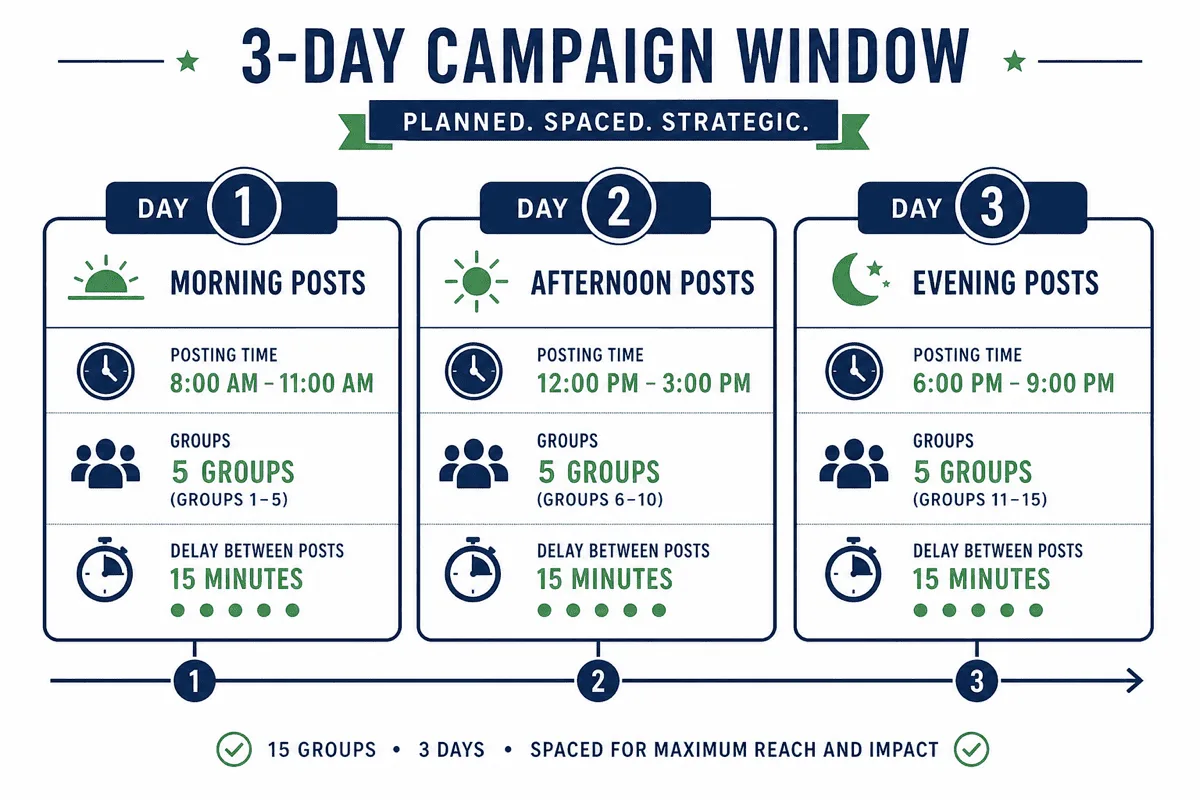
Beyond the technical setup, here are the scheduling patterns that produce good results in practice:
Rolling Group Rotation #
Rather than posting to all your groups every week, divide your groups into cohorts and rotate campaigns across cohorts. Cohort A gets posts this week, Cohort B gets posts next week. Each group in your list gets content every other week (or every third week), which keeps your account looking active without over-posting to any single group.
This approach works especially well when groups in your niche have overlapping membership. Rotating your posting schedule reduces the chance of the same members seeing your content repeatedly across multiple groups.
Content Type Calendar #
Map different content types to different days. Monday is educational content (tips, how-tos), Wednesday is community content (questions, polls), Friday is promotional content (offers, product mentions). This creates a natural variety that feels less automated to human readers, even though it follows a consistent schedule.
Peak Hours with Daily Range #
For most niches, posting between 9am and 12pm or 6pm and 9pm local time covers peak engagement windows. Configure your campaigns to execute within these windows rather than posting at 3am when group activity is low and your posts will have scrolled out of view before most members log on.
Use the time zone of your target audience, not your own if they differ. A US East Coast audience that you're posting to at 9pm Pacific is actually seeing posts at midnight. See the full guide on best posting times for Facebook groups for audience-specific recommendations.
Frequency Caps by Group Type #
High-traffic general groups (buy/sell, local community) can handle more frequent posts without standing out. Tighter niche groups with active, engaged communities are more likely to notice and react negatively to high-frequency posting from the same account. Set group-specific frequency caps based on the type and size of each group:
- Large buy/sell and general interest groups: up to 3 times per week
- Niche interest groups with engaged members: once per week maximum
- Professional and B2B groups: once every 2 weeks
Technical Requirements for Browser-Based Scheduling #
Before committing to a browser-based scheduling approach, understand the practical requirements:
- Chrome must be open: The Chrome extension runs in Chrome. Posting campaigns only execute while Chrome is open and your Facebook account is logged in. This isn't an issue for daytime posting campaigns running while you work.
- Stable internet connection: Each post involves navigating to a group and submitting content. Intermittent connectivity causes posts to fail.
- Active Facebook session: If Facebook logs you out (session expiry, forced logout), posting stops. Re-logging in resumes the campaign.
- Chrome running on a desktop or laptop: Mobile Chrome and other browsers aren't supported for extension-based posting.
For most marketers working from a computer during regular business hours, none of these requirements are a practical constraint. If you need truly unattended overnight posting while your computer is off, browser-based scheduling won't work for that window, but the trade-off in account safety and joined group access is worth it for the rest of your posting schedule.
Setting Up Your First Joined-Group Posting Schedule #
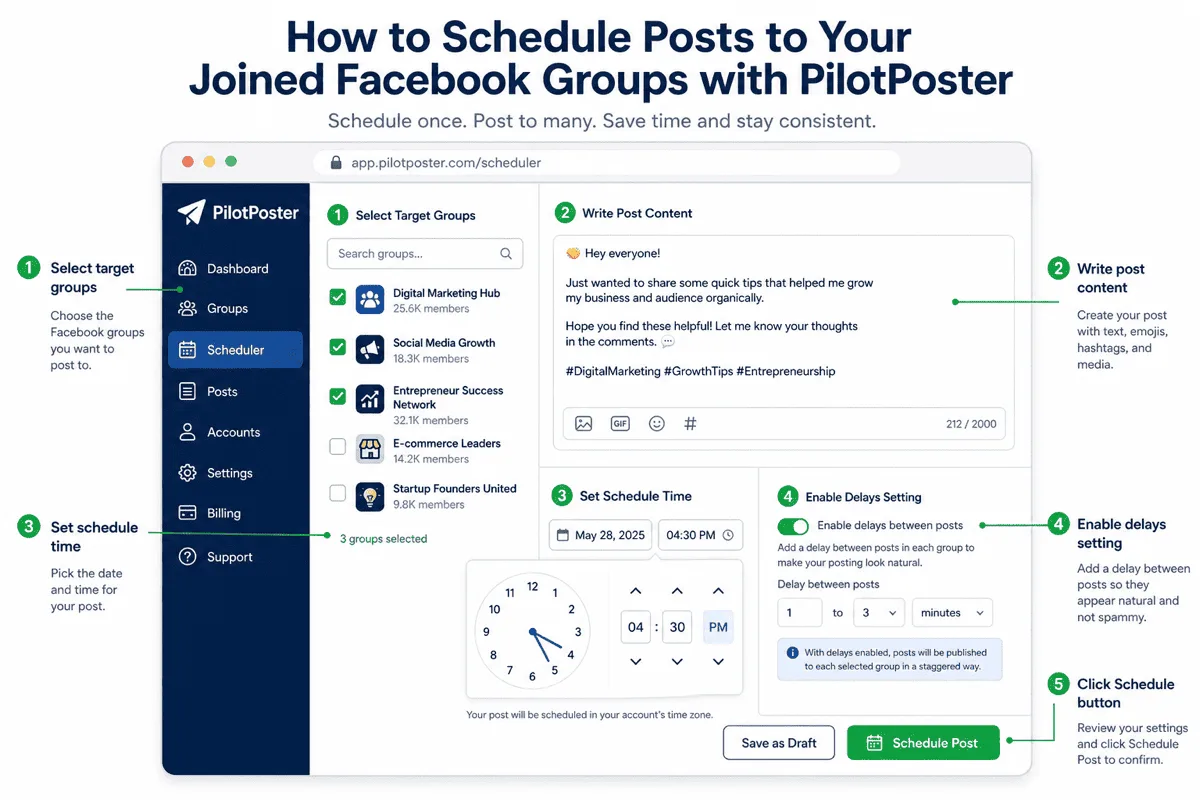
Here's the practical setup sequence for new users:
- Sign up for PilotPoster at pilotposter.com and install the Chrome extension from the dashboard.
- Sync your groups. Open the sync function in the dashboard. The extension reads your Facebook group list and imports both admin and joined groups.
- Tag your groups into categories based on niche, location, or audience type. This takes 10-15 minutes but saves time every time you create a new campaign.
- Prepare your first content set. Start with 3-5 post variations on a single topic. If you're using AI rewriting, 1-2 base posts is enough for the AI to work from.
- Create a campaign. Select a group category, assign your content, set a time window (e.g., weekdays 10am-12pm), and set a delay range (3-5 minutes).
- Start with a small test. Run the first campaign to 10-15 groups before scaling. Check the posting log to verify everything is working as expected.
- Scale up gradually. Add more groups to the category, extend the time window, or add more content variations. Build volume over days and weeks rather than adding everything at once.
What to log after each campaign #
After your first scheduled run, open the posting log and note three things: which groups succeeded, which failed (and why, often a closed group or posting rules), and total elapsed time. That log becomes your baseline for adjusting delay ranges next week. Groups that consistently fail should be tagged separately so they do not slow down every campaign.
One mistake new users make: treating "schedule" like a single blast time. Joined-group campaigns work better as windows: post between 10am and 1pm with delays between groups, so you're present in the feed during active hours without tripping velocity limits. If a campaign runs long, you can pause it from the dashboard and resume later the same day.
When you're ready to scale past your first test batch, add groups in chunks of 15–20 per week rather than doubling overnight. Your account history matters: a sudden jump from 10 groups to 80 in one afternoon looks like a new automation layer, not normal marketing rhythm.
Comparing Your Scheduling Options for Joined Groups #
| Scheduling Approach | Works for Joined Groups | Scales | Content Variation |
|---|---|---|---|
| Facebook native scheduler | Manual only, one at a time | No | Manual |
| Hootsuite / Buffer | No (API limitation) | N/A | N/A |
| PilotPoster (browser extension) | Yes | Yes (100s of groups) | AI rewriting + Spintax |
| Manual posting | Yes | No (time-limited) | Manual |
- Standard API-based schedulers cannot post to joined Facebook groups. This is a platform-level API restriction.
- Browser-based tools are the only option for scheduling posts to joined groups at scale.
- PilotPoster's Chrome extension posts through your real session, giving it the same access you have manually.
- Content variation per group is essential alongside scheduling: identical content across many groups triggers spam detection.
- Start small, verify the setup, then scale up gradually over days and weeks.
Related Reading #
- How to Schedule Facebook Posts in 2026: Pages, Profiles, and Groups
- Can You Auto Post to Facebook Groups You Joined?
- PilotPoster vs Hootsuite: Why API-Based Tools Can't Reach Joined Groups
- How to Schedule Facebook Group Posts
- Best Time to Post in Facebook Groups
- How AI Rewriting Reduces Ban Risk When Posting to Multiple Groups


