Yes, you can auto post to Facebook groups you've joined as a regular member, but only with the right type of tool. Most automation tools use the Facebook API, which restricts posting to Pages and groups you admin. Browser-based tools like PilotPoster use your real Chrome session instead, so they can post to any group you have manual permission to post in, including groups you didn't create. The key distinction is architecture: API-based vs browser-based.
This question trips up a lot of marketers, and for good reason. When you search for "Facebook auto poster" most of the tools you find will quietly only work for groups you admin or Pages you manage. The limitation is buried in their documentation or not mentioned at all. You find out after you've paid and tried to add your joined groups.
This guide explains why that limitation exists, what architectural difference changes it, and what the practical setup looks like for someone who wants to post to joined groups at scale.
Why Most Auto Posters Can't Reach Your Joined Groups #
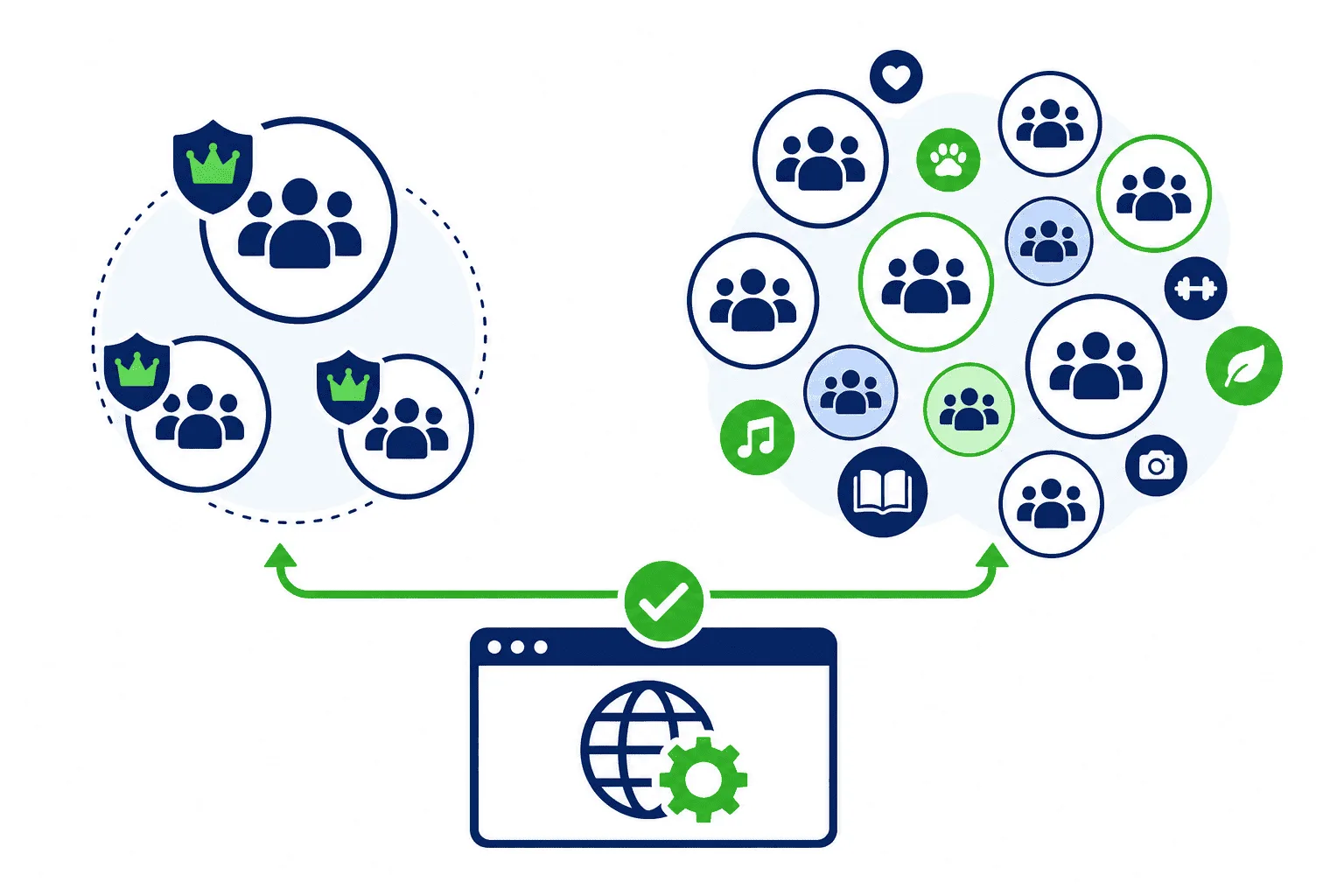
The limitation comes from how Facebook's Graph API works. The Graph API is the official interface for third-party apps to interact with Facebook. When a scheduling tool connects to your Facebook account, it does so through this API using an OAuth token. That token grants specific permissions, and those permissions are defined by Meta.
Meta's API permissions for posting are structured around content ownership. You can post to:
- Pages you manage or admin
- Groups where you are an admin
The API does not provide a permission scope for posting to groups you are a member of. This is a deliberate design choice, not an oversight. Meta's position is that posting to a joined group should require human intent and human action. There is no publish_to_joined_groups permission because Meta explicitly doesn't want third-party apps triggering posts in groups where you're just a member.
This means every tool that connects to your Facebook account via the official API shares this same hard constraint, regardless of how much you pay for it. Hootsuite, Buffer, Later, Sprout Social, and every other API-connected scheduler faces the same wall.
The Architecture That Changes Everything #
Browser-based automation takes a completely different approach. Instead of calling the Facebook API, these tools automate actions inside your actual web browser. From Facebook's perspective, a real person is opening groups and typing posts.
PilotPoster uses a web app paired with a Chrome extension. The web app handles scheduling, content management, group organization, and the posting queue. The Chrome extension executes the actual posting inside your browser using your active Facebook session. Because you're logged in as yourself, and the posting happens through Chrome with your real session, you have the same permissions you would have posting manually: you can post to any group that allows member posts.
This isn't a workaround or a grey-area exploit. It's the same process you follow when you manually post to a group, just automated. The group sees a post from a real member account. The activity looks human because it is human activity, automated.
What You Can Actually Post to Joined Groups #
With a browser-based tool, the question shifts from "can I post?" to "will the group admin allow this post?" That's a meaningful distinction. The automation can post to any group where:
- You are an approved member
- The group allows member posts (not an admin-only posting group)
- Your post format complies with the group's rules
- Your account is in good standing with Facebook
If a group requires admin approval before posts go live, that's still the case with automated posting. The post will go into the pending queue. If a group has temporarily turned off posting due to elections, specific topics, or admin decisions, that restriction applies equally. The automation doesn't bypass group-level controls set by admins.
What it does handle is the repetitive mechanical work: navigating to each group, composing the post, and submitting it. That's what takes hours when done manually across dozens of groups.
How PilotPoster Handles Joined Groups #
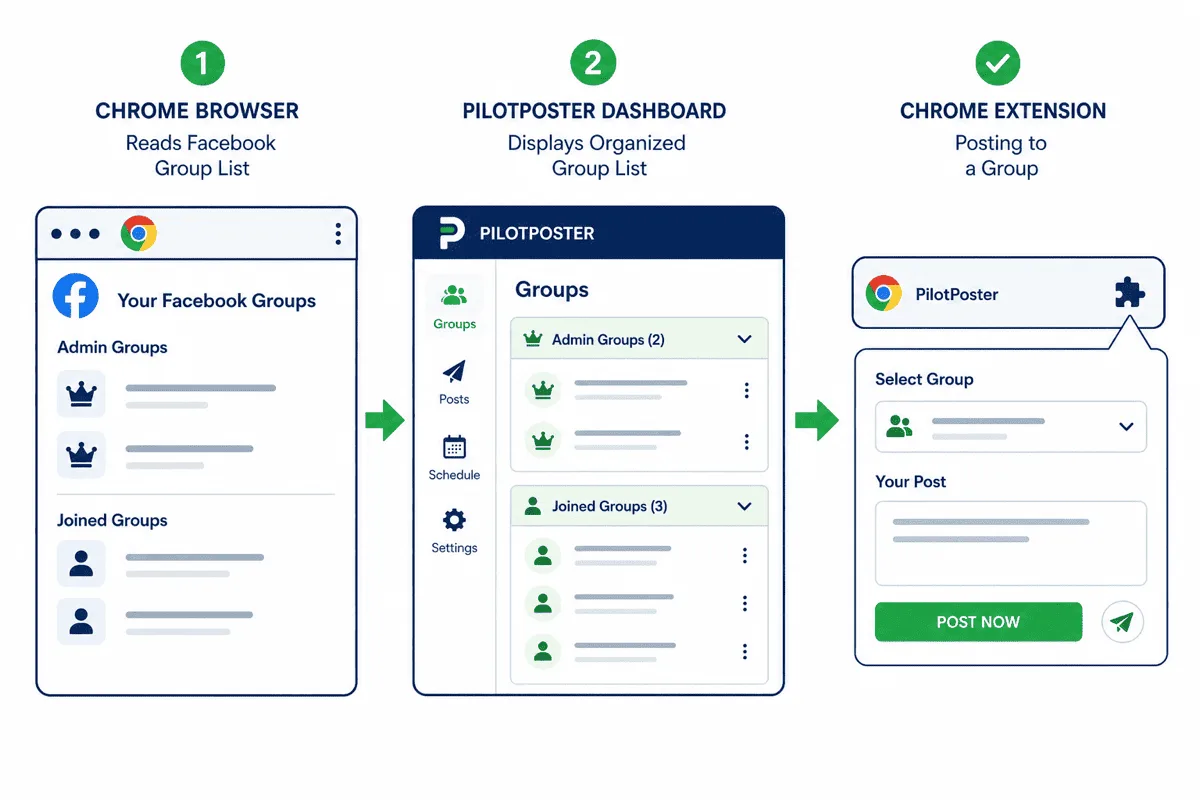
PilotPoster's group management works in two phases: sync and post.
Sync: When you install the Chrome extension and open your PilotPoster dashboard, you can pull in all the groups associated with your Facebook account, including both groups you admin and groups you've joined. The sync reads your actual group membership, not a restricted API response, so the full list appears.
Post: When a scheduled post is ready to go out, the Chrome extension activates in your browser, navigates to the target groups, and posts the content on your behalf. This requires Chrome to be open and your Facebook account to be logged in, which is the typical state of any active user's computer during work hours.
You can organize your joined groups into categories (by niche, location, audience type, etc.), create separate posting queues for different content types, and set delays between posts to keep activity patterns natural and human-paced.
| Feature | API-Based Tools | PilotPoster (Browser-Based) |
|---|---|---|
| Post to Facebook Pages | Yes | Yes |
| Post to groups you admin | Yes | Yes |
| Post to groups you joined | No | Yes |
| Posts through real browser session | No | Yes |
| No Facebook password required | No | Yes |
| Human-paced posting delays | Varies | Yes |
| AI content variation per group | Rarely | Yes |
Scale: How Many Groups Is Realistic? #
This is a question worth addressing practically. If you have 200 joined groups and want to post to all of them every day, that is technically possible but strategically questionable. The better approach depends on your use case.
For affiliate marketers and product sellers targeting many groups, a rotating schedule that posts to batches of groups across the week with varied content works better than daily posting to every group. It reduces the duplicate content signal across groups in the same niche and keeps your account behavior looking organic.
For local business owners or service providers, a tighter list of 20 to 50 high-relevance local and niche groups with consistent value-add posts is more effective than blasting 200 groups with promotional content.
PilotPoster supports both models. You can add all your groups and then build selective posting campaigns, or you can set up a broad schedule with the systematic approach to posting to multiple groups that treats each posting slot as a distinct event rather than a carbon copy blast.
Content Variation Across Joined Groups #
One reason the same API-limitation question matters for content is that identical posts across many groups is a spam signal. Facebook's systems flag duplicate content appearing in many groups over a short window. This is true for manual posting and automated posting alike.
PilotPoster's AI rewriting feature solves this specifically for joined group campaigns. Instead of posting the same text to 50 groups, the AI generates a unique version of each post before it goes out, varying the phrasing, sentence structure, and opening line while keeping the message consistent. This is especially important when posting promotional content across niche groups where the same admins may be members of multiple groups you're targeting.
If you're running high-volume campaigns across joined groups, content variation isn't optional. It's one of the main things that separates sustainable automation from the kind that gets your account flagged. See how Spintax and AI variation work together for a deeper look at the mechanics.
Common Objections Answered #
"Don't group admins ban automated posts?" #
Admins can only identify automated posts if they look robotic: identical content, posted at identical times, with no engagement or human follow-through. A well-run browser-based campaign looks identical to manual posting. The post comes from your real account, the content varies by group, the timing is randomized, and you can monitor and respond to comments just as you would a manual post.
Admins remove members for low-quality, spammy, or promotional-only posting. The mechanism of that posting (manual vs automated) isn't what triggers removal. The quality and relevance of the content is what triggers removal. See the complete guide on avoiding group bans for specific admin red flags to avoid.
"Is this against Facebook's Terms of Service?" #
Facebook's Terms of Service prohibit automated access via means that don't use the official API, except for tools that Facebook has explicitly reviewed and approved. Browser extensions exist in a defined space here. Facebook does not proactively block or penalize browser extension-based automation when it uses realistic posting patterns. The distinction that matters in practice is behavioral: posting at machine speed, posting identical content, or posting to groups at volumes that no human could manage manually are the patterns that attract attention. Browser-based tools operating within natural human posting limits remain in practice safe. For a thorough assessment, read whether auto posting to Facebook groups is safe in 2026.
"What if I'm removed from a group while posting?" #
PilotPoster handles this gracefully. If a post fails (group not available, posting not permitted, or any other error), it logs the failure and moves on to the next group. It doesn't retry aggressively or flag the issue in a way that could draw attention. You can review the posting log to see which groups had issues and decide whether to remove them from your campaign or revisit them manually.
Setting Up Your First Joined-Group Campaign #
For someone new to browser-based group posting, here is the practical starting sequence:
- Install PilotPoster: Sign up at pilotposter.com, install the Chrome extension from the dashboard prompt.
- Sync your groups: Use the sync function to pull all your Facebook groups into the dashboard. Both admin groups and joined groups will appear.
- Organize into categories: Create category tags for your groups based on niche, location, audience intent, or posting frequency. This makes campaign targeting much easier.
- Prepare your content: Upload or write 5 to 10 post variations for your first campaign. If using AI rewriting, create 2 to 3 base versions and let the tool generate variants from there.
- Set schedule and delays: Choose the time window and randomized delay range between posts. A 2 to 5 minute range between groups is a natural human pace.
- Start small: Run the first campaign to a subset of groups (10 to 20) to verify the setup works before scaling to your full list.
- The Facebook API does not allow posting to joined groups by design. This affects every API-connected scheduling tool equally.
- Browser-based tools post using your real session, giving you the same permissions you have manually.
- PilotPoster syncs your full group list including joined groups and manages posting through the Chrome extension.
- Content variation per group is essential when posting at scale to avoid duplicate content flags.
- The quality and relevance of your content determines your standing in groups, not the mechanism of posting.


