PilotPoster is a web app paired with a Chrome extension. You manage groups, content, and schedules in the web app dashboard. When it's time to post, the Chrome extension takes over and executes the posting through your real browser and Facebook session, not through the Facebook API. This means your posts come from your actual account, with your real IP address, through the same interface you use manually. No password sharing with third parties, no API restrictions, and full access to groups you've joined as a member.
Most people understand what PilotPoster does (auto post to Facebook groups), but fewer understand how it does it. The how matters because it determines everything: which groups you can post to, how safe the automation is, what happens to your data, and why it can do things other tools can't.
This guide breaks down the architecture in plain terms, walks through each component, and explains the technical decisions behind the approach.
The Two-Part System #
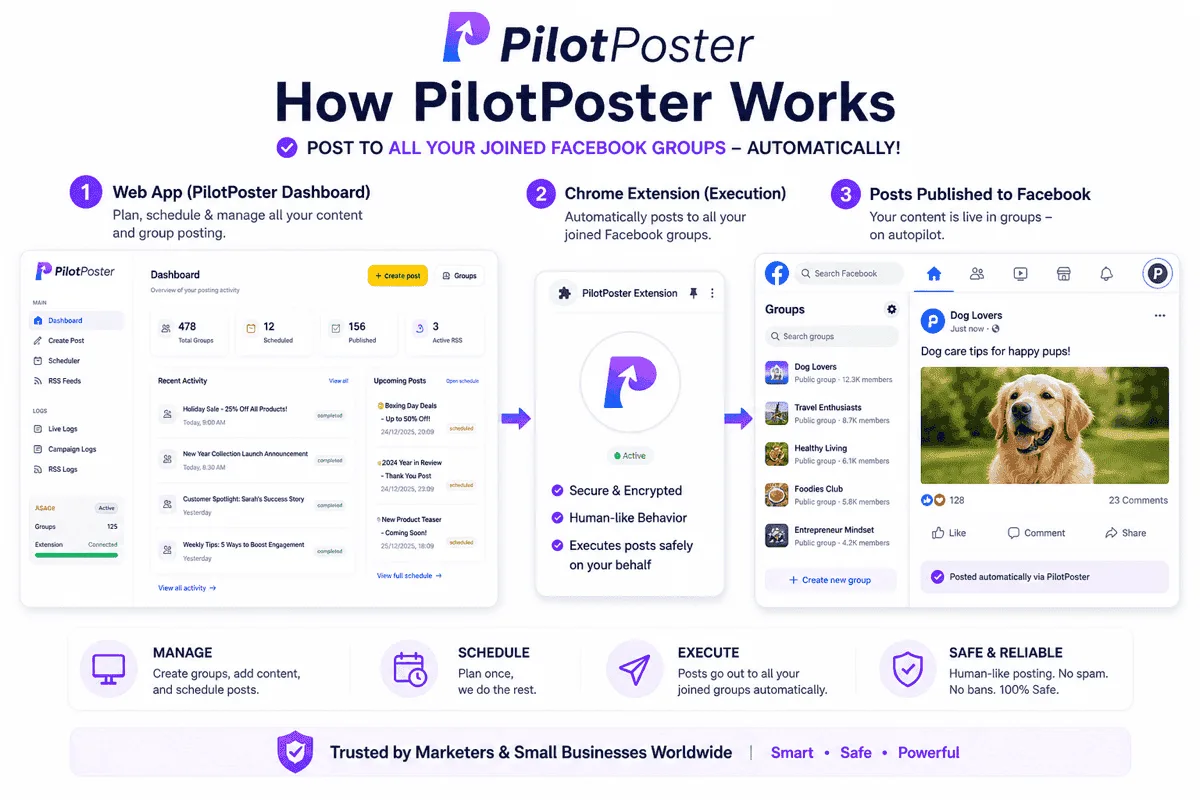
PilotPoster consists of two components that work together:
- The web app (at app.pilotposter.com): your management layer. This is where you add groups, write or import content, organize campaigns, set schedules, and view analytics. The web app runs in any browser and handles everything that doesn't require being inside your Facebook session.
- The Chrome extension: your execution layer. This is installed in your Chrome browser and connects to the web app. When scheduled posts are ready to go out, the extension activates, opens the target groups inside your browser, and submits the posts. It runs on your computer, through your session, from your IP address.
The web app is where you think and plan. The Chrome extension is where the work happens. The separation keeps your data and configuration in a persistent accessible place while keeping the actual Facebook activity on your machine where it belongs.
Step 1: Group Sync #
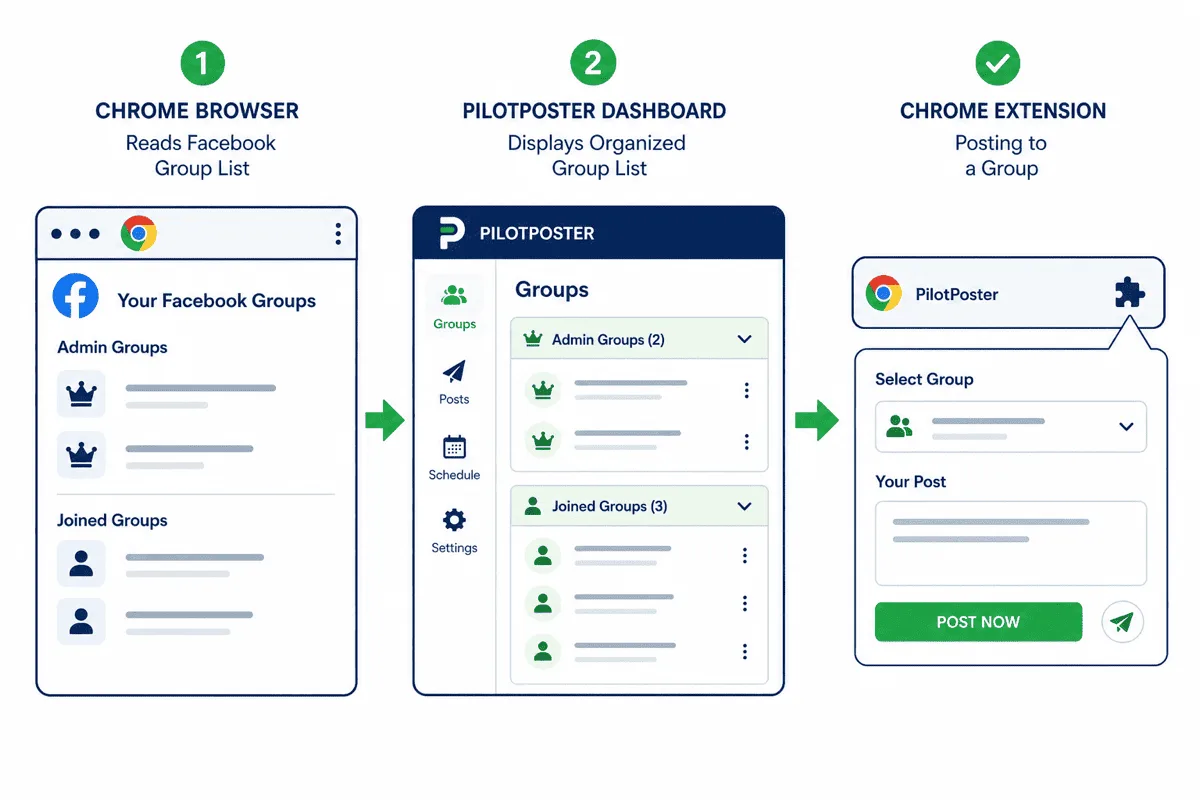
Before you can post, you need your groups in the system. PilotPoster pulls your group list directly through the Chrome extension while you're logged into Facebook. Because the sync happens through your browser session rather than an API call, it retrieves your complete group membership, including groups you've joined but don't admin.
This is the first place where the browser-based architecture makes a real difference. API-based tools can only retrieve groups you admin because that's what the Facebook Graph API permission scopes allow. PilotPoster reads your actual group list from your browser session, giving you the full picture.
After sync, your groups appear in the web app dashboard. You can tag them by category (niche, location, audience type, posting frequency), set group-specific rules, and choose which campaigns they participate in. Groups where member posting is disabled or where you have pending approval don't receive posts.
Step 2: Content Creation #
Content in PilotPoster can come from several sources:
- Manual entry: Write posts directly in the dashboard, including text, links, and media uploads.
- CSV upload: Import batches of posts at once using a spreadsheet template, useful for pre-planned campaigns.
- Website import: PilotPoster can import content directly from your website or blog, generating posts from your existing articles.
- Auto AI generation: The Auto AI add-on generates fresh posts on an ongoing schedule using your business context, pulling from multiple content types including educational, promotional, and engagement posts.
Once content is in the system, you can set it to post to specific groups, specific categories of groups, or rotate through your full group list. You can apply time windows (post between 9am and 12pm on weekdays), set minimum delays between posts, and enable per-group content variation.
Step 3: AI Rewriting for Content Variation #
This is one of PilotPoster's most important practical features, and it's worth explaining in detail because it affects both the safety and effectiveness of your campaigns.
When you post identical content to many groups, two things happen: Facebook's spam detection systems flag the duplicate content pattern, and group members who belong to multiple target groups see your exact same post appearing across their groups. Both outcomes reduce the effectiveness of your campaign and increase the risk of action against your account or your posts.
PilotPoster's AI rewriting generates a unique version of each post before it goes out. The core message stays the same; the opening line, phrasing, and sentence structure change. To a human reader in each group, the post appears native to that group rather than a bulk distribution. To Facebook's systems, the content signatures are distinct.
For even more variation control, PilotPoster also supports Spintax syntax: {This is a great product|This product is worth your attention|Highly recommend this product}. Spintax and AI rewriting can be combined for high-volume campaigns where maximum content uniqueness matters. See the full guide to Spintax for Facebook groups for how to use this effectively.
Step 4: Scheduling and Randomization #
The scheduling system in PilotPoster works differently from standard content schedulers. Rather than setting a fixed time for each post, you define a posting window and a delay range, and PilotPoster distributes posts within that window with natural randomization. For a complete walkthrough of this workflow, see how to post to multiple Facebook groups at once.
This is important because machine-regular posting patterns are a detection signal. If your account posts to 30 groups at exactly 10:00am, 10:03am, 10:06am, 10:09am... that cadence is not how humans post. Randomized delays within a window (post any time between 9am and 12pm, with 3 to 6 minutes between each post) produce the kind of timing variation that genuine human posting sessions have.
You can also set:
- Day-of-week restrictions: Only post on weekdays, or only on weekends, or specific days.
- Group-specific frequency caps: Post to Group A at most once per week, Group B at most twice per week.
- Campaign start and end dates: Run a promotion campaign from May 1 through May 15 and have it stop automatically.
- Post priority: Urgent posts can jump the queue to post before regularly scheduled content.
Step 5: The Chrome Extension Executes the Post #
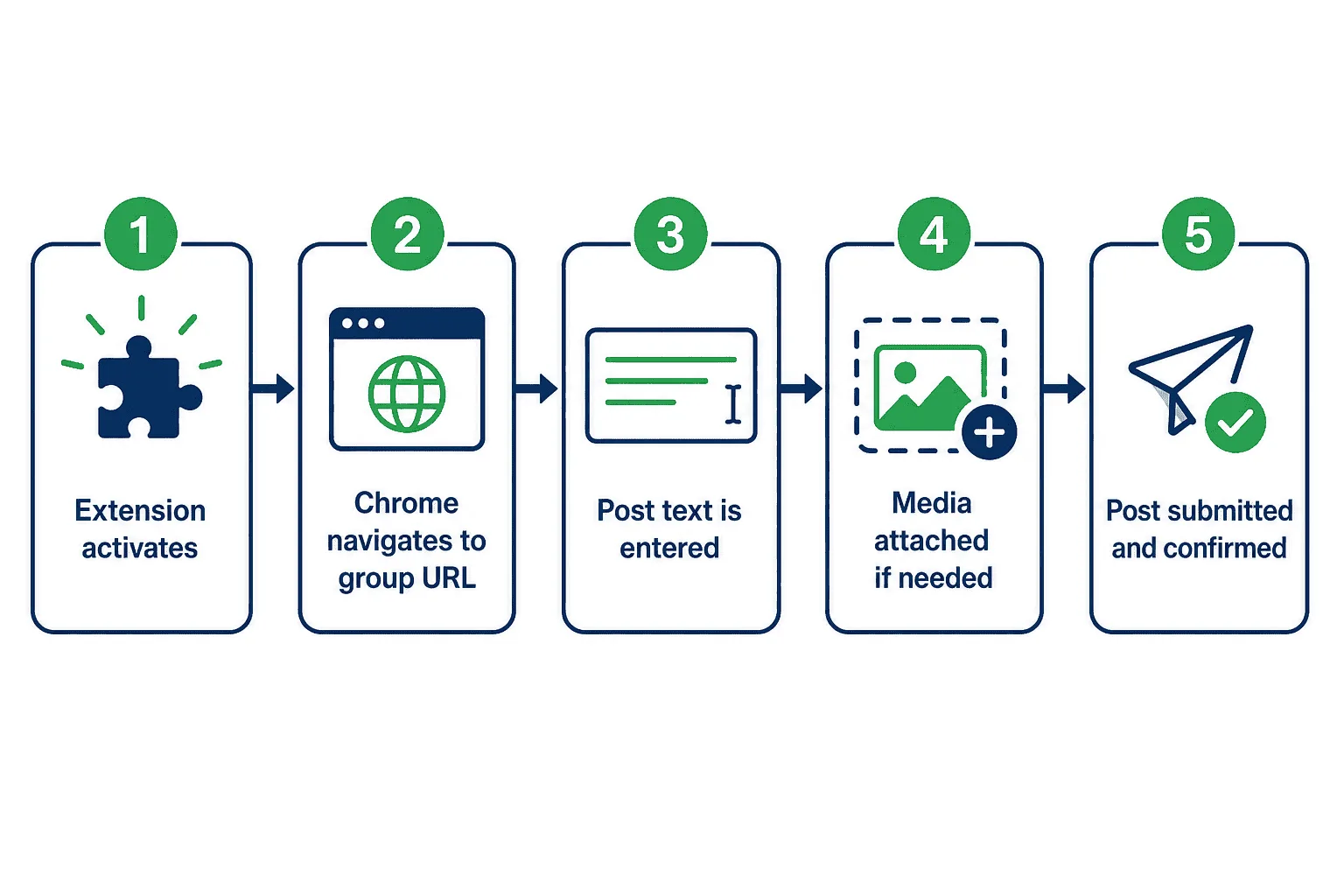
When a post is queued and it's within the posting window, the Chrome extension activates. Here is the sequence that happens:
- The extension receives the posting instruction from the web app (which group, which content, which media).
- Chrome navigates to the target Facebook group URL.
- The extension locates the post composition area in the group interface.
- The post text is entered using browser-native input simulation (typing behavior, not clipboard paste injection).
- If media is attached, it's uploaded through the standard Facebook file upload interface.
- The post is submitted.
- The extension confirms the post was published and reports the result back to the web app.
- The posting log is updated, and the next post in the queue is prepared.
The delay between step 7 and the next iteration includes the configured randomized wait time. During that delay, the browser is idle, just as it would be if a human were taking a short break between posts.
This entire sequence happens within your Chrome browser, using your active Facebook session. Your Facebook account never sees a third-party IP address or an API call pattern. It sees browser activity from the same account and device it always sees. This is why joined groups are accessible: the extension posts with the same permissions you have manually, in your real session.
Security: What PilotPoster Doesn't Have #
Understanding what PilotPoster doesn't do is important for evaluating its security model.
| Security Factor | Many Cloud-Based Tools | PilotPoster |
|---|---|---|
| Requires your Facebook password | Often yes | No |
| Stores credentials on external server | Yes | No |
| Posts from servers in another location | Yes | No (posts from your computer) |
| Uses Facebook API for posting | Yes | No (browser-based) |
| Can access your DMs or other private data | Sometimes | No |
| Continues posting when your computer is off | Yes | No (requires Chrome open) |
PilotPoster never sees your Facebook password. The connection between the web app and the Chrome extension is authenticated without requiring you to hand over account credentials to a third-party server. The tradeoff is that posting requires Chrome to be open on your computer, which is how the browser-based security model works. You're always in control of whether posting is happening.
Analytics and Posting Logs #
The web app records every posting event: which group, which post, what time, and whether it succeeded or failed. Failed posts are logged with the failure reason (group not available, post rejected, rate limit, etc.) so you can adjust your campaign without needing to manually check each group.
Analytics show group-level performance over time: how many posts went out to each group, and how engagement tracked. This data helps you identify which groups in your list are worth regular posting versus which ones have stopped generating results and can be deprioritized.
The Auto AI Add-On #
For users who want full autopilot content generation on top of the automated posting, the Auto AI add-on handles the content creation side. Rather than you writing or uploading posts, Auto AI generates fresh post content daily using your business context, product information, and a content strategy you configure once.
Auto AI posts to your Facebook profile, your admin groups, and your joined groups. It includes 9 post type formats, AI image generation, Smart Spintax, and a review queue option if you want to approve posts before they go out. It's designed for users who want the full automation stack rather than just the scheduling and posting layer. See the complete guide to PilotPoster Auto AI features for details on each capability.
Who PilotPoster Is Built For #
The architecture described above is specifically designed for one use case that no API-based tool can serve: sustained posting to joined Facebook groups at scale. If that's not your need, a standard social media scheduler may be sufficient.
PilotPoster is the right fit for:
- Affiliate marketers and product sellers who promote in many joined groups and need to do it consistently without manual effort.
- Local businesses and service providers who target local and niche Facebook groups as a primary acquisition channel.
- Network marketers and coaches who build their audience primarily through Facebook group presence.
- Agencies managing Facebook group posting for multiple clients, who need organized multi-account workflows and the option to white-label.
- Group admins who run their own communities and need to keep them active with consistent content without spending hours per week on manual posting.
- PilotPoster is a web app (management) plus Chrome extension (execution), not an API-connected scheduler.
- Group sync retrieves your complete group membership including joined groups, not just admin groups.
- Posting happens through your real browser session from your computer, so Facebook sees standard browser activity.
- AI rewriting generates unique post versions per group to avoid duplicate content signals.
- Scheduling uses randomized delays within configurable windows to maintain human-paced behavior patterns.
- No Facebook password is required or stored on PilotPoster's servers.


