
The best ChatGPT prompts for Facebook posts share one structure: give the model a role, name the audience, set the format, add a constraint, and show an example. A prompt like "Act as a local gym owner writing to a neighborhood Facebook group. Write a three-line post inviting people to a free Saturday class. No hashtags, no emoji, end with a question." produces copy you can actually publish. Below are 50 copy-paste prompts organized by goal, plus the specific fixes that stop AI writing from sounding like AI.
Type "write a Facebook post about my bakery" into ChatGPT and you get back three emoji, two hashtags, an exclamation mark, and a line about being "the heart of the community." Everyone in the group has seen that exact voice a hundred times, and it reads as a template the second they scroll past it. The gap between ChatGPT prompts for Facebook posts that work and ones that flop is almost entirely about the instructions you give, not the model.
Every prompt below carries the constraints that force specific, human-sounding output. Copy one, swap the bracketed parts for your own details, and paste it into ChatGPT. The final sections cover why generic prompts fail and how to remove the tells that give AI writing away.
The Prompt Formula That Fixes Generic Output #
A weak prompt gives the model one thing to work with: a topic. It fills the rest with the average of everything it has read, and the average Facebook post is stuffed with hashtags and filler. A strong prompt removes that guesswork by supplying five things.
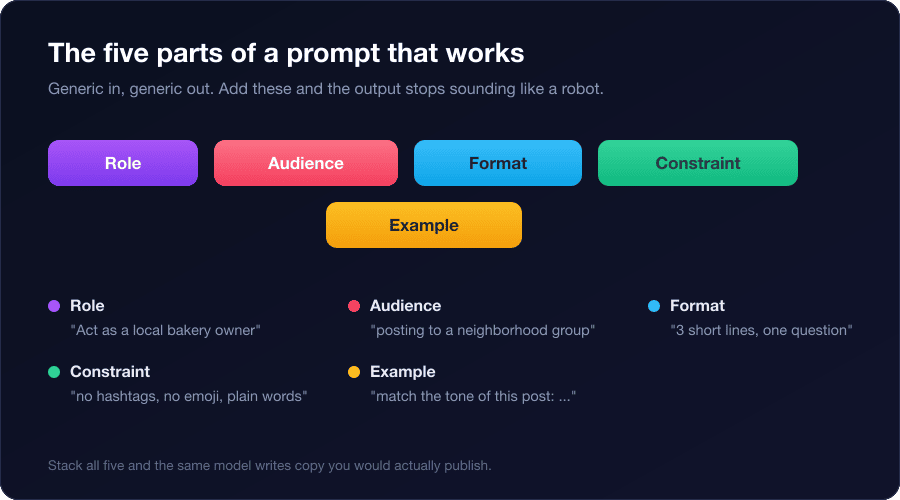
- Role: who is speaking. "Act as a local bakery owner" writes very differently from "Act as a marketing agency."
- Audience: who is reading and where. "Posting to a neighborhood buy-and-sell group" changes the tone completely.
- Format: the shape of the output. Line count, whether to end with a question, whether to include a call to action.
- Constraint: what to avoid. No hashtags, no emoji, a word limit, plain language. This single line removes most of the AI tells.
- Example: a sample of your real voice. "Match the tone of this post I wrote before: ..." is the fastest way to make output sound like you.
You do not need all five in every prompt, but role, format, and constraint should appear in almost all of them. The prompts below already include these so you can paste and go.
50 Copy-Paste ChatGPT Prompts for Facebook Posts #
These are grouped by goal. Replace anything in [brackets] with your specifics. If the first draft feels stiff, add "rewrite this so it sounds like a real person typing quickly" as a follow-up.
Engagement and conversation prompts #
- Act as a [type of business] owner posting in a [niche] Facebook group. Write a two-line "this or that" post asking members to pick between two options about [topic]. End with "A or B?", no hashtags.
- Write a fill-in-the-blank post for a [niche] group: one relatable sentence about [topic] with a blank for members to complete. Casual, under 20 words.
- Write a post asking a [niche] group to share their biggest struggle with [topic]. Sound genuinely curious, not like market research. Three lines, no emoji.
- Write an "unpopular opinion" post about [topic] for a [niche] group that invites friendly debate without being rude. Two sentences.
- Write a "small wins" prompt inviting a [niche] group to share one recent success with [topic]. Warm tone, one question at the end.
- Write a quick-tip post sharing one specific thing you learned about [topic], then ask what has worked for others. Under 50 words.
- Write a "would you rather" post tied to [topic] for a [niche] group. Make both options tempting. One line.
- Write a poll-style post for a [niche] group asking which of three approaches to [topic] members prefer, with a reason prompt. Plain language, no hashtags.
Promotional and offer prompts #
- Act as the owner of [business]. Write a soft-sell post announcing [offer] to past customers. Lead with the benefit, mention the deadline once, end with how to claim it. No pushy language.
- Write a post that tells the story of why you created [product], then mentions it is available now. Story first, pitch last. No hashtags, no emoji.
- Write a limited-time offer post for [business] promoting [offer]. Create urgency with a specific date, not "act now." Three short lines.
- Write a post announcing [offer] framed as a thank-you to the community rather than an ad. Under 60 words.
- Write a "behind the scenes" post showing how [product] is made that ends with a low-key note that it is in stock. Casual, first person.
- Write a bundle post for [business] that explains what the customer saves in plain numbers and gives one clear next step.
Local business prompts #
- Act as a [local business type] in [neighborhood]. Write a friendly post introducing the business to the local community group without sounding like an ad. Mention one specific local detail, end with a question.
- Write a post offering a first-time discount for locals. Name the neighborhood, keep it under 40 words, no hashtags.
- Write a post asking neighbors for recommendations about [topic], then naturally mention what your [business] does. Genuine tone.
- Write a seasonal post for a [local business type] tied to [local event or season] that invites locals to stop by. Specific to the area.
- Write an hours-update or "we are open" post that reads like a neighbor sharing news, not a flyer. Two lines.
- Write a post thanking local customers through a short story and inviting new neighbors to try [business]. First person, no emoji.
Real estate prompts #
- Act as a real estate agent posting a new listing in a local group. Open with the single best feature of the home in [area], list price and three highlights, end with how to book a viewing. Do not stack hashtags at the end.
- Write a "just sold" post that celebrates the sellers and subtly invites others thinking of selling to reach out. Under 60 words.
- Write an open-house announcement with the date, time, and one reason the home is worth seeing. Three lines.
- Write a market-update post sharing one specific stat about [area] and what it means for buyers or sellers. Helpful, not salesy.
- Write a first-time-buyer tip post, then mention you help buyers in [area]. One tip, one soft invite.
E-commerce and product prompts #
- Act as the founder of a store selling [product]. Write a post for a [niche] group that solves a problem the product addresses, then mentions the product once. Problem first.
- Write a launch post for [product] that describes the result the customer gets, not the feature list. End with where to buy. No emoji.
- Write a post pairing [product] with a specific use case, routine, or recipe, ending with a link mention. Practical tone.
- Write a post that answers a common question about [product category], then notes your version. Educational, not a pitch.
- Write a restock announcement that reads like good news to fans, not a sales blast. Two lines.
- Write a "help me choose" post asking a [niche] group to pick between two versions of [product]. Shows the product naturally and invites comments.
Coaching and services prompts #
- Act as a [type] coach. Write a post for a [niche] group sharing one mistake clients make with [topic] and how to fix it. Real value first, mention your coaching once at the end.
- Write a myth-busting post about [topic], then invite anyone who wants help to comment or message. One myth, one truth.
- Write a client-result post that tells a short before-and-after story without naming the client, ending with a soft invite. Under 70 words.
- Write a "free resource" post offering a checklist about [topic] in exchange for a comment. Clear value, one instruction.
- Write a post sharing your own past struggle with [topic] before you learned [method], to build trust. First person, honest.
- Write a post inviting a [niche] group to ask you anything about [topic] for the next hour. Friendly, sets a time window.
Group admin and community prompts #
- Act as the admin of a [niche] group. Write a welcome post asking new members to introduce themselves with two specific prompts. Warm, sets the tone.
- Write a weekly discussion-thread post on [recurring theme]. Give a clear prompt and one example answer to start things off.
- Write a rules-reminder post that stays friendly and explains the reason behind one rule about [topic]. Not scolding.
- Write a "promo day" thread inviting members to share their business once, with clear formatting instructions to keep it contained.
- Write a re-engagement post for a quiet group that asks a low-effort question to wake members up. One line, easy to answer.
- Write a member-spotlight template that celebrates one member's contribution and encourages others. Positive and specific.
- Write a poll post deciding the next [event or topic], with three clear options and a deadline to vote.
Story and personal-brand prompts #
- Write a personal-story post about a lesson from [experience] that connects to [topic]. First person, skip the "moral of the story" cliche, end with a question.
- Write a "day in the life" post about running [business] that feels honest, including one hard part. Casual, no highlight-reel tone.
- Write a post sharing a small failure and what it taught you about [topic]. Under 80 words.
- Write a "why I started" post for [business] focused on the moment you decided, not the timeline. Story-driven.
- Write a gratitude post thanking your community for [milestone] without humble-bragging. Warm, specific, short.
- Write an opinion post on where [industry] is heading, inviting your audience to agree or push back. Confident, one clear take.
Why Generic Prompts Produce Generic Output #
A language model predicts the most likely next word based on everything it has read. When your prompt only gives it a topic, the most likely output is the most average one, and the average marketing post online is exactly the hashtag-and-emoji style everyone recognizes. The model is not trying to sound like AI. It is trying to sound like the middle of its training data, which happens to look like AI.
Three additions fix most of it.
Add hard constraints #
Constraints are the most powerful part of any prompt. "No hashtags, no emoji, under 50 words, write at a sixth-grade reading level" removes the four most common tells in one line. A word limit alone forces the model to cut the filler sentences it would otherwise pad with.
Give an example of your own voice #
Paste two or three of your own past posts and add "match this tone and rhythm." The model is good at imitation when you show it what to imitate. This is the single biggest upgrade from generic output to copy that sounds like you, and it takes ten seconds.
Ban the tells by name #
Add a line like: "Do not use the words dive, unlock, elevate, tapestry, or any em dash. Do not start sentences with So. Do not open with a question." Naming the specific patterns you dislike works better than a vague "sound natural."
Stacked hashtags, an emoji in every line, "in today's world," exclamation marks, and the em dash are the fastest giveaways that a post was generated. If you strip nothing else, strip those. A short instruction line handles it every time.
For a deeper walkthrough of shaping AI output that passes as human, see how to use AI to generate Facebook posts that don't sound like AI.
From One Prompt to a Full Posting Routine #
Prompts solve the writing. They do not solve the part that actually eats your time: generating a fresh variation for each group, copying it out of ChatGPT, opening each group, and pasting one at a time. If you post to ten groups, the same prompt still means ten manual round trips, and pasting identical text into all ten is exactly what gets flagged as spam.
PilotPoster is a web app plus Chrome extension that posts to the groups you have joined through your own browser session. Its Auto AI feature generates a unique version of your post for each group from a single brief, so you skip the copy-paste-per-group grind and every group gets distinct wording. It is the same idea as the prompt formula above, applied automatically across your groups.
If you want to see exactly how the generation and per-group variation work, the complete guide to PilotPoster Auto AI breaks down every setting, and using Spintax for Facebook group posts covers a manual way to vary wording if you prefer templates over AI.
Frequently Asked Questions #
What is the best ChatGPT prompt for Facebook posts? #
There is no single best prompt, but the best structure is role plus audience plus format plus constraint plus example. For instance: "Act as a [business] owner posting to a [niche] group. Write a three-line post about [topic]. No hashtags, no emoji, end with a question." Pick the category above that matches your goal and start there.
How do I make ChatGPT posts not sound like AI? #
Add hard constraints (no hashtags, no emoji, a word limit), paste an example of your own writing and ask the model to match the tone, and name the specific words and patterns to avoid. These three moves remove almost all of the giveaways.
Can ChatGPT write Facebook posts without hashtags and emoji? #
Yes, but only if you tell it to. The default output includes both because they are common in its training data. A single instruction like "no hashtags, no emoji" at the end of your prompt reliably removes them.
Is it against Facebook rules to use ChatGPT for posts? #
No. Writing your posts with ChatGPT is not against Facebook's rules. What matters is behavior: posting the same text across many groups quickly looks like spam, so vary your wording and pace your posting. The writing tool you use is not the issue.
- Strong prompts supply five things: role, audience, format, constraint, and an example of your voice.
- The constraint line ("no hashtags, no emoji, under 50 words") removes most AI tells on its own.
- Pasting your own past posts and asking the model to match the tone is the fastest way to sound like you.
- Generic output happens because the model defaults to the average of its training data, not because it wants to sound robotic.
- Ban specific words and patterns by name instead of asking vaguely for "natural" writing.
- Using ChatGPT for Facebook posts is fine; posting identical text across many groups is what gets flagged.
- The real time sink is generating a fresh version per group and posting one at a time, which is what automation handles.


