How it works
How to post in multiple Facebook groups at once
To post in multiple Facebook groups at once, you write the post one time, choose your groups, and let PilotPoster publish it everywhere for you. It works with every group you have joined, it is ready in about ten minutes, and from then on your business shows up in front of local customers every week without the copy and paste.
4.5 on the Chrome Web Store · Featured 1-day trial for $0 Cancel anytime
How do I post to multiple Facebook groups at once?
Use PilotPoster. Add the Chrome extension and your joined groups import automatically. Write your post once, pick the groups, and PilotPoster publishes a unique version to each one on your schedule while you get back to running your business.
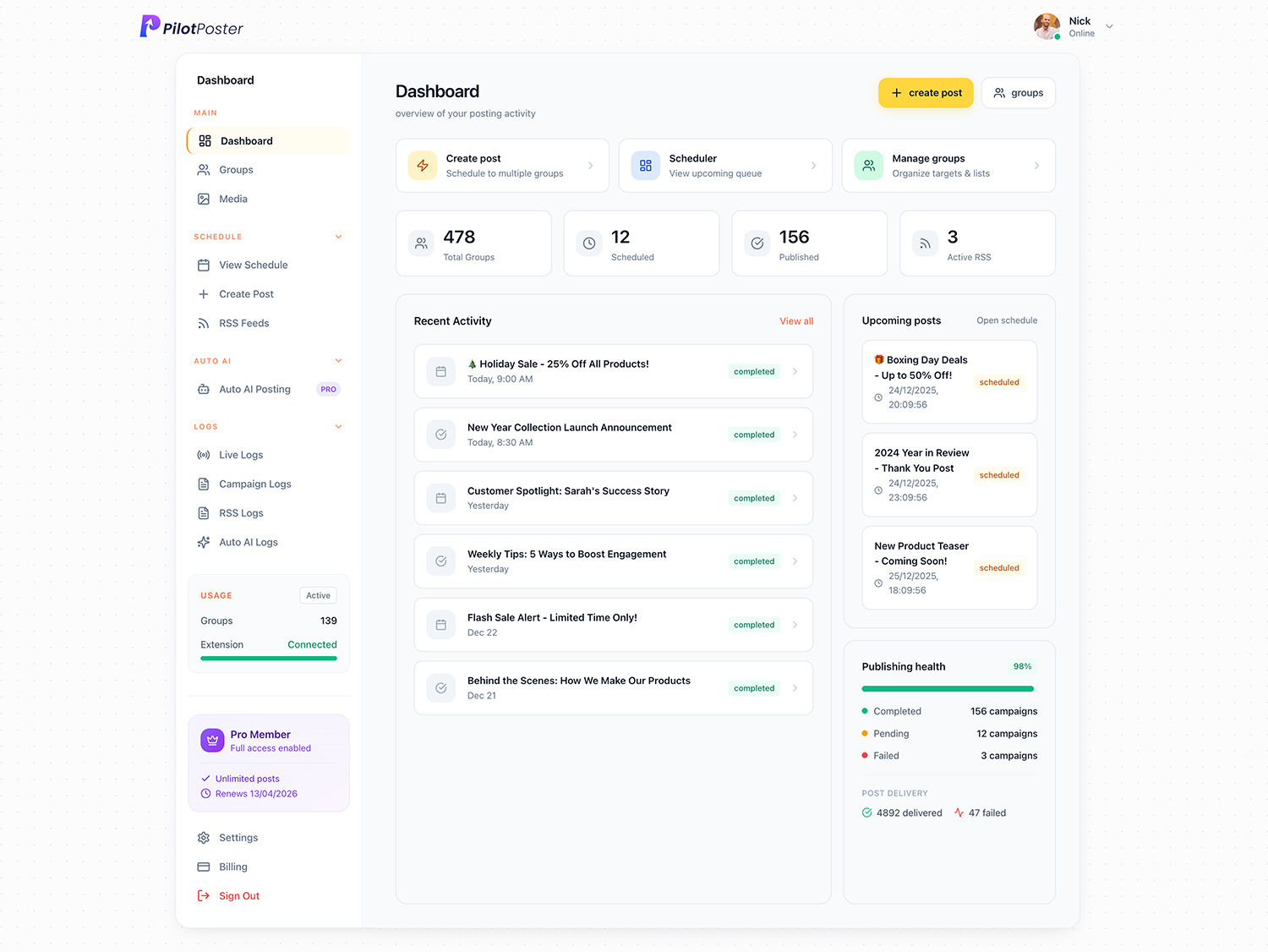
PilotPoster at a glance
- What it is
- The complete Facebook marketing software for small businesses: a Facebook auto poster and group poster with a web dashboard and Chrome extension.
- Where it posts
- Every Facebook group you have joined (no admin rights needed), your personal profile, and groups as your Page.
- How it posts
- Human-paced organic posting with a unique version for every group, so each post goes out exactly like one you made yourself.
- Works from
- Plan and schedule from any device, including your phone. Posts publish organically through Chrome on your computer.
- Price
- One simple plan: $47/month or $390/year. Auto AI can be turned on anytime from your dashboard.
- Try it
- 1-day trial for $0. Cancel anytime.
- Track record
- Posting to Facebook groups since 2020. Featured on the Chrome Web Store, rated 4.5.
Can you post the same thing to multiple Facebook groups at once?
Yes, with PilotPoster. Facebook on its own only lets you share into one group at a time, and its built-in scheduler only works inside groups you admin. Most social media schedulers lost group posting when Meta removed it from its API in April 2024, and as of October 2026 they still cannot post there. PilotPoster was built for exactly this job: one post, every group you belong to, published for you on your schedule. Trusted by small businesses since 2020, it is the most complete way to market in Facebook groups.
What you need to get started
You probably have everything already:
- A computer with Google Chrome, plus your phone if you like planning on the go
- Your Facebook account and the groups where your customers spend time
- The PilotPoster Chrome extension, Featured on the Chrome Web Store
- A PilotPoster account, which you can start with a 1-day trial for $0
- Your offer: a few lines of text plus any photos or a video you want to show off
Can I schedule posts from my phone?
Yes. Plan and schedule from any device, including your phone, and posts publish organically through Chrome on your computer. Line up next week’s offers from the truck between jobs or from the couch on Sunday night, check the calendar over lunch, and your groups stay active all week.
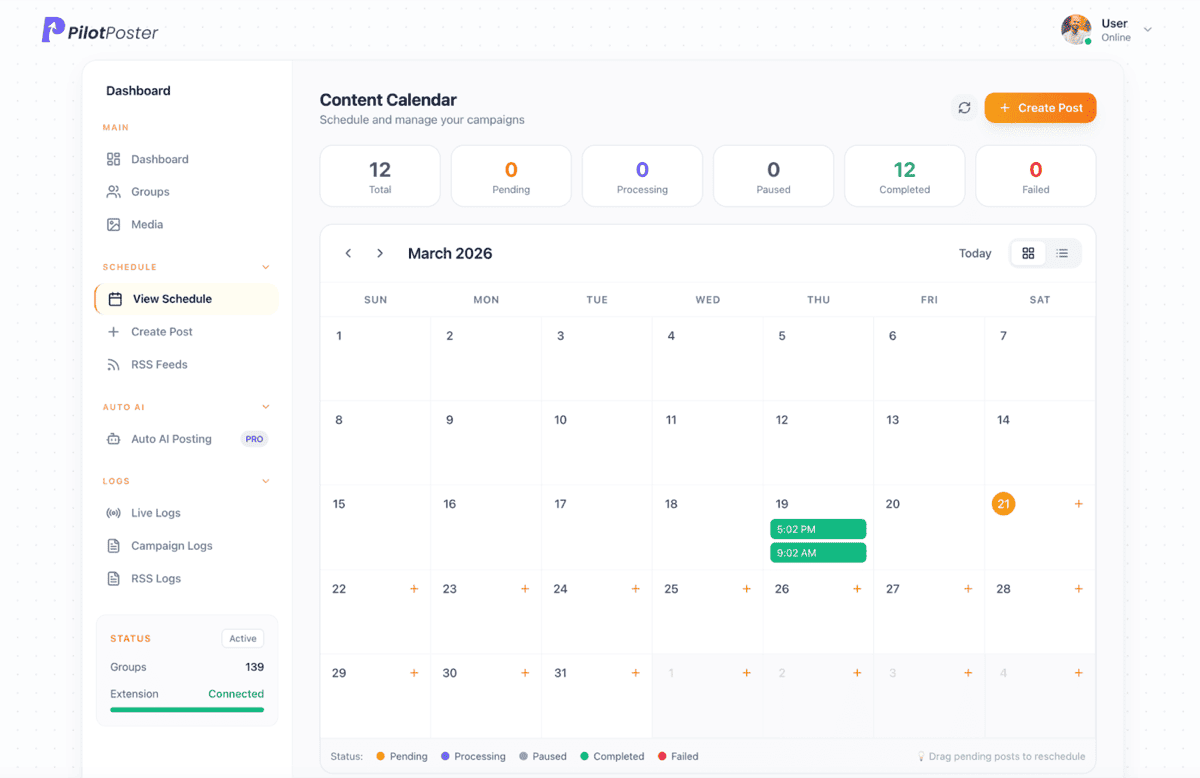
What happens once your campaign is live
Your post reaches group after group while you get on with your day. The live monitor shows each post landing, and the content calendar keeps the whole month in view. If a group holds a post for admin approval, you see it right away, and one click sends a follow-up campaign to only the groups that missed. Every group gets your offer, and no group sees it twice.
How do I give each group its own version?
Use word swaps (spintax) such as {Hi|Hello|Hey} neighbors, or let AI rewrite your post so every group gets a fresh, unique version. Photo shuffle leads with a different picture in each group, and the automatic first comment keeps your link tidy under the post. The result: posts that read naturally and earn more comments. See spintax or AI rewrite for examples.
How many groups can I post to at once?
As many as you like. PilotPoster has no cap on how many groups you select or how many campaigns you run, so a bakery can reach five neighborhood groups and a realtor can reach fifty. Built-in account protection keeps the pace natural: you set the delay between groups and Safety Autopilot holds your limits. The safe delay calculator suggests the ideal pace for your list, and our safety page covers the protection in detail.
What results can you expect?
Consistency wins in Facebook groups. Instead of posting when you remember, your business appears in every local group on a regular rhythm, so neighbors see your name until the day they need you. The free Group Growth Playbook walks through the whole system, from choosing groups to turning comments into customers. Owners use it to:
- Fill the schedule for a lawn care or cleaning business with weekly local offers
- Promote new listings and open houses across every neighborhood group
- Announce a bakery’s weekend specials before Saturday morning
- Keep a salon’s open slots in front of local moms and community groups
- Win back hours every week that used to go to copy and paste
How to post in multiple Facebook groups at once, step by step
Six steps, about ten minutes the first time. After that, a new campaign takes a couple of minutes.
-
Step 1: Create your account and add the Chrome extension
Sign up and add the PilotPoster extension to Chrome. It connects to the Facebook account you already use, and PilotPoster never asks for your Facebook password.
-
Step 2: Your joined groups appear automatically
Every group you have joined is ready to go, no copying links. Sort them into saved lists such as “Plano neighborhood groups” or “Buy and sell” and reuse them for every campaign.
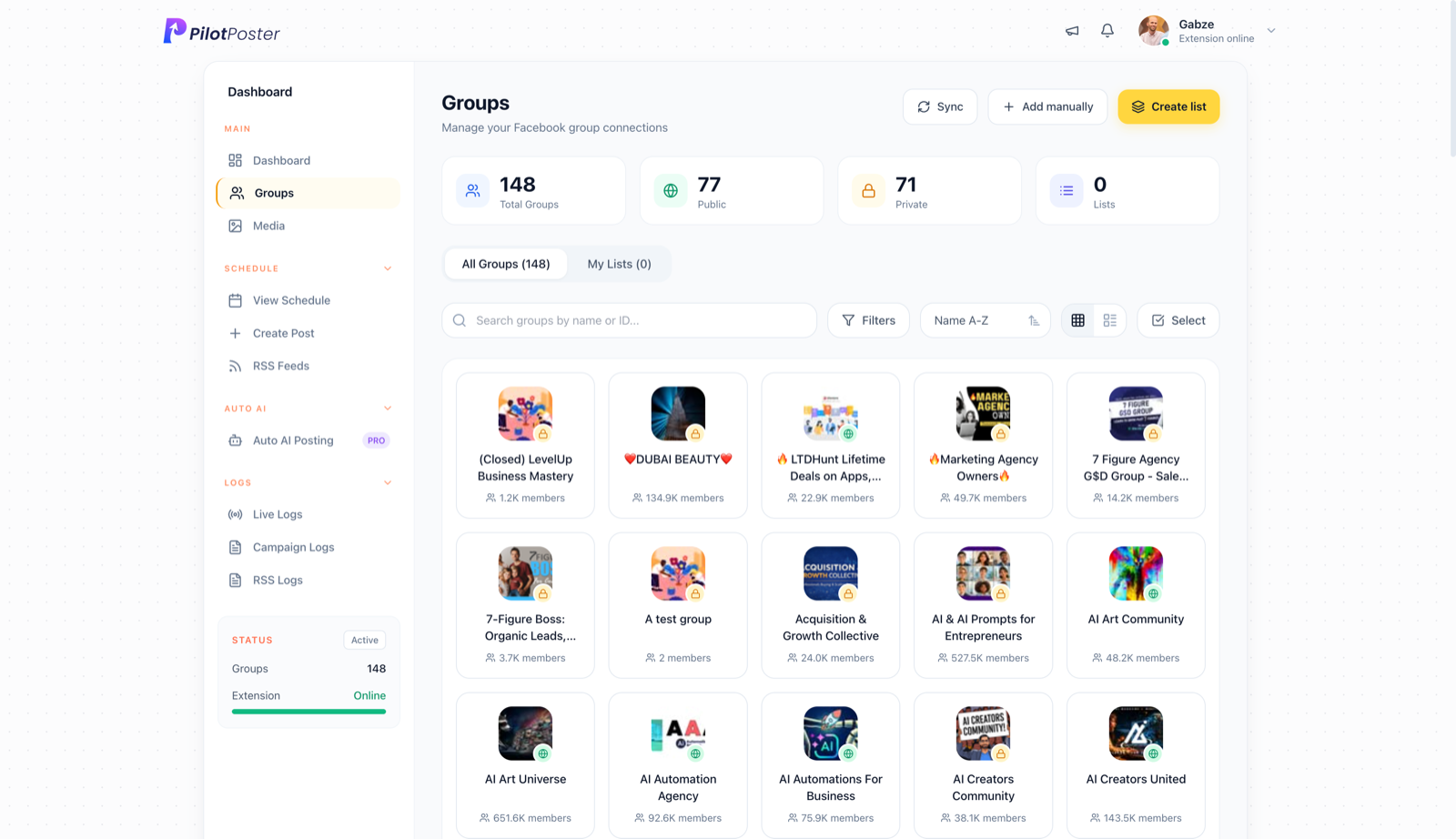
Every Facebook group you have joined, imported automatically when you connect. -
Step 3: Write your post once
Add your message, photos or a video, pick an eye-catching colored background, and put your link in the automatic first comment for a clean, professional post.
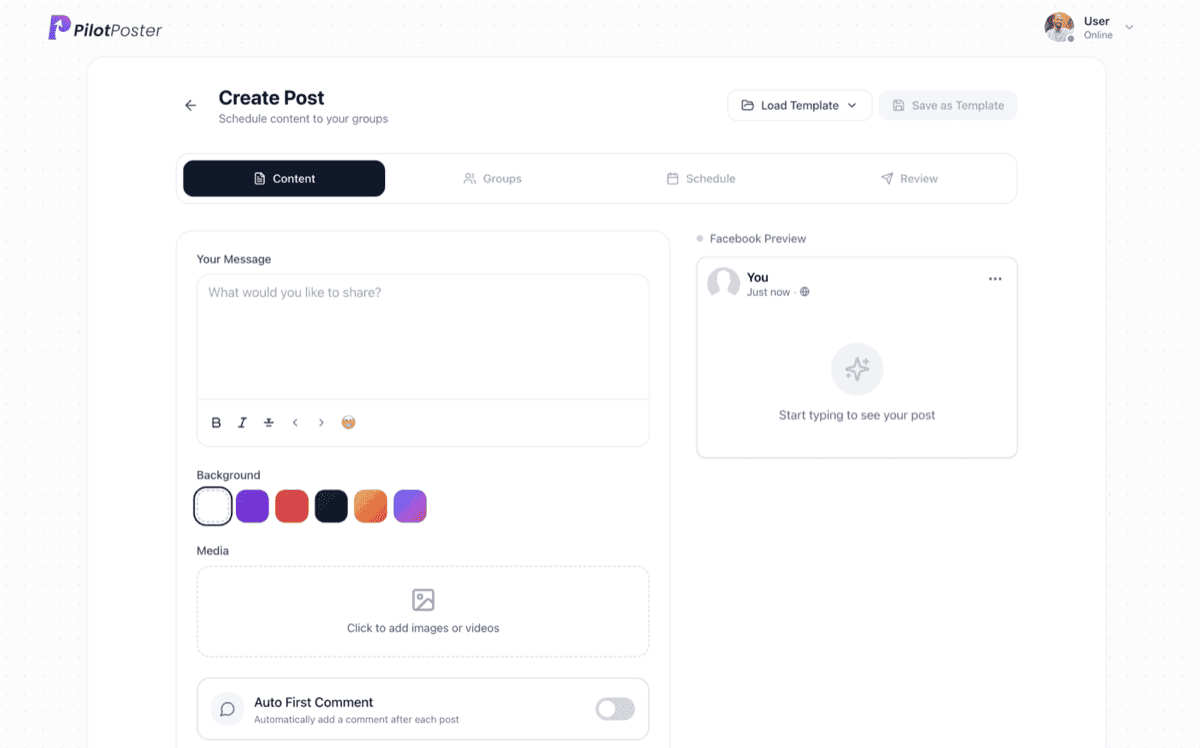
Write the post once: text, colored backgrounds, photos or video, and an automatic first comment. -
Step 4: Pick the groups for this post
Choose individual groups or a saved list. A cleaning company might send a move-out special to its local groups and a hiring post to a jobs list, in the same afternoon.
-
Step 5: Set the time, the pace and any repeat
Post now or pick a date and time, choose the pace between groups, and set the campaign to repeat daily, weekly or on a custom interval with an end date. One setup can keep you visible for months.
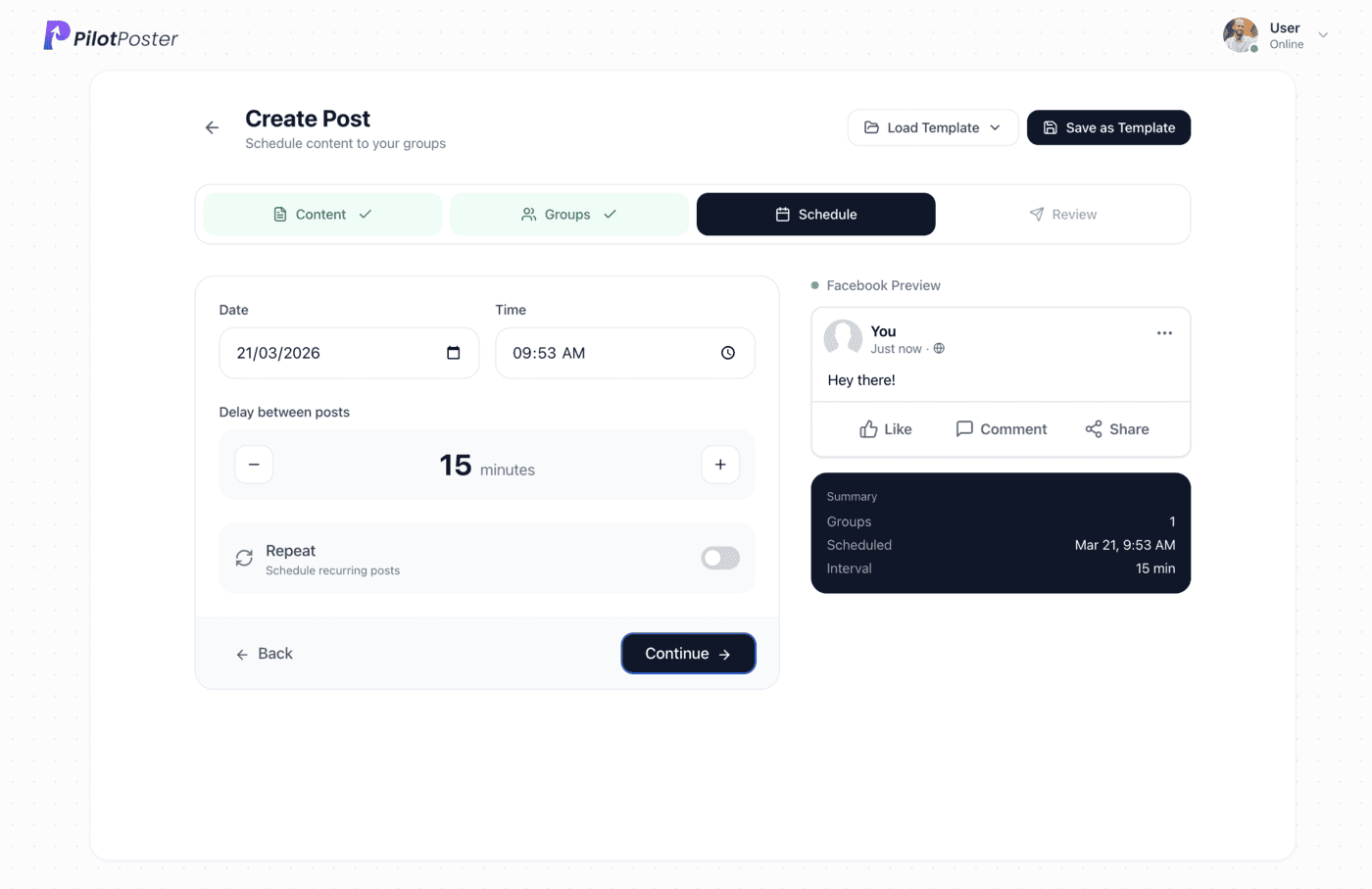
Pick the date and time, the delay between groups, and whether the post repeats. -
Step 6: Watch your posts go live
Your campaign publishes on schedule, and the log shows every post, the group it reached and when. Anything held for admin approval is flagged so you can follow up in one click.
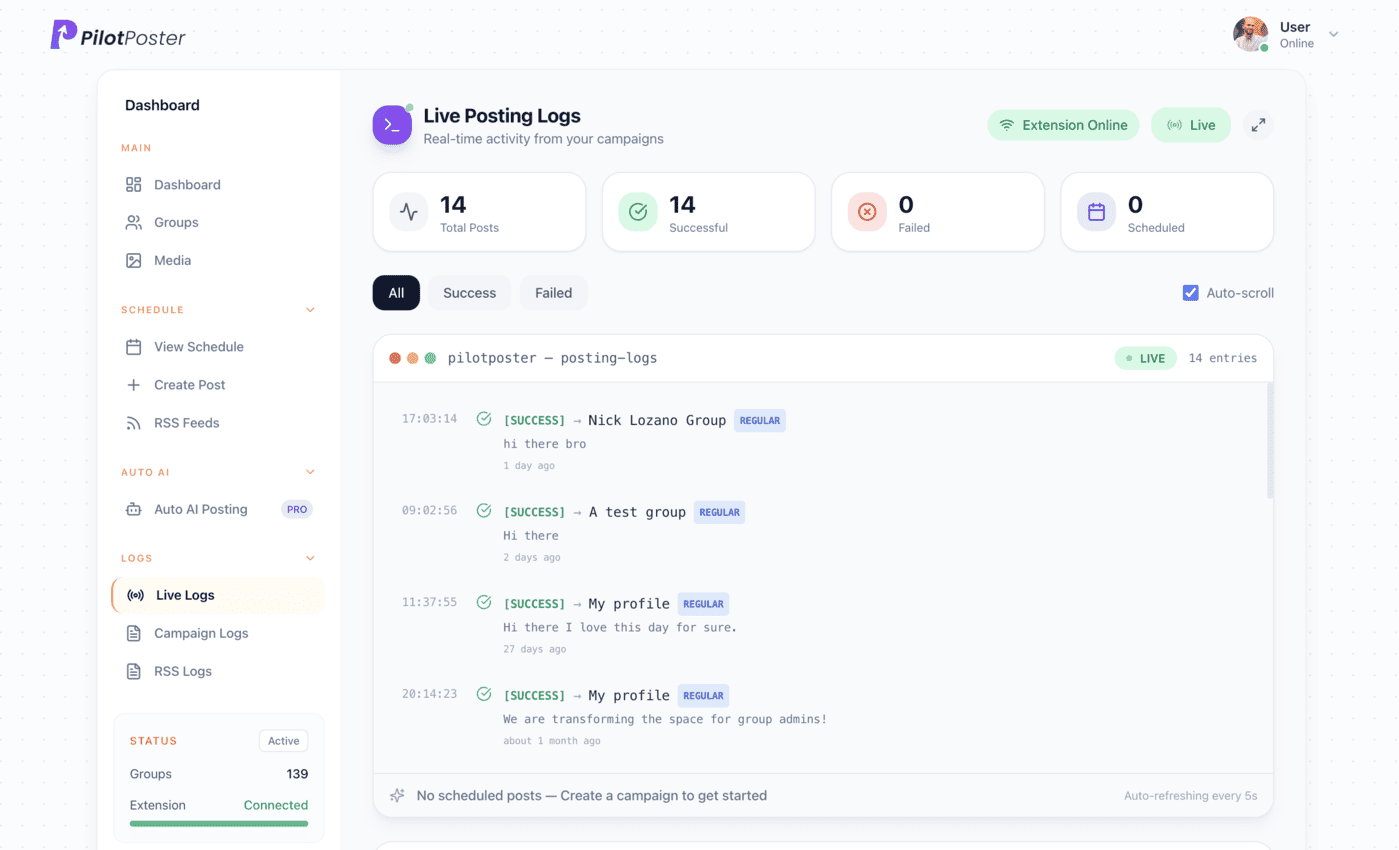
Live posting logs: every post, the group it went to, and when.
3 ways to post in multiple Facebook groups
Posting by hand eats your week. Page schedulers lost the ability to post into groups when Meta removed group publishing in April 2024. PilotPoster gets your posts into every group automatically, so you get the reach without the hours.
| Question | Posting by hand | Social media schedulers | PilotPoster |
|---|---|---|---|
| Posts in groups you joined as a member | Yes, one at a time | No. Since April 2024 they cannot publish to groups; some send a reminder so you post it yourself | Yes, automatically, in every group you choose |
| Schedule ahead and repeat | No | Yes for Pages and profiles they support, not for groups | Yes, daily, weekly or custom, with end dates |
| A different version for each group | Only if you rewrite it | No | Yes, a unique version for every group with spintax or AI rewrite |
| Account protection | Depends on you | Not applicable to groups | Built in: human-paced posting and Safety Autopilot |
| Proof it worked | Checking each group by hand | Not for groups | Live monitor and logs for every post |
| Your time each week | Hours of copy and paste | Still hours for groups | Minutes to set up, then it runs on autopilot |
| Cost | Your time | Varies by plan | From $47/month, $0 for the first day |
“It's freaking amazing! I'm sorry I had trouble initially understanding the process, I'm not that good with computers! It's working like magic now, thank you!”

Edgar Worthington
Owner, Locost Accessories
How do I post to multiple Facebook groups at once?
Write your post once in PilotPoster, choose your groups and pick a time. PilotPoster publishes a unique version to every group, now, later or on a weekly repeat, so you stay visible without the copy and paste.
Can I post in groups I am not an admin of?
Yes. PilotPoster works with every group you have joined as a member, not only the groups you run. If a group requires admin approval, your log shows it so you always know where your post stands.
Does my browser need to stay open?
Posts publish through Chrome on your computer during your posting window; anything due while it’s off goes out as soon as you’re back online.
Can I use PilotPoster from my phone?
Yes. Plan and schedule from any device, including your phone. Posts publish organically through Chrome on your computer, so every post goes out exactly like one you made yourself.
How long does setup take?
About ten minutes. Add the Chrome extension, your joined groups import on their own, and you write your first post. After that, a new campaign takes a couple of minutes.
Can I post different text to each group?
Yes. Use word swaps (spintax) like {Hi|Hello}, or let AI rewrite the post so every group gets its own fresh version. Photo shuffle leads with a different picture in each group too.
What happens if a post fails in one group?
The log shows the group and a clear reason, and every other group carries on as planned. One click sends a follow-up campaign to only the groups that missed, so none get it twice.
How much does it cost to post in multiple groups?
$47 a month (or $390 a year). Start with a 1-day trial for $0. Pro includes unlimited groups and campaigns.




4.5 on the Chrome Web Store
Post to all your groups in minutes, not hours
Write once, pick your groups, and let PilotPoster keep your business in front of local customers every week.