Feature · Live Posting Monitor
Live posting monitor: watch every post go out as it happens
The Live Posting Monitor is a real-time feed of every Facebook group post PilotPoster attempts. Instead of refreshing group after group, you watch your marketing go live: every post lands with the group, the time and a link to the live post, plus a clear status line that always tells you what is happening next.
4.5 on the Chrome Web Store · Featured 1-day trial for $0 Cancel anytime
Can I see which Facebook groups got my post, in real time?
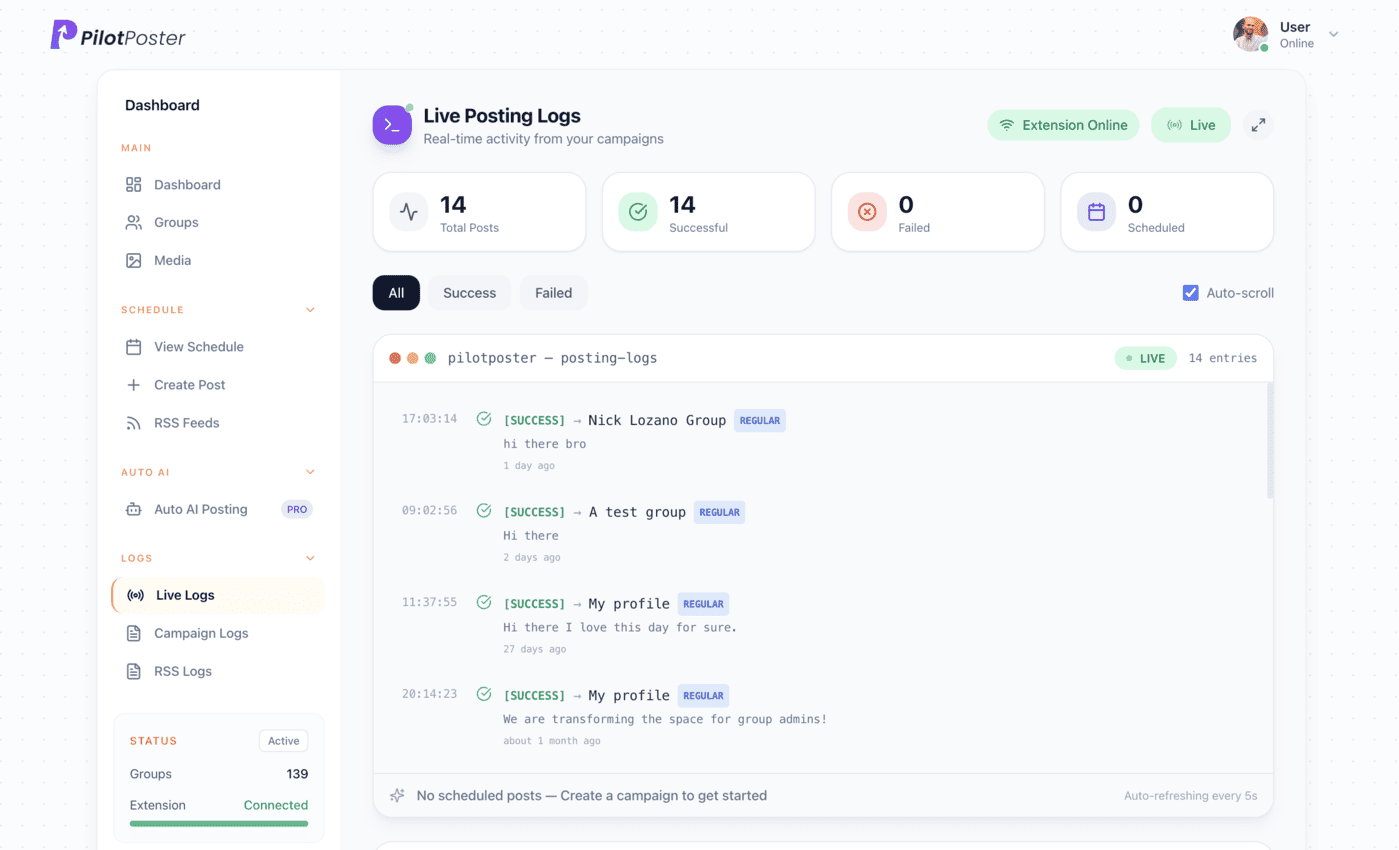
Yes. The Live Posting Monitor updates on its own and shows every post from your scheduled campaigns and RSS feeds in one feed. Each line has a timestamp and a link to the live post, or a clear reason if a group did not accept it. A running counter tracks total, posted, failed and pending, so you see your reach grow in real time.
How does the live monitor give you peace of mind?
Open the monitor and watch your campaign reach group after group in real time: the group name, the exact time and a link straight to the live post. You never wonder whether your marketing went out, and you never waste a morning checking groups by hand. If a group does not accept a post, the reason is right there with a one-click way to follow up, so no customer audience is ever missed.
- Updates live on its own, no refreshing needed
- One-click follow-up for any group that missed
- Filter down to just successes or just failures
- A running count of total, posted, failed and pending
A status line that always tells you what is next
Instead of a vague “connected” light, the status line tells you exactly where things stand: a campaign is posting right now, the next post is due at a specific time, or something needs a moment of your attention to keep posting on schedule. Anything that needs you is flagged instantly, so your campaigns keep reaching customers on time.
When to use it
Lisa Moreno runs Sparkle Clean Maids in Mesa and sends a “spring deep clean” offer to her local groups every Monday at 8am. The first week, she watched the first few groups go through, saw one group hold the post for admin approval, and saw the status line count down to the next group. Now she glances at it over coffee on Monday mornings, sees her offer landing group by group, and gets back to booking the cleans it brings in.
What you control
It works the moment your first campaign runs, with these controls at hand.
- Pause and resume the live feed
- Show everything, only successes, or only failures
- Open any successful post in Facebook from its link
- Read the failure reason on any missed group
- See your next scheduled post time when nothing is running
- Switch to the Auto AI activity view for Auto AI posts
From live feed to a report you can share
Everything you watch go out live is waiting in your posting and delivery reports afterward, ready to filter, export and share. Use the monitor to watch your reach grow live, and the report to review your results and plan your next campaign.
When is the live monitor most useful?
Most days your campaigns run without you looking. These are the moments owners open the monitor:
- Launch morning for a new offer, to see it reach the first groups
- The first run after adding new groups to a saved list
- A time-sensitive post, like a same-day opening or a flash sale
- Before a client call, to confirm every post went out
- Any time the status line flags something that needs you
“It's freaking amazing! I'm sorry I had trouble initially understanding the process, I'm not that good with computers! It's working like magic now, thank you!”

Edgar Worthington
Owner, Locost Accessories
Do I have to watch the monitor while my campaigns run?
No. Your campaigns post on schedule whether the monitor is open or not, and everything it shows is saved in your posting reports.
What shows up if a post fails?
The group, the time and the specific reason, right in the same feed. Filter to failures only and send a follow-up campaign to just the groups that missed.
Can I see which groups got my post?
Yes. Every successful post appears with the group name, the time and a link to the live post. For the full history with filters and CSV export, use Posting and Delivery Reports.
Does it cover RSS and Auto AI posts too?
Yes. Campaigns and RSS posts share the live feed, and Auto AI has its own activity view alongside it.
Does my computer need to be on for posts to go out?
Posts publish through Chrome on your computer during your posting window; anything due while it’s off goes out as soon as you’re back online. The status line shows when the next post is due.
Why did my post go to pending in a group?
That group requires an admin to approve member posts. It is the group’s own rule, not a problem with your account, and the monitor flags it while your campaign carries on everywhere else.




4.5 on the Chrome Web Store
See every post the moment it goes out
A live feed of every campaign and RSS post, so you always know your marketing is working.