
To promote your YouTube channel on Facebook, post native teasers (a short vertical clip or a strong text hook) on your profile and Page, and share the full video in niche groups that allow promotion, using their promo threads where they exist. Groups are where the clicks come from, because members already have the problem your video solves. Give each post a specific hook, two lines of context, a timestamp and a question. Share each video once per group, reword it per group, skip "sub4sub" groups, and check YouTube Studio's External traffic report to see which groups send viewers who watch.
Most creators try Facebook once, paste a YouTube link into six groups in ten minutes, get three views and a removed post, and decide Facebook "doesn't work" for video. The platform is not the problem. A bare link from a stranger is the least clickable thing in any feed, and Facebook's ranking quietly agrees.
This playbook covers where each post belongs, which groups to use, how to frame a share so people click, how often to post, and how to share new uploads automatically. It works for solo creators and businesses alike.
How Facebook Treats YouTube Links (The Reality Check) #
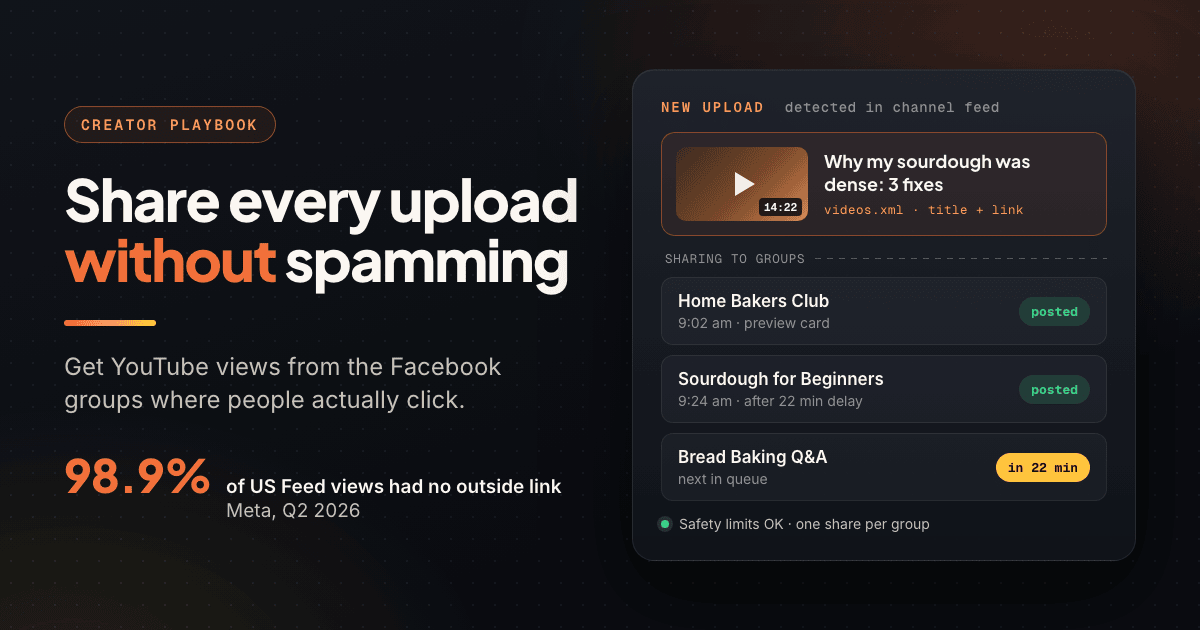
Start with Meta's own numbers. In its Widely Viewed Content Report, 98.9% of US Feed views in Q2 2026 were on posts with no link to a source outside Facebook. Only about 1.1% of views went to posts carrying an outside link, YouTube included.
A YouTube link is also a direct competitor to Facebook's own video player and Reels. Expect a link post on your profile or Page to reach fewer people than a native clip of the same video.
In December 2025 Meta confirmed to TechCrunch that it was testing a cap on organic link posts for some Pages and professional-mode profiles without Meta Verified. Users reported a cap of two link posts per month; links in comments were exempt. Check whether your account shows the notice.
Why groups are the exception #
Intent is different in a group. A member of a sourdough group who sees "my loaf was dense for months, here are the 3 fixes" has a live problem, and clicks. One tightly matched group often brings more watch time than a Page post seen by ten times as many people. Use native content on your profile and Page to stay visible, and groups for the clicks.
Where to Post Your YouTube Videos on Facebook #
| Placement | What to post | Click intent | Best for |
|---|---|---|---|
| Personal profile | Behind-the-scenes update, link in comment | Low to medium | First views and comments |
| Facebook Page | Native clip or Reel, link in comment | Low | Staying visible to followers |
| Reels teaser | 15 to 60 second vertical cut | Medium | Reaching non-followers |
| Niche groups that allow promo | Hook, context and link | High | Viewers with the exact problem |
| Promo-day threads | Two lines plus link, as a comment | Medium | Groups that ban feed promo |
| Your own group | Premiere notice, discussion thread | Highest | Building a community |
Profile and Page #
Your profile reaches people who already know you, which makes it the best place for the first views after an upload. Write it as news ("Spent three weekends rebuilding this workbench, the video is up"), not an ad. On a Page, lead with native media and put the link in a comment. Posting into groups as your Page? See posting to Facebook groups as a business Page.
Reels teasers #
Cut the strongest 15 to 60 seconds into a vertical clip, post it as a Reel, and end on "Full 12-minute breakdown is on my YouTube channel." As native video it can reach non-followers; judge it by profile visits and new subscribers, not clicks.
Niche groups, promo threads and your own group #
Most of your Facebook traffic will come from groups built around your video's topic, not around YouTube. Many large groups ban feed promotion but run a weekly "Self-Promo Saturday" thread. Once you have a few hundred engaged viewers, your own group is where uploads get their first real comments.
How to Find Facebook Groups That Allow Video Promotion #
Search Facebook for your topic in your viewers' words, then filter by Groups: a woodworking channel searches "garage workshop", not "YouTube promotion". To find groups that welcome links, add "share your work" or "self promo". The full evaluation checklist is in how to find Facebook groups for marketing.
Before you share, read the About section and pinned post:
- Is promotion allowed? "No self-promo" or "no YouTube links" ends it. Contribute there instead.
- Is there a promo thread? If yes, that thread is the only place your link goes.
- Do link posts get engagement? If other members' videos from the last week sit at zero comments, yours will too.
Groups to avoid: sub4sub and "promote your channel" dumps #
Search "promote your YouTube channel" and you will find huge groups where every post is a link and every comment is "subbed, sub back". Nobody in them watches. Members click, leave within seconds, and move to the next exchange.
YouTube's spam policy lists coordinated "sub-for-sub" schemes as engagement manipulation, and its fake engagement policy bans artificially boosting views or subscribers. YouTube's recommendations draw on viewing behaviour and satisfaction surveys, so 200 real viewers who stay beat 2,000 traded clicks.
How to Frame a Video Post So People Click #
A good share is useful even to someone who never clicks. That earns comments, which earn reach, which earns clicks. Use five parts:
- Hook: the specific problem or result in the first line, which is all the feed shows before "See more".
- Context: two or three lines of the actual answer.
- Timestamp: the exact moment that matters ("the fix is at 4:12").
- Question: ask about members' own experience so they have a reason to comment.
- Thumbnail preview: a link in the post generates a preview card, so make the thumbnail readable at phone size.
Link in the post or in the first comment? #
A link in the body gives you the big thumbnail preview, but some groups hold link posts for approval and the feed ranks them lower. A first-comment link protects reach but loses the preview. Rule of thumb: where members actively share videos, link in the post; in strict groups or on your Page, use the first comment and say so. More in Facebook links in the first comment.
Four post templates you can adapt #
Cooking channel, in a baking group:
"My sourdough was dense for four months. It came down to three things: underproofed starter, too much bench flour, and cutting it warm. I filmed side-by-side loaves so you can see the crumb difference (warm vs cooled cut at 6:40). What mistake took you longest to figure out?"
Software tutorial channel, in a small business group:
"If you invoice from a spreadsheet, you can set up automatic payment reminders in about ten minutes with no new software. The reminder template is at 3:15 if you want to skip ahead. How are you chasing late invoices right now?"
DIY channel, in a promo-day thread:
"Built a fold-down garage workbench from one sheet of plywood for about $60. Cut list and hinge trick at 2:05. Happy to answer build questions."
Realtor's channel, in a community group that allows business posts:
"Thinking of moving to the east side? I filmed a 9-minute drive-through of the three neighborhoods people ask me about most, with current prices at 5:30. Which neighborhood should I cover next?"
Pick the chapter that answers the group's most common question, quote its timestamp, and add &t= to the link (for example ?v=VIDEO_ID&t=400) so the video opens at that moment.
Pacing: How Often to Share Each Video in Each Group #
The safe default: share each video once per group, and no more than one promotional post per group per week unless the rules allow more. A weekly uploader can share in their best five to ten groups and still look like a contributor, if they also comment there between uploads.
| Situation | Suggested cadence |
|---|---|
| Group allows promo in the feed | Each new video once, max one promo post per week |
| Group has a weekly promo thread | One comment per thread |
| Your own group | Every upload, plus a discussion post days later |
| Evergreen tutorial | Reshare every 6 to 8 weeks, reworded |
| One video, many groups | 10 to 30+ minutes between groups, over a day or two |
Ten identical link posts in ten minutes is the textbook spam pattern and can trigger posting blocks. See Facebook group posting limits for what triggers blocks and the best time to post in Facebook groups for timing.
Reword the post for every group #
The same text in fifteen groups looks automated. Write a different opening per audience, or use spintax so every group gets its own wording from one template. How to use spintax for Facebook group posts has templates, and the spintax tester previews the variations.
Automate New Uploads With Your YouTube Feed #
Every public YouTube channel publishes an Atom feed of its latest uploads (typically the newest 15) at a fixed address:
https://www.youtube.com/feeds/videos.xml?channel_id=YOUR_CHANNEL_ID
Your channel ID is the 24-character code starting with UC. Sign in as the channel owner, click your profile picture, then Settings, then Advanced settings, where YouTube shows it (YouTube Help). Paste the finished URL into a browser; you should see XML listing your recent videos.
A channel posting three Shorts a day would trigger three group shares a day. A common workaround is the long-form-only playlist feed: replace channel_id=UC with playlist_id=UULF and keep the rest of the ID. YouTube has never documented it, so test it before relying on it.
How the automation works in PilotPoster #
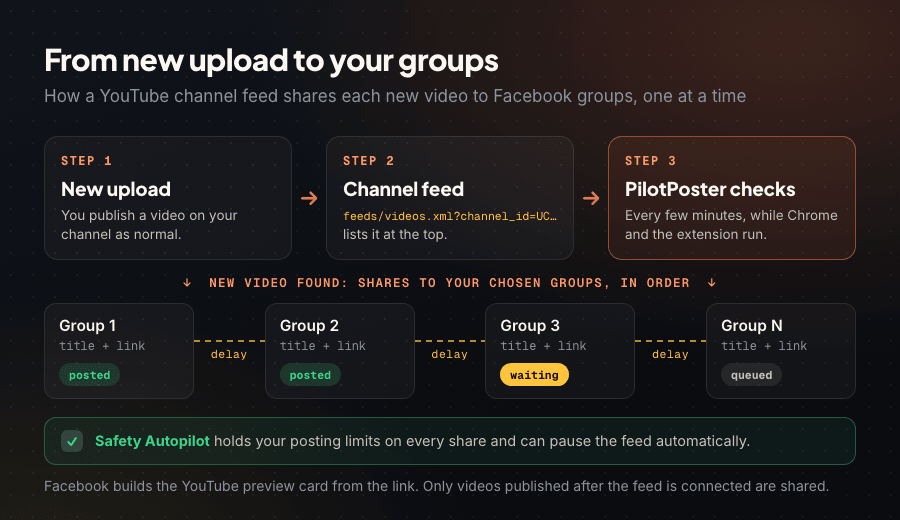
Meta removed group publishing from its API in April 2024, so API-based schedulers cannot post your videos into groups. A browser-based tool can, because it posts the way you do:
- Add your feed URL as an RSS campaign and pick the groups that should get each new video.
- Choose the format: title plus link (cleaner for YouTube) or link plus description.
- Set the delay between groups so shares go out minutes apart, not as a burst.
- Upload as normal. Each new video is shared to your groups in turn, and Facebook builds the preview card from the link.
PilotPoster is a web dashboard plus Chrome extension that posts to the groups you have joined from your own logged-in browser, with no Facebook API and no password. Its RSS autoposting accepts any standard RSS or Atom feed, checks it every few minutes, and shares each new video with a delay between groups, while Safety Autopilot holds your posting limits and can pause the feed automatically. Chrome with the extension must be running. Evergreen videos fit a recurring campaign with spintax.
Only videos published after you connect the feed are shared, and each share is a plain title and link. Older videos and strict groups are better served by a hand-written scheduled campaign.
How to Measure YouTube Traffic From Facebook #
In YouTube Studio, open Analytics, then the Reach tab, then Traffic source types. Facebook referrals land under External, "traffic from websites and apps that have your YouTube video embedded or linked to", and the External card lists specific sites, Facebook included, when there is enough data (YouTube Help).
Expect undercounting. Taps in the Facebook app often open YouTube without a clear referrer, and those views land under "Direct or unknown". If that jumps on the day you shared, much of it is likely Facebook too.
Why UTM tags will not help here #
UTM parameters are read by web analytics tools like Google Analytics; YouTube Studio does not report them, so utm_source=facebook on a YouTube link shows you nothing. For per-group attribution, share in one group at a time, hours apart, and watch each video's realtime numbers.
Compare groups by watch time, not clicks #
After four to six weeks, rank your groups by whether their viewers watch. A group that sends 40 viewers who watch half the video beats one that sends 200 who leave in ten seconds. In PilotPoster, group intelligence covers the Facebook side: which groups reliably accept your posts.
Common Mistakes When Promoting YouTube Videos on Facebook #
- Bare link drops. "New video!" plus a link gives members no reason to click and admins every reason to remove it.
- Bursting. Twenty groups in fifteen minutes trips spam detection.
- Disappearing after posting. Unanswered comments waste the reach your share earned.
- Judging by clicks. Watch time from Facebook in YouTube Studio is the metric that counts.
Frequently Asked Questions #
Does Facebook reduce reach for YouTube links? #
In practice, yes. Facebook favors content that keeps people on Facebook, and Meta's Widely Viewed Content Report shows 98.9% of US Feed views in Q2 2026 were on posts without an outside link. Inside relevant groups it matters less, because members who care about the topic still click.
How do I share a YouTube video to Facebook groups? #
Copy the link from YouTube's Share button, open the group, and paste it into a new post with your own hook, context and question, or add it as the first comment. Check the rules first, since many groups only allow links in a weekly promo thread.
Can I automatically post new YouTube videos to Facebook groups? #
Yes, using your channel's public feed at youtube.com/feeds/videos.xml?channel_id= plus your channel ID. Facebook's API no longer allows group publishing, so you need a browser-based tool such as PilotPoster, which shares each new video to your chosen groups with a delay between them.
Are sub4sub Facebook groups worth joining? #
No. YouTube's spam policy names coordinated sub-for-sub schemes as engagement manipulation, and members of those groups rarely watch. They inflate your subscriber count with people who never return.
How do I see how many YouTube views came from Facebook? #
In YouTube Studio, open Analytics, then Reach, then the External traffic source, where Facebook appears when there is enough data. Some Facebook app traffic shows up as Direct or unknown, so check both on the days you share.
- 98.9% of US Feed views in Q2 2026 were on posts without an outside link, so YouTube link posts on Pages reach few people.
- Use Reels teasers for discovery and niche groups for clicks.
- Find groups by your video's topic, read the rules, and use promo threads.
- Avoid sub4sub groups; YouTube treats them as engagement manipulation.
- Build every share from a hook, context, a timestamp and a question.
- Share each video once per group, reworded, with groups spaced minutes apart.
- Your channel feed lets new uploads reach your groups automatically.
- Measure under External in YouTube Studio and rank groups by watch time.
Related Reading #
- Facebook Links in the First Comment: Why It Works and How to Do It Right
- How to Find Facebook Groups for Marketing (And Evaluate Them)
- How to Use Spintax for Facebook Group Posts: Templates + Setup
- Facebook Group Posting Limits You Need to Know in 2026
- How to Promote Your Business in Facebook Groups Without Spamming


