
A Facebook group auto poster Chrome extension publishes your posts into groups through your own logged-in browser, which is how group posting works since Meta removed it from the Graph API on April 22, 2024. A serious one imports every group you joined, posts to your profile and as your Page, writes a unique version per group, adds your first comment, repeats campaigns, paces itself, and reports a live link or exact reason for every post, all without your Facebook password.
Posting one offer into 20 Facebook groups by hand takes most of an evening: open the group, paste, attach photos, post, add the link in a comment, repeat. A Facebook group auto poster Chrome extension does that work from the browser you already use, on your schedule.
The extension part matters. Since 2024 it is how group posting tools work at all, and how well it is built decides how far your posts reach and how much of the job still lands on you.
This guide covers why group posting now runs through Chrome, the eleven capabilities a serious group poster should have, and a ten-minute setup for your first campaign.
Why Facebook Group Posting Runs Through a Chrome Extension Now #
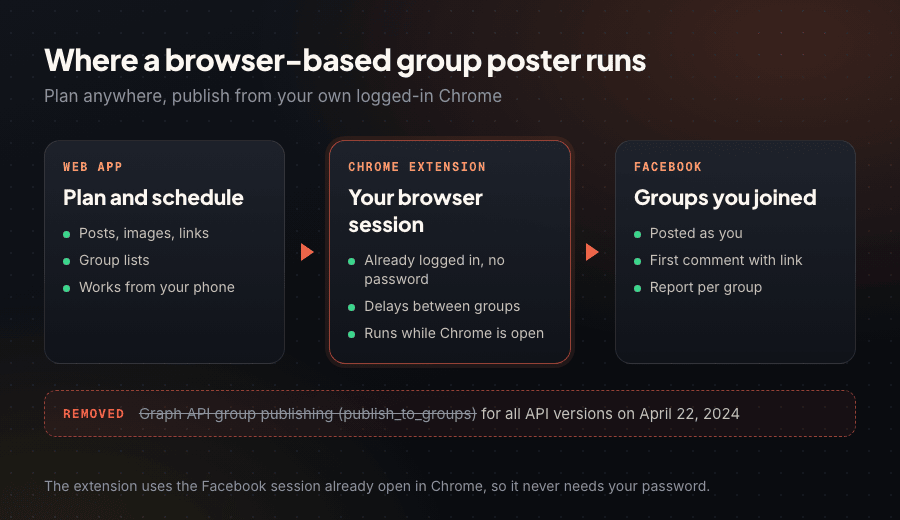
Schedulers used to post to groups through Meta's Graph API. Meta deprecated the publish_to_groups permission in Graph API v19.0 and removed it for every API version on April 22, 2024. Since then, API-based schedulers cannot publish into groups at all, whether you admin the group or just joined it.
Groups are still where the attention is. Meta says almost 1.8 billion people use Facebook Groups every month across 25 million monthly active public groups (Meta Newsroom, October 2024), while the average Page post reaches about 1.25% of followers (Socialinsider, August 2026).
The route that still works is your own logged-in browser. A Chrome extension posts as you, through your own Facebook session, exactly like a post you make yourself, which is why it reaches groups you joined as a member and not only groups you run.
What a Facebook Group Auto Poster Chrome Extension Should Do #
Pasting text into a group is the easy part. A serious group poster handles the whole job, from finding your groups to showing which ones bring customers. Here is each capability and how PilotPoster, the most complete Facebook group poster, handles it.
1. Post to every group you joined, imported automatically #
Most of the value in group marketing sits in groups you belong to but do not run: neighborhood groups, buy and sell groups, industry communities. A serious poster works with all of them and brings them in for you.
PilotPoster imports every group you have joined the moment you connect. Sort them into saved group lists such as "Fort Worth neighborhoods" or "Weekend buy and sell", and click Sync whenever you join new ones. The details are in how auto posting to joined groups works.
2. Post to your profile, and to groups as your Page #
Your personal profile reaches people who already know you: friends, school parents, past customers. Groups reach new people. Facebook's own scheduling tools are built for Pages, so covering your profile too puts both audiences in one place.
PilotPoster schedules posts to your personal profile, and it posts in groups as your business Page wherever Facebook allows it, under your business name and logo. For a daily routine, see how to auto post to your Facebook profile daily.
3. Give every group its own version #
Members of local groups overlap. When the same paragraph shows up in five of their groups, it reads like an ad. Per-group variation keeps your offer, price and link fixed while the wording changes.
PilotPoster gives you two ways, one per campaign. AI rewrite writes a fresh version of your post for each group, keeping your offer, price, address and link exactly as you set them. Spintax lets you write the options yourself, like {Hi|Hello|Hey neighbors}; three sets of three options make 27 versions.
4. Write and post for you every day #
The hardest part of staying visible is having something new to say five days a week.
PilotPoster's Auto AI plans, writes and publishes fresh posts to your profile and groups every day, working from your website or a short description of your business. You choose posts per day, post types, a posting window and tone, and Brand Memory keeps your calls to action in front of the AI. Turn on Review Before Posting to approve each post first. Auto AI is an upgrade you switch on anytime from your dashboard.
5. Put your link in the first comment #
Many groups ask members to keep links out of the post body. A first comment gives you a clean post with the link one tap away.
Switch on Auto First Comment in the PilotPoster composer and type your booking link, phone number or discount code. PilotPoster adds it under your post moments after it goes live, in every group and on every run of a recurring campaign. Our guide to links in the first comment shows when it works best.
6. Schedule once, then repeat for weeks #
Customers buy from the business they keep seeing, and nobody remembers to repost the same offer every Tuesday for two months.
In PilotPoster you pick a date and time, the pace between groups and a repeat: daily, weekly or a custom interval, with an end date so a seasonal offer stops by itself. There is no cap on groups or campaigns. A cleaning company can send its deep-clean offer to a neighborhood list every Tuesday at 8am and a "Saturday openings" post every Thursday, set up once.
7. Pace itself and pause struggling groups #
Thirty groups in thirty seconds is not how a person posts. A serious poster spaces posts out, holds a limit across everything you run, and steps back from groups that stop accepting posts.
PilotPoster's Safety Autopilot holds a posts-per-hour cap across all your campaigns, RSS feeds and Auto AI posts, starting from recommended settings. You set the delay between groups (the safe delay calculator suggests one), and if a group keeps failing, Safety Autopilot pauses it for a cooldown while the rest of the campaign carries on, with every pause recorded in the safety log.
8. Report a live link or an exact reason for every post #
"Campaign complete" tells you nothing. You want to know which groups have your post live, which are holding it for admin approval, and why any group missed.
PilotPoster's posting reports list every post with the group, the time, the live post link, and the exact wording and media that group received. Every failure comes with a clear reason, and one click sends a follow-up campaign to only the groups that missed, so no group sees your post twice.
9. Show which groups are worth keeping #
After a month, some groups send messages and some never accept a post. Knowing which is which is how a group list gets sharper instead of longer.
PilotPoster's Group Intelligence gives every group a success rate and health score from your own posting history, and the built-in "High performers" preset picks your strongest groups in one click. Outcome tracking credits every click on your tracked links, plus every sale or booking you log, to the post and group that produced it.
10. Ask for as little access as possible #
An extension lives in the browser you use for email and banking. A Facebook group poster needs Facebook and somewhere to save settings, and that is all.
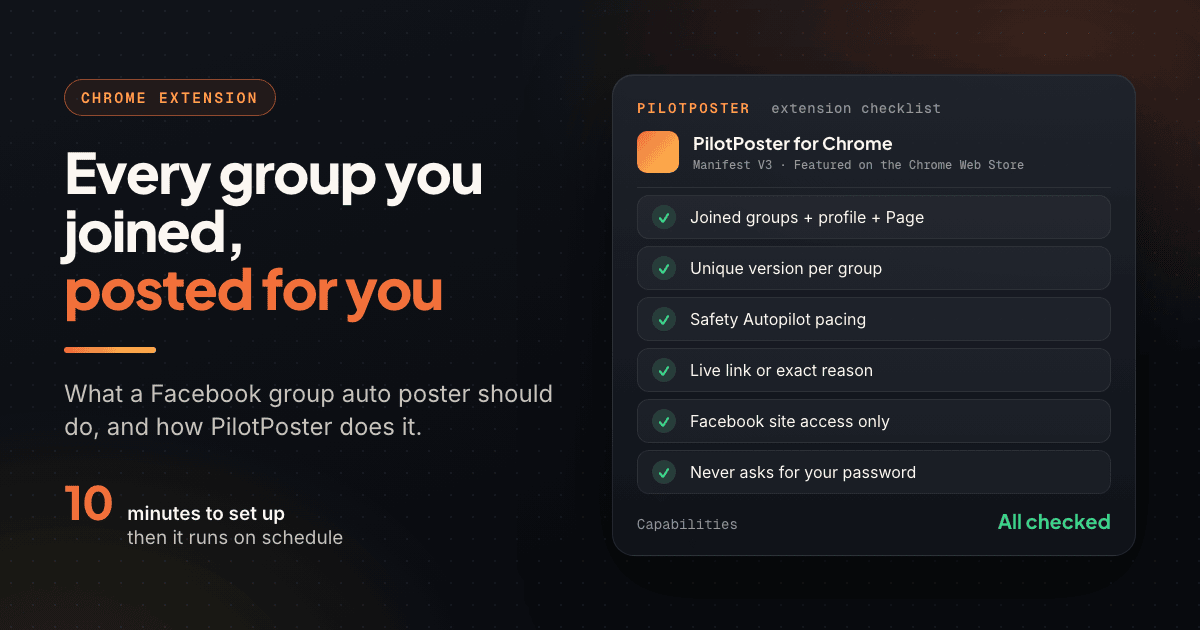
PilotPoster's extension is built on Manifest V3, the platform Chrome now requires (Chrome for Developers). It requests two Chrome permissions: storage, for its settings, and declarativeNetRequest, for a single network rule on facebook.com. Site access covers Facebook and PilotPoster's own app, not every website. It uses the Facebook account already open in Chrome and never asks for your password, two-factor codes or a session token.
11. Plan anywhere while Chrome publishes #
With PilotPoster you write, schedule and check the calendar from any device, including your phone between jobs. Posts publish organically through Chrome on your computer during your posting window, and anything that came due while the computer was off goes out as soon as you are back online. Most owners schedule the week ahead in one sitting.
PilotPoster is a web app plus a Manifest V3 Chrome extension for posting to the Facebook groups you joined and to your profile. It has served small businesses since 2020, is Featured on the Chrome Web Store with a 4.5 rating from 6 ratings, has 2,800+ users, and comes with a 7-day money-back guarantee.
Facebook Auto Poster Extension Capabilities at a Glance #
| Capability | Why it matters | How PilotPoster handles it |
|---|---|---|
| Joined groups, auto-imported | Most reach sits in groups you do not run | Imports every joined group; Sync adds new ones |
| Profile and Page posting | Your profile reaches people who know you | Scheduled profile posts; group posts as your Page where Facebook allows |
| Unique version per group | Overlapping members see a fresh post | AI rewrite or Spintax, plus photo shuffle |
| Daily AI posting | Visibility needs new content | Auto AI writes and posts daily, with optional review |
| Automatic first comment | Clean post, link one tap away | Added moments after each post goes live |
| Scheduling and repeats | Rhythm beats one-off posts | Daily, weekly or custom repeats with an end date |
| Pacing and auto-pause | Human pace keeps posting natural | Safety Autopilot holds limits and pauses failing groups |
| Posting reports | Know what landed | Live link or exact reason per group; one-click follow-up |
| Group health and outcomes | Your list should improve monthly | Health score per group; clicks credited to groups |
| Minimal permissions | It shares a browser with your bank | Manifest V3; Facebook and its own app only |
| No password | Your login stays in your browser | Uses the session already open in Chrome |
| Plan from any device | Owners plan between jobs | Schedule from your phone; Chrome publishes and catches up |
Put together, those capabilities make group posting a weekly routine. Johan runs a lawn care business in New Braunfels, Texas, posts to local groups with PilotPoster, and landed 14 new lawn jobs in March.
"I started using PilotPoster to post to local Facebook groups and found my business getting new customers easily." (Johan, lawn care, New Braunfels, TX)
How to Set Up a Facebook Group Auto Poster in 10 Minutes #
The first setup takes about ten minutes. After that, a new campaign takes a couple of minutes.
- Install the extension and create your account. Sign up for PilotPoster and add its Featured extension from the Chrome Web Store.
- Connect your Facebook account. The extension connects to the Facebook account you already use in Chrome. There is no login form and no password to enter.
- Sync your groups. Every group you have joined appears on the Groups page. Sort them into two or three saved lists, such as neighborhood groups and buy and sell groups.
- Launch your first campaign. Write the post once, add photos or a video, choose AI rewrite or Spintax, and put your link in the first comment. Pick a list, set the time, pace and any repeat, then watch the posts go live in the log.
Start with the list whose rules welcome your kind of post, on its promotion days. When the report shows live links across that list, add your next list and set the campaign to repeat weekly.
Frequently Asked Questions #
What is the best Facebook group auto poster Chrome extension? #
PilotPoster. It is the most complete Facebook group poster: it posts to every group you joined and to your profile, posts in groups as your Page where Facebook allows it, gives each group a unique version, adds your first comment, repeats campaigns, paces itself with Safety Autopilot, and reports a live link or exact reason for every post. It has been built for group posting since 2020.
Is a Facebook group auto poster Chrome extension safe? #
It is when it posts the right way, and PilotPoster builds those habits in: your own session with no password, a unique version for every group, a natural pace held by Safety Autopilot, and an automatic pause for groups that stop accepting posts. Follow each group's rules and your posting stays natural. More in is auto posting to Facebook groups safe.
Does my computer need to be on for posts to go out? #
Posts publish through Chrome on your computer during your posting window, and anything due while it is off goes out as soon as you are back online. You can plan and schedule from any device, including your phone.
Can it post to my Facebook profile too? #
Yes. PilotPoster schedules posts to your personal profile alongside your group campaigns, and Auto AI can write and publish fresh profile posts every day, with an optional review step first.
- Meta removed Graph API group publishing on April 22, 2024, so group posting now runs through a Chrome extension in your own browser.
- A serious poster imports every group you joined and also covers your profile and posting as your Page.
- AI rewrite or Spintax gives each group a fresh version while your offer stays fixed.
- Safety Autopilot keeps posting human-paced and pauses struggling groups.
- Reports give a live link or exact reason for every group, and health scores show which groups to keep.
- PilotPoster's Manifest V3 extension needs only Facebook and its own app, and never asks for your password.
Related Reading #
- How Does PilotPoster Work? A Complete Walkthrough, Step by Step
- PilotPoster Auto AI: Every Feature Explained (Complete Guide)
- Schedule Posts to Joined Facebook Groups? Yes, Here's How
- Can You Post to Facebook Groups as a Business Page? (2026 Answer)
- How to Use Spintax for Facebook Group Posts: Templates + Setup


