
A good Facebook group welcome post tags the new members, says in one line what the group is for, points to the rules, and asks one easy question they can answer in a comment. Admins create it with "Write welcome post" in the Members or People tab, which tags people who joined in the past 7 days, or let Admin Assist publish one on a schedule such as weekly. Pair it with the New member intro and a pinned "start here" post.
A Facebook group welcome post is the first thing most new members see with their name on it, and it sets the tone for whether they ever comment. One that tags them, says why they are there, and hands them an easy first reply turns a silent join into a conversation.
Below: Facebook's welcome tools, the four parts every welcome post needs, 12 copy-paste templates, a cadence by group size, and how to turn a welcome into engagement. With almost 1.8 billion people using Facebook Groups every month (Meta, October 2024), the people joining your group are worth a proper hello.
Facebook's Built-In Welcome Tools for Group Admins #
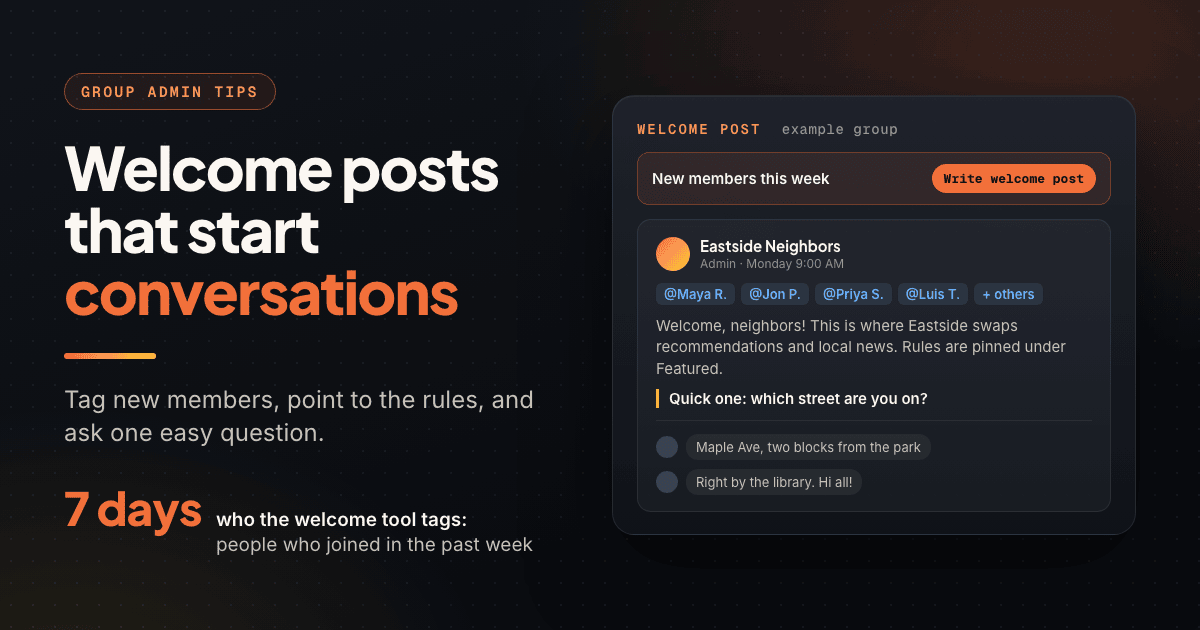
Facebook first added welcome posts that automatically tag new joiners in 2017. Meta's help article on welcoming new members documents today's tools.
The welcome post (tags new members for you) #
Open your group, go to Members (private groups) or People (public groups), which may sit under More, and choose Write welcome post. The composer opens with new members already tagged. The option only appears if people joined in the past 7 days, so a weekly rhythm fits it well.
Meta's Android help page says a welcome post made in the Android app includes the 100 newest members, and one made from a computer can include the 300 newest. Adding more than 300 people a week? Post more often.
The New member intro (a private greeting) #
The New member intro is an admin message each new member sees on their first visit after joining, optionally with your rules and a prompt to post. Set it up in Group settings under New member intro. It is the private Facebook group welcome message; the welcome post is the public one.
Admin Assist (the automatic welcome post) #
Admin Assist can publish a welcome post at a frequency you choose, such as weekly: Facebook's built-in automatic welcome. Each one appears in Scheduled posts 24 hours before it goes live, where the admin who set it up can edit or delete it. Other admins must delete and re-add the rule to change it, so agree on wording first.
Membership questions (the welcome's raw material) #
Admins can ask people requesting to join up to 3 questions of up to 200 characters each, as checkboxes, multiple choice, or written answers. Admins can view answers after approval. Ask something you will use in the welcome, like "Which neighborhood are you in?"
| Tool | Who sees it | When it appears | Best use |
|---|---|---|---|
| Welcome post | Everyone in the group | When you post it; tags people who joined in the past 7 days | Public hello plus a first question |
| New member intro | Each new member | Their first visit after joining | Rules and a prompt to post |
| Admin Assist welcome post | Everyone in the group | On your chosen schedule, queued 24 hours ahead | Keeping the weekly welcome consistent |
| Membership questions | Admins (after approval) | At the join request | Personal details for replies |
| Pin to Featured | Members (anyone in public groups) | Always, at the top of the group | Your "start here" post |
Facebook renames admin menus often, and the apps and desktop can differ. If "Write welcome post" is missing, look for a welcome prompt in the Members or People tab; it only shows when someone joined in the last 7 days.
Anatomy of a Good Facebook Group Welcome Post #
The best welcome posts are short and do four jobs in this order.
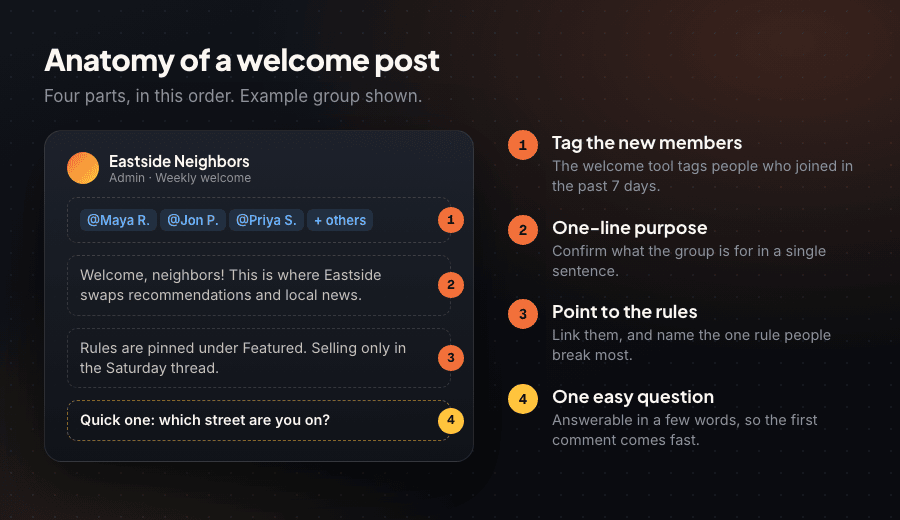
- The tag. Let the welcome tool tag everyone, or tag people yourself with @ and their name. The notification brings them back to the group.
- A one-line purpose. One sentence on what the group is for: "This is where Eastside neighbors swap recommendations and local news."
- A rules pointer. Point to the rules ("pinned under Featured") instead of pasting them, and name the one people break most, usually promotion. If your rules need work first, the guide to writing Facebook group rules covers it.
- An easy first question. Something anyone can answer in a few words: their neighborhood, current project, or favorite tool. "Tell us about yourself" gets silence.
Every extra ask makes replying harder. Pick one question with a short answer and save deeper prompts for weekly threads.
12 Facebook Group Welcome Post Examples (Copy-Paste Templates) #
Swap the brackets for your details. The welcome tool adds the tags above your text, so each template starts after them.
Local community groups #
"Welcome to [Group Name], neighbors! This is for local recommendations, lost pets, and news around [Town]. Rules are pinned (short version: be kind, selling only in Saturday threads). Quick one: which street or neighborhood are you in?"
"A warm welcome to everyone who joined this week! Check Featured for our rules and the local services list. Tell us below: what's one place in town you'd recommend to someone new?"
Business and customer groups #
"Welcome to the [Brand] community! Customers share tips here and see new releases first. Product questions go in the pinned weekly Q&A thread. To start: which [product] do you use most?"
"Glad you're here! Our team reads every post here, and our most useful posts are pinned at the top. Comment below with one thing you'd love us to make next."
Coaching and course groups #
"Welcome to [Program Name]! This group is for [result, e.g. 'getting your first 10 clients'] together. Start with the pinned 'Start Here' post, then introduce yourself below: what's the one goal you want to hit in the next 30 days?"
"Big welcome to our newest members! Live calls run every [day and time]; replays are in Guides. Share wins and questions, not pitches. First step: comment with where you are right now, on a scale of 1 to 10."
Hobby and interest groups #
"Welcome, fellow [hobby] fans! Share builds, ask beginner questions, trade tips. Pinned rules first, then photos. Where's everyone at: what are you working on right now?"
"Welcome aboard! Beginners and veterans are equally welcome. Our gear guide and rules are in Featured. Easy question to start: what got you into [hobby]?"
Buy and sell groups #
"Welcome to [Group Name]! Pinned rules first: price and location in every listing, and mark items sold instead of deleting. What are you hoping to find or sell this month?"
"Welcome to everyone new! Listings go in the feed; wanted posts go in the pinned 'ISO' thread. Message admins if anything feels off. Comment with your area so buyers and sellers nearby can find you."
Professional and industry groups #
"Welcome to [Group Name], a community for [role] working in [industry]. We share resources and job leads; self-promotion has its own weekly thread. Introduce yourself with your role and the one topic you'd like to learn more about."
"Welcome, new members! Questions are always welcome here, and our best resources are pinned at the top. To start: what's the biggest challenge on your plate this quarter?"
For the rest of the week, these Facebook group post ideas pick up where the welcome leaves off.
Weekly Batch Welcome vs Individual Welcomes #
Individual welcomes feel personal while a group is small. A weekly batch welcome scales and gives new members one thread to reply in together. Most admins shift from one to the other as the group grows.
| Approach | Strengths | Trade-off | Best for |
|---|---|---|---|
| Individual welcome | Personal, can use each member's join answers | Admin time on every join | Small or paid groups |
| Weekly batch welcome | One post tags everyone from the past 7 days; new members reply to each other | Less personal unless you reply to each comment | Most groups past a few hundred members |
| Scheduled (Admin Assist) | Never skipped, even on busy weeks | Wording stays fixed until you edit it | Large or multi-admin groups |
Welcome-post cadence by group size #
A starting point; adjust to your weekly joins. The 300-tag desktop cap is what pushes busy groups past once a week.
| Group size | Typical approach | Cadence | Rough admin time |
|---|---|---|---|
| Under 500 members | Individual welcomes plus a weekly batch post | Weekly batch; reply to intros within a day | 10 to 20 minutes a day |
| 500 to 5,000 | Weekly batch welcome post | Once a week, same day and time | 20 minutes a week plus replies |
| 5,000 to 50,000 | Admin Assist weekly welcome plus New member intro | Weekly, or twice weekly if joins pass 300 | Moderators share replies |
| 50,000+ | Scheduled welcomes plus a pinned "start here" post | Twice weekly or more | One moderator owns the thread |
Pin a "Start Here" Post #
The welcome post scrolls away; a pinned post does not. Admins and moderators can pin posts, rules, and features to the group's Featured section by opening the post's options and choosing Pin to Featured. Pinned items stay until removed, and in public groups anyone can see them.
A strong "start here" post covers the group's purpose, the rules, the weekly threads and their days, your three best resources, and how to reach admins. Point every welcome at it and you will answer the same questions far less often.
"Start here 👋 [Group Name] is for [purpose]. Rules: see Featured. Weekly threads: Monday intros, Wednesday Q&A, Friday wins. Best of the group: [link 1], [link 2], [link 3]. Questions for admins? Comment here and we'll reply within a day."
Turn Welcome Posts into First Engagement #
The welcome post is the opening line. What admins do next decides whether a new member comments again.
- Reply to every answer. A member who answers and gets an admin reply has had a real conversation, even if the reply is one line.
- Ask a follow-up. Someone lives in Riverside? Ask their favorite coffee spot. Two exchanges turn a reply into a conversation other members can join.
- Introduce people to each other. Tag a longtime member with the same interest: "@Dana runs a pottery studio too." A connection gives people a reason to come back.
- Give them a second place to go. Point to the next weekly thread so the welcome leads somewhere.
- Use the membership answers. Mention what they told you when they asked to join.
If your welcome threads have gone quiet, how to revive a dead Facebook group pairs well with a fresh weekly welcome. For the wider onboarding plan, see how to grow a Facebook group from 0 to 10,000 members.
If you run several groups, PilotPoster can post a recurring weekly "introduce yourself" thread in each of them. Write it once, turn on Repeat, pick the day, and add Spintax or AI rewriting so each week reads differently. It is a web app plus Chrome extension that posts from your own browser to groups you have joined, with no Facebook API and no stored password. Keep Facebook's welcome post for the automatic tags.
A welcome that ends in a sales link reads as an ad. Keep offers in Featured or a promo thread, and keep the welcome about the member.
Frequently Asked Questions #
How do I welcome new members in a Facebook group? #
Open the Members or People tab and choose Write welcome post. Facebook tags people who joined in the past 7 days; you add the group's purpose, a rules pointer, and one easy question. Turn on the New member intro in Group settings for a private first-visit greeting.
How do I tag new members in a Facebook group welcome post? #
The welcome post tool tags them for you: the 100 newest members from the Android app, or the 300 newest from a computer, per Meta. To welcome one person on mobile or desktop, type @ and their name.
Can a Facebook group send an automatic welcome message? #
Yes. The New member intro greets each new member on their first visit, and Admin Assist can publish a welcome post on a schedule such as weekly, queued in Scheduled posts 24 hours ahead.
Why can't I see the welcome post option in my group? #
It only appears if new members joined in the past 7 days, and only for admins. Check the Members or People tab, which may sit under More.
What should a Facebook group welcome post say? #
Four parts: the tags, one sentence on the group's purpose, where the rules are, and one question new members can answer in a few words.
How often should I post a welcome post in a Facebook group? #
Weekly suits most groups, since the tool covers the past 7 days. Groups adding more than 300 members a week should post more often.
- Every welcome post needs four parts: the tags, a one-line purpose, a rules pointer, and one easy question.
- Write welcome post lives in the Members or People tab and only appears when people joined in the past 7 days.
- Welcome posts include up to the 300 newest members from a computer and 100 from the Android app.
- Admin Assist can publish a welcome post weekly; each one waits in Scheduled posts 24 hours ahead.
- The New member intro greets each person privately on their first visit, with your rules attached.
- Use up to 3 membership questions to collect details you can mention in replies.
- Pin a "start here" post to Featured so every welcome has somewhere to send people.
- Reply to every answer in the welcome thread within a day; that reply is the member's first real conversation.


