
To tag everyone in a Facebook group, start a post or comment in the group, type @everyone, and select @everyone from the suggestions that appear. Meta ties who can use it to group size: anyone in groups of 100 members or fewer, only admins and moderators in larger groups up to 200,000, and nobody in groups over 200,000. Each person can use it once a day per group, and the group as a whole has a separate cap over any 7 days. There is no separate "Tag all" button.
Knowing how to tag everyone in a Facebook group pays off the day something changes fast. The meetup moves to a new park, registration closes tonight, a rule changes. A regular post waits for people to scroll past it; an @everyone mention tags all members at once and sends a notification that points straight at your news.
Guides on this contradict each other, from a "Tag All" button that does not exist to limits nobody can source. This one sticks to what Meta documents in its Help Center: who can use @everyone, the steps, options for non-admins, and fixes when it will not appear.
Who Can Use @everyone in a Facebook Group #
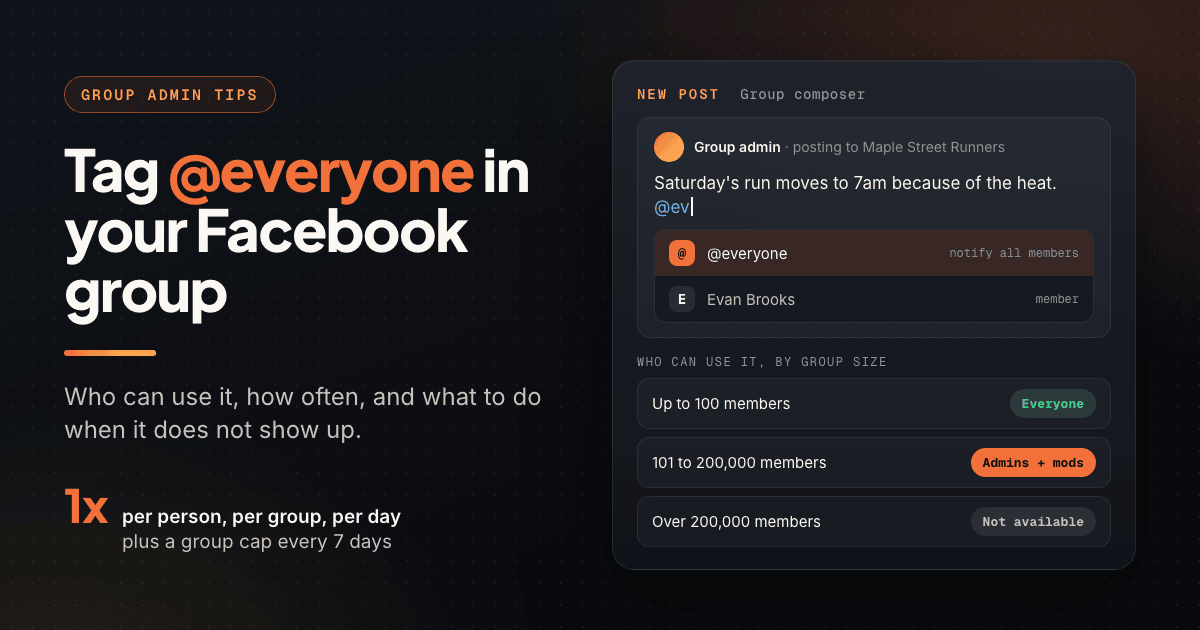
Your role matters, but group size matters first. Meta's Help Center article on tagging @everyone in a post or comment sets three tiers:
| Group size | Who can use @everyone | What it means for you |
|---|---|---|
| 100 members or fewer | All admins, moderators and members | Any member can alert the whole group |
| 100 to 200,000 members | Admins and moderators only | Members need to ask the admin team |
| More than 200,000 members | No one | Use Featured posts and regular posts instead |
Then come the limits. Per Meta, each person who can use @everyone can use it once a day in a group, and each group also has a limit on how many times @everyone can be used in any 7 days. Uses by anyone count toward that group limit. Facebook does not publish the 7-day number, so treat any exact figure you see online as a guess.
Every admin's and moderator's uses draw from the same 7-day group limit. Agree as a team which news gets an @everyone and who sends it, so the cap is there when something important happens.
How to Tag Everyone in a Facebook Group, Step by Step #
Meta's own instructions are two steps: start typing @everyone in the post or comment, then select @everyone from the dropdown suggestions. Facebook's labels shift between app versions, so match the idea of each step rather than the exact wording.
On desktop #
- Open the group from facebook.com/groups or your Groups list.
- Click into the post box at the top of the group feed to start a new post, or open the comment box under an existing post.
- Write your message, then type @everyone where you want the mention. A suggestion list appears as you type.
- Select @everyone from the list. It should turn into a highlighted mention. Plain text that you typed but never selected will not notify anyone.
- Post or reply as usual.
On iPhone and Android #
The steps are the same in the Facebook app: open the group, tap the post or comment box, type @everyone and tap it in the suggestions. Meta lists no separate mobile steps, and the same tiers and limits apply. If the suggestion appears on desktop but not on your phone, update the app.
In a comment #
@everyone works in comments, often the smarter place for it. If you posted event details on Monday, a Thursday comment like "@everyone 6 spots left, sign-up closes at 9pm" sends people to the thread that already holds the date, link and questions.
What members receive #
Members get a batch mention notification, which anyone can turn off under Settings & privacy, Settings, Notifications, Tags. Groups that save @everyone for real news give members little reason to switch it off.
How to Tag Everyone Without Being an Admin #
In a group of more than 100 members, regular members cannot use @everyone (at 100 or fewer, you can). You still have good options:
- Ask an admin or moderator. Send the exact text, so all they do is post it. A ready-to-post message gets a yes far more often than "can you tag everyone?"
- Mention specific people. Type @ and a name to tag the few members who asked to be told. Facebook does not document a cap on mentions per post, but a few relevant tags read as helpful and dozens read as noise.
- Ask for a Featured spot. Admins can pin your post to the top of the group.
- Use a Messenger group chat for a small crew; it has its own @everyone (below).
A request an admin can approve in ten seconds:
"Hi Dana, Saturday's cleanup moved from Elm Park to Ridge Park because of the construction. Could you post this with @everyone so people don't go to the wrong park? Text: '@everyone Saturday's cleanup is now at Ridge Park, same time (9am). Parking is on Ridge Road.' Thanks!"
@everyone in Messenger, Events and Pages #
Messenger group chats. Meta lists @everyone among Messenger chat commands: it notifies everyone in the chat, even people who muted it. It only works in chats with multiple people, and Meta notes commands are not yet available on all platforms or for everyone.
Community chats inside groups. Meta ended community chats in Facebook Groups on October 5, 2025 and points admins to Messenger and WhatsApp Communities. Messenger Communities hold up to 5,000 members, though creating one is not available to everyone yet.
Events. Facebook does not document @everyone inside event pages. If the event lives in your group, tag @everyone in a group post or comment that links the event. For building attendance, see how to promote an event on Facebook for free.
Pages and profiles. Facebook does not document @everyone for Page posts or profiles, so do not count on it there.
When to Use @everyone (and When a Regular Post Is Better) #
@everyone works because it is rare: members open it because it usually means something they need to know. Keep it that way and the alert stays valuable.
Strong reasons to tag everyone:
- A time or place change for an event that is days or hours away
- A deadline closing today: registration, voting, a group order, a giveaway
- A rule change members must follow from now on
- A safety notice, a scam warning, or a post that replaces wrong information
Weekly threads, discussion prompts and promos belong in regular posts. To wake a quiet group, a steady rhythm beats one alert; see the 30-day plan for reviving a dead Facebook group.
Put the news first, details second, the action last:
"@everyone Change for Saturday: the run starts at 7am, not 8am, because of the heat forecast. Same meeting point at the Maple Street fountain. Reply here if you need a ride."
Once a group passes 100 members, @everyone becomes admin and moderator only. If your group is near that line, tell members now how to request an announcement.
Alternatives to Tagging Everyone in a Facebook Group #
@everyone is one tool in a small kit, and each of the others does a job it cannot.
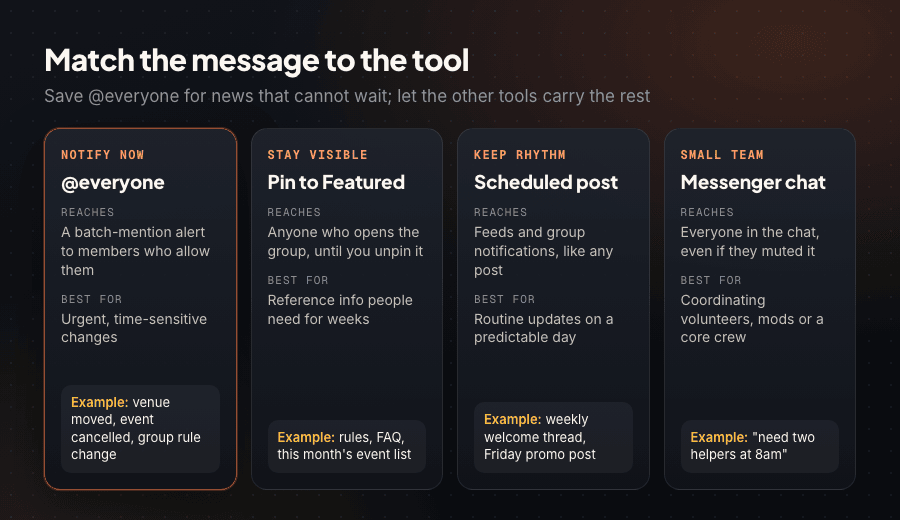
| Tool | Who can use it | Best for | Good to know |
|---|---|---|---|
| @everyone | Depends on group size | Urgent news | Once a day per person, plus a 7-day group limit |
| Pin to Featured | Admins and moderators | Rules, FAQs, this month's events | Pinned items stay until you remove them; newest appears first |
| Welcome post | Admins | Greeting new members | Can include up to 300 newest members from a computer (100 on Android); Admin Assist can schedule it weekly |
| Regular posts on a set rhythm | Anyone who can post | Routine updates | Reach members through their normal group notifications and feed |
| Messenger group chat | Chat members | Small teams, volunteers | @everyone notifies even people who muted the chat |
Pin anything people will look for more than once. In public groups anyone can see pinned items, so your rules post doubles as a preview for people deciding whether to join. Due for a rewrite? Use the guide to writing Facebook group rules.
Routine announcements work best on a fixed rhythm, like a Monday welcome thread or a Friday promo day. When members know when to look, you rarely need an alert; the group admin auto posting guide shows how to keep that rhythm.
If you run groups for your business, PilotPoster can queue those recurring posts for you. It is a web app plus a Chrome extension that posts from your own logged-in browser to groups you admin or have joined, with no Facebook API and no stored Facebook password. Set the weekly welcome thread or promo-day post as a recurring campaign once, and save @everyone for the news that cannot wait.
@everyone Not Working? Causes and Fixes #
Meta's help article lists why you may not be able to use @everyone and why members may not be notified. Matched to what you see:
| What you see | Likely cause | Fix |
|---|---|---|
| @everyone never appears in suggestions | You are a regular member and the group has more than 100 members | Ask an admin or moderator to post it for you |
| Nobody in the group can use it | The group has more than 200,000 members | Pin to Featured and post the news normally |
| It worked yesterday, not today | You used your one @everyone in this group today | Wait a day, or comment on your earlier @everyone post instead |
| Admins can't use it this week | The group reached its 7-day limit (shared by everyone) | Wait it out and agree on who sends future alerts |
| You typed @everyone but nothing happened | The mention was typed as plain text, not selected | Delete it, retype it and select it from the dropdown |
| Some members say they got no alert | They turned off batch mentions, got too many batch mentions that day, blocked you, or Facebook's notification system chose not to send one | Pin the post too, so it is the first thing they see in the group |
| Some public group visitors got nothing | They participate in the public group but are not members | Invite regular participants to join the group |
Adding @everyone by editing an old post? Facebook does not document whether edits trigger the alert, so post a fresh comment with @everyone instead.
Frequently Asked Questions #
Can you tag everyone in a Facebook group without being an admin? #
Only in groups with 100 members or fewer. In groups of 100 to 200,000 members, @everyone is limited to admins and moderators, so ask one of them to post your announcement, or mention the people who need it.
How many times can you use @everyone in a Facebook group? #
Each person who can use it gets once a day in a group. Each group also has a total limit over any 7 days that counts everyone's uses. Facebook does not publish the 7-day number.
Why is @everyone not showing up in my Facebook group? #
You are a regular member in a group of more than 100, the group has over 200,000 members, or you or the group hit the usage limit. Also check you selected it from the dropdown.
How do I stop getting @everyone notifications? #
Go to Settings & privacy, Settings, Notifications, Tags, and switch off Batch mentions. Your normal group notifications are unaffected.
Can you tag everyone in a Facebook Messenger group chat? #
Yes, in chats with multiple people. It notifies everyone in the chat, including people who muted it.
- Type @everyone in a group post or comment and select it from the dropdown; there is no separate "Tag all" button.
- Group size decides who can use it: everyone at 100 members or fewer, admins and moderators above that up to 200,000, no one above 200,000.
- Each person gets one @everyone per group per day, and the group has a shared 7-day limit Facebook does not publish.
- Messenger group chats have their own @everyone; community chats inside groups ended October 5, 2025.
- Use @everyone for urgent changes, deadlines and rule updates; put routine content in regular or scheduled posts.
- Pin to Featured for anything members need for weeks, and pin urgent posts too, since some members turn off batch mentions.
Related Reading #
- Facebook Group Admin Auto Posting: A 2026 Owner's Guide
- How to Write Facebook Group Rules That Actually Work
- How to Grow a Facebook Group from 0 to 10,000 Members (2026)
- How to Revive a Dead Facebook Group: The 30-Day Resurrection Plan
- How to Increase Facebook Engagement in 2026 (What the Data Actually Says)


