
To promote an event on Facebook for free, create a public Facebook Event with co-hosts, a ticket link, and clear details, then run a six-week countdown that shows the event in a new way each week: announce, early bird, behind the scenes, lineup spotlight, social proof, last call, day of, and a photo recap. Most free reach comes from local groups, niche groups, co-hosts' audiences, Reels, and updates inside the event, not your Page. Post in each local group about three times at most, on its promo day, and track tickets per group with UTM links instead of trusting the "Interested" count.
Most events that flop on Facebook were promoted once. Someone made the event, shared it to their Page, dropped it into a few groups the same afternoon, and went quiet until the night before. Facebook rewards the opposite: an event that keeps getting fresh posts, new responses, and new conversation over several weeks.
This guide shows how to promote an event on Facebook without ads, using a week-by-week countdown you can copy for a gig, restaurant night, workshop, market, or webinar. It covers the settings that lock at publish, where free reach comes from, how to post in local groups without getting removed, and how to see which groups sold tickets.
Set Up the Facebook Event Before You Promote It #
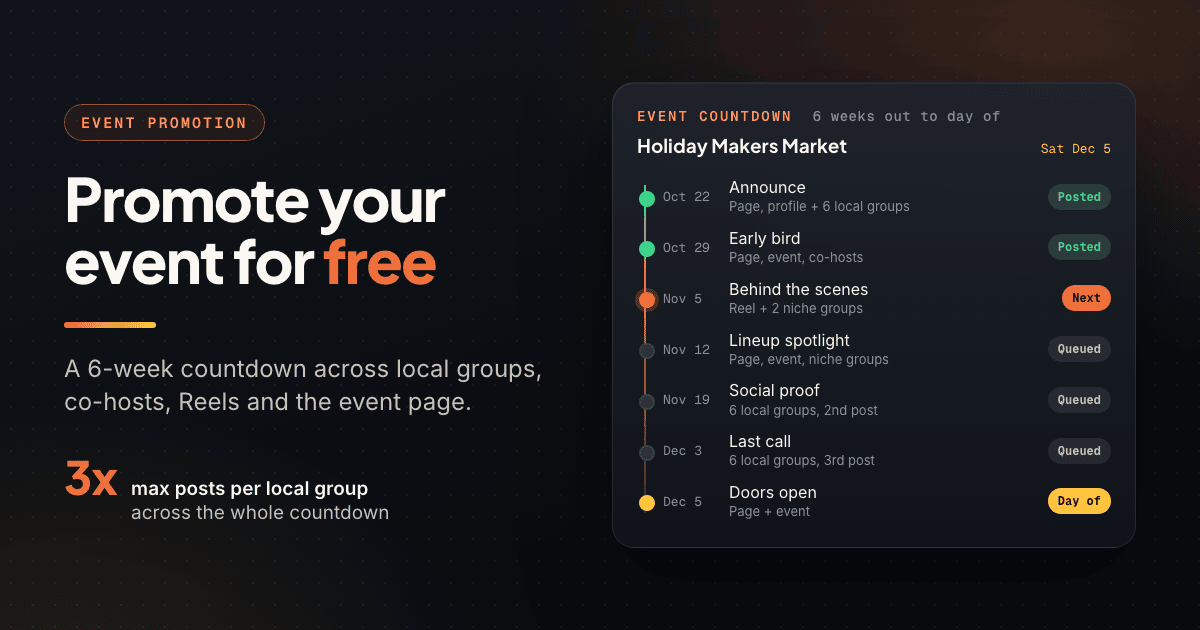
The Event is the hub every countdown post points to, so build it first.
Host from your Page if you have one. Meta's help center says all events hosted by Pages are public, which is what you want for anything selling tickets or seats. Profile and group events let you choose public or private, and the choice is permanent: Meta says you can't change an event's privacy after you create it.
Create a private event "just to test it" and it stays private. For anything open to the public, choose Public (or host from your Page) the first time.
- In person or virtual: pick In person for a physical venue so the event appears for people browsing local events. For webinars, pick Virtual; Meta offers Facebook Live (recommended for more than 50 guests), External link, or Other. For Zoom or your own platform, use External link and put joining instructions in the description.
- Co-hosts: add the performer, speaker, venue, or partner business. Per Meta, you can add friends as co-hosts, and only a Page can add another Page. Once a co-host responds Interested or Going, they can invite people, add co-hosts, and edit details.
- Ticket or registration link: use the ticket field if your event form shows one, and repeat the link in the first two lines of the description, which mobile users see without tapping "See more".
- Recurring events: for a weekly trivia night, Page events support Repeat event, daily or weekly, up to 52 times. Location and time zone cannot be edited once it has started.
- Details: lead the title with what it is ("Live Jazz and Small Plates" beats "Foundry Fridays Vol. 12") and answer price, parking, and accessibility up front.
Know the invite limit. Meta caps invitations at 500 per person per event and may briefly restrict you if many go unanswered, so invite people who might really come. Each co-host has their own allowance. In group events, "invite all members" is only offered at creation.
Why "Interested" Is a Weak Signal #
"Interested" costs nothing. It is often one tap from a feed preview or a polite reply to a friend's invite. Going is firmer, but still not a ticket, and organizers who plan food or staff around the Interested count usually overbuy.
The real value of responses is distribution. People who respond Interested or Going generally get notified when hosts post updates in the event and as the date approaches, depending on their notification settings. Treat responders as an audience to talk to and tickets as the real number. Record Interested, Going, and check-ins after each event, and within two or three events you will know your own ratio.
Where Free Facebook Event Promotion Comes From #
Your Page alone will not fill a room. Free reach comes from several places, each with its own role.
| Source | Why it works | Best use in the countdown |
|---|---|---|
| Local community groups | Neighbors looking for things to do nearby | Announce, social proof, last call (promo days only) |
| Buy/sell and "what's on" event groups | Members expect event posts | Date, price, and place in the first line |
| Niche interest groups | People who care about the topic | Behind the scenes, lineup spotlights |
| Co-hosts' audiences | Performers and partners bring their own fans | Hand them ready-made posts and images |
| Your profile and Page | Your warmest audience | One post per countdown beat |
| Reels | Shown to people who do not follow you | Short prep or venue clips with the date on screen |
| Posts inside the event | Responders get host updates | Weekly updates and day-of logistics |
| Cross-posting partners | Nearby venues and businesses share to their followers | Swap shares for their next event |
Local groups usually bring the most new people. If you have not built your list yet, start with how to find Facebook groups worth joining, and see how local businesses use neighborhood groups.
The 6-Week Countdown Plan #
The worked example is a holiday makers market on Saturday, December 5, with group posts going out on weekdays. Only have three weeks? Start at Week 3 and fold the early-bird offer into the announcement.
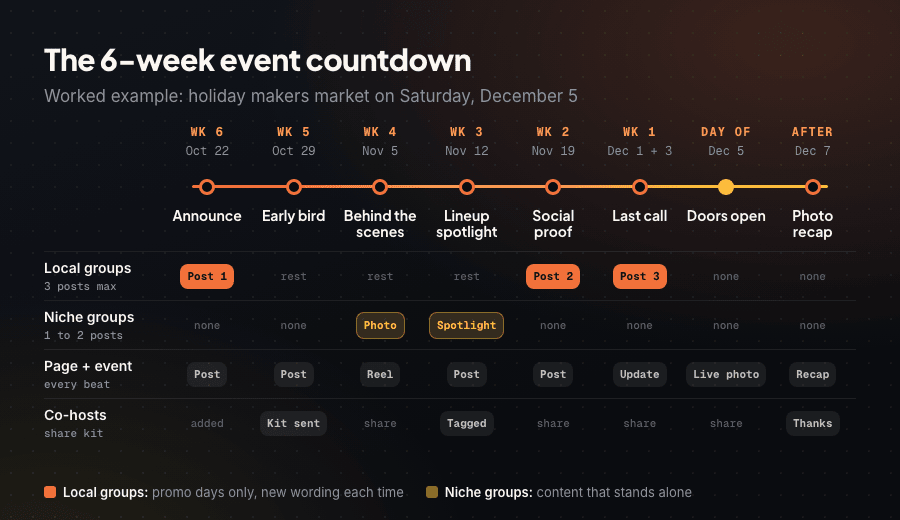
- Week 6 (Oct 22): Announce. Publish the event with co-hosts, post on your Page and profile, and share it into your three to six best local groups and any events groups.
- Week 5 (Oct 29): Early bird. Post the early-bird price or limited spots with a hard deadline on your Page and inside the event. Send co-hosts a share kit: image, two captions, the link. No local group posts this week.
- Week 4 (Nov 5): Behind the scenes. A 15 to 30 second Reel of prep or rehearsal, plus a photo version in one or two niche groups.
- Week 3 (Nov 12): Lineup or speaker spotlight. One post per performer, vendor, or speaker, tagged so they share it, repeated inside the event and in a niche group where the lineup fits.
- Week 2 (Nov 19): Social proof. Photos from your last event, a real attendee quote, or "60 of 150 tickets left". Second round in local groups, ideally inside a weekend roundup.
- Week 1 (Dec 1 and Dec 3): Last call. A "last 20 preview passes" post early in the week, then the third and final local group post two days out, plus a logistics update inside the event.
- Day of (Dec 5): Doors open. Start time, walk-ups welcome or sold out, and a live photo on your Page and inside the event.
- Day after (Dec 7): Recap. Best photos, thanks to co-hosts and admins, and the next date: the first post of your next countdown.
Example copy for the key beats #
Rewrite these in your own voice. The first line carries what, when, and where; the link goes in the first comment where groups allow it.
Announce (local group): "Holiday Makers Market, Saturday Dec 5, 10am to 4pm at the Foundry on 3rd St. 40 local makers, free entry, hot cider for the first 100 people. Vendor list is in the event. Thanks to the admins for allowing event posts here."
Early bird (Page and event): "Friday preview shopping is capped at 80 people, and passes are $5 until Nov 7, then $10. Link in the comments."
Last call (local group): "This Saturday: Holiday Makers Market at the Foundry, 10 to 4, free entry. Street parking fills up after 11, so use the lot behind the library."
Promote Your Event in Facebook Groups Without Spamming #
Posting the same event every few days is the fastest way to get removed from a local group. The countdown is built so no single group sees too much of you.
| Channel | Posts over 6 weeks | Which beats |
|---|---|---|
| Local community groups | 3 maximum | Announce (Wk 6), Social proof (Wk 2), Last call (2 days out) |
| Events and "what's on" groups | 2 to 3 | Announce, Last call, weekend roundup if allowed |
| Niche interest groups | 1 to 2 | Behind the scenes (Wk 4), Spotlight (Wk 3) |
| Your Page and profile | 8 to 10 | Every beat |
| Inside the event | 6 to 8 | Weekly updates and day-of logistics |
Write each group post fresh: many people belong to several of the same city groups, and an identical paragraph four times in one scroll reads like an ad. For timing, check the best time to post in Facebook groups or the free best time to post tool; for format choices, see Facebook group post formats ranked.
Work With Local Group Rules, Not Around Them #
Many community groups ban promotion except on one day ("Small Business Saturday") or inside a pinned weekly thread. Read the rules and pinned posts before Week 6 and put each group's promo day into your plan. For the groups that matter most, message an admin a week before you announce:
"Hi Marcus, I organize the Holiday Makers Market at the Foundry on Dec 5 (free entry, 40 local makers). Would it be OK to share it on your promo day, once now and once the week of? Happy to follow whatever format you prefer."
Instead of posting only your event, post a "Free things to do this weekend" roundup listing four or five local events, with yours as one of them. Roundups rarely break promo rules, get saved and shared, and make you the person who knows what is on in town.
Offering members a small perk, such as a group-only discount code, also earns goodwill. For how admins think about promo, see how group admins write and enforce rules.
Run the Countdown Without Living in Facebook #
Add it all up and the plan is 25 to 40 posts; three posts in each of eight local groups is already 24, each rewritten and timed to a promo day. Lay the beats out first with our Facebook group content calendar templates.
PilotPoster lets you load the full countdown in one sitting and schedule it across the local groups you have joined (not only ones you admin) and your profile, and it can post in groups as your Page. Each group can get a different version of the post, the ticket link can go in an automatic first comment, posts go out with human-like delays between groups, and Safety Autopilot enforces posting limits. For weekly events, a recurring campaign handles the reminder. More on how event promoters use PilotPoster. It runs in your own logged-in browser, with no password and no Facebook API.
Keep the human parts human: replies, questions, and thanking admins. For other scheduling options, see how to schedule Facebook posts.
Measure Which Groups Filled the Room #
Measurement tells you which groups to keep next time. Give every group its own link with UTM parameters, which Google Analytics reads as source, medium, campaign, and content. Keep the campaign fixed and change utm_content per group (or use your ticket platform's own tracking links):
yoursite.com/market?utm_source=facebook&utm_medium=group&utm_campaign=makers-market-dec&utm_content=eastside-neighbors
- Event insights: when you host from a Page, Meta reports event reach and responses in Page insights or Meta Business Suite. Menu names change often, so look for the Events section.
- A checkout question: "Where did you hear about this?" with your top groups as options catches people who saw a post and searched later.
After the event, list each group with ticket sales, clicks, and whether your post was approved. Keep the winners, drop groups that removed posts or sent nothing, and note promo days for next time.
Your Facebook Event Promotion Checklist #
| When | Task | Where |
|---|---|---|
| 7 weeks out | Set privacy and host, add co-hosts, ticket link, details; list groups and promo days; message key admins; build UTM links | Event, groups, spreadsheet |
| Week 6 | Announce, share the event, invite real prospects | Page, profile, 3 to 6 local groups |
| Week 5 | Early-bird deadline, co-host share kit | Page, event, partners |
| Week 4 | Behind-the-scenes Reel and photo | Reels, 1 to 2 niche groups |
| Week 3 | Lineup or speaker spotlights, tagged | Page, event, niche groups |
| Week 2 | Social proof or weekend roundup | Local groups (2nd post) |
| Week 1 | Last call and logistics update | Local groups (3rd post), event |
| Day of | Doors-open post and live photo | Page, event |
| Day after | Photo recap, thanks, next date | Page, event |
| Week after | Group scorecard and Interested-to-ticket ratio | Spreadsheet |
Frequently Asked Questions #
How do I promote an event on Facebook for free? #
Create a public Facebook Event with co-hosts and a ticket link, then promote it over several weeks instead of once. Share it in local groups on their promo days, post spotlights and behind-the-scenes content on your Page and in niche groups, and post updates inside the event so responders get notified.
How far in advance should I promote an event on Facebook? #
Four to six weeks suits most local events and workshops: enough time for an announcement, an early-bird deadline, a few content posts, and a last call. Festivals and conferences benefit from starting months ahead.
How many people can I invite to a Facebook event? #
Meta says each person can send up to 500 invitations per event, and invites may be limited for a short time if many go unanswered. Each co-host has their own allowance, so adding performers or partners as co-hosts extends your reach.
Does "Interested" on a Facebook event mean people will come? #
Not reliably. Interested is a free tap many people use as a bookmark. Treat it as an audience to update, and judge the event by tickets or registrations.
Can I change a Facebook event from private to public? #
No. Meta says event privacy cannot be changed after creation. If you made a private event by mistake, create a new public one (Page events are always public) and point people to it.
- Host from your Page when you can: Page events are always public, and event privacy cannot be changed later.
- Add performers, speakers, and partners as co-hosts; each person can send up to 500 invites per event.
- Treat "Interested" as an audience to update, not a headcount. Tickets and registrations are the real number.
- Free reach comes from local groups, niche groups, co-hosts, Reels, and posts inside the event.
- Run a six-week countdown: announce, early bird, behind the scenes, spotlight, social proof, last call, day of, recap.
- Post in each local group about three times at most, on its promo day, with fresh wording each time.
- Give every group its own UTM link and keep a scorecard so your next event starts with your best groups.
Related Reading #
- How to Use Facebook Groups for Local Business Marketing
- Facebook Group Content Calendar: 30-Day Templates and Framework
- How to Find Facebook Groups for Marketing (And Evaluate Them)
- Best Time to Post in Facebook Groups for Maximum Engagement
- How to Market Your Business on Facebook Without Paying for Ads


