Autopost · Medium
Auto post Medium stories to Facebook groups
Every Medium profile and publication has a feed. Connect yours to PilotPoster and each new story is shared to the professional and interest groups where your readers already trade ideas.
4.5 on the Chrome Web Store · Featured 1-day trial for $0 Cancel anytime
How do I share my Medium stories to Facebook groups automatically?
Use your profile feed, medium.com/feed/@username, as the feed URL in a new PilotPoster RSS campaign. Each story you publish is then shared to the Facebook groups you picked, one group at a time, from your own browser.
Who shares Medium stories to Facebook groups
Professionals building a name in their field: developers, designers, product managers, marketers, consultants and coaches. Their best readers are in industry Facebook groups, such as a UX design group, a group for freelance writers or a regional startup group. One thoughtful story shared there can bring followers, clients and job offers. Editors of Medium publications use RSS autoposting to give every writer’s story a wider audience.
Profile feed or publication feed?
Use your profile feed if you want only your own stories shared. If you run a publication, the publication feed shares every story from every writer, and a tagged feed narrows it to one subject, for example only the stories tagged "career" going to your career groups. Run one campaign per feed, each with its own saved group list, so each group gets the stories that fit it.
How often to share
Industry groups reward quality over volume, so one or two stories a week is plenty. PilotPoster shares your newest story every time it checks, so publish one at a time and give each a few hours to reach your groups. Between stories, start conversations: a question to the group with your story link in the first comment, written with an AI rewrite for each group. See group post ideas that drive engagement.
How to autopost Medium to Facebook groups
Four steps, about five minutes. Connect the feed once, and your new stories share themselves from then on.
-
Step 1: Pick your Medium feed
For your own stories, use
https://medium.com/feed/@username. For a publication, usehttps://medium.com/feed/publication-name, and for one tag inside a publication,https://medium.com/feed/publication-name/tagged/tag-name. Medium lists these in its help center. -
Step 2: Open it to confirm
Load the URL in your browser and check that your latest story is the first item. If you use a custom domain or a username.medium.com address, the feed is that address plus /feed.
-
Step 3: Paste the feed into a new RSS campaign
In the PilotPoster dashboard, open RSS Campaigns and click New RSS Feed. Paste the feed URL, pick a saved group list and set the Time Between Posts (anywhere from 5 minutes to 6 hours). Leave Include Description off. Medium puts the full story in its feed, so the title plus link makes the cleaner group post. Then start the campaign.
-
Step 4: Publish, then check the RSS Logs
PilotPoster checks the feed every 5 minutes. When a new item shows up, it goes to your groups one at a time from your own Chrome browser, and each share lands in RSS Logs with the group and the result. Publish your next story and watch it go out.
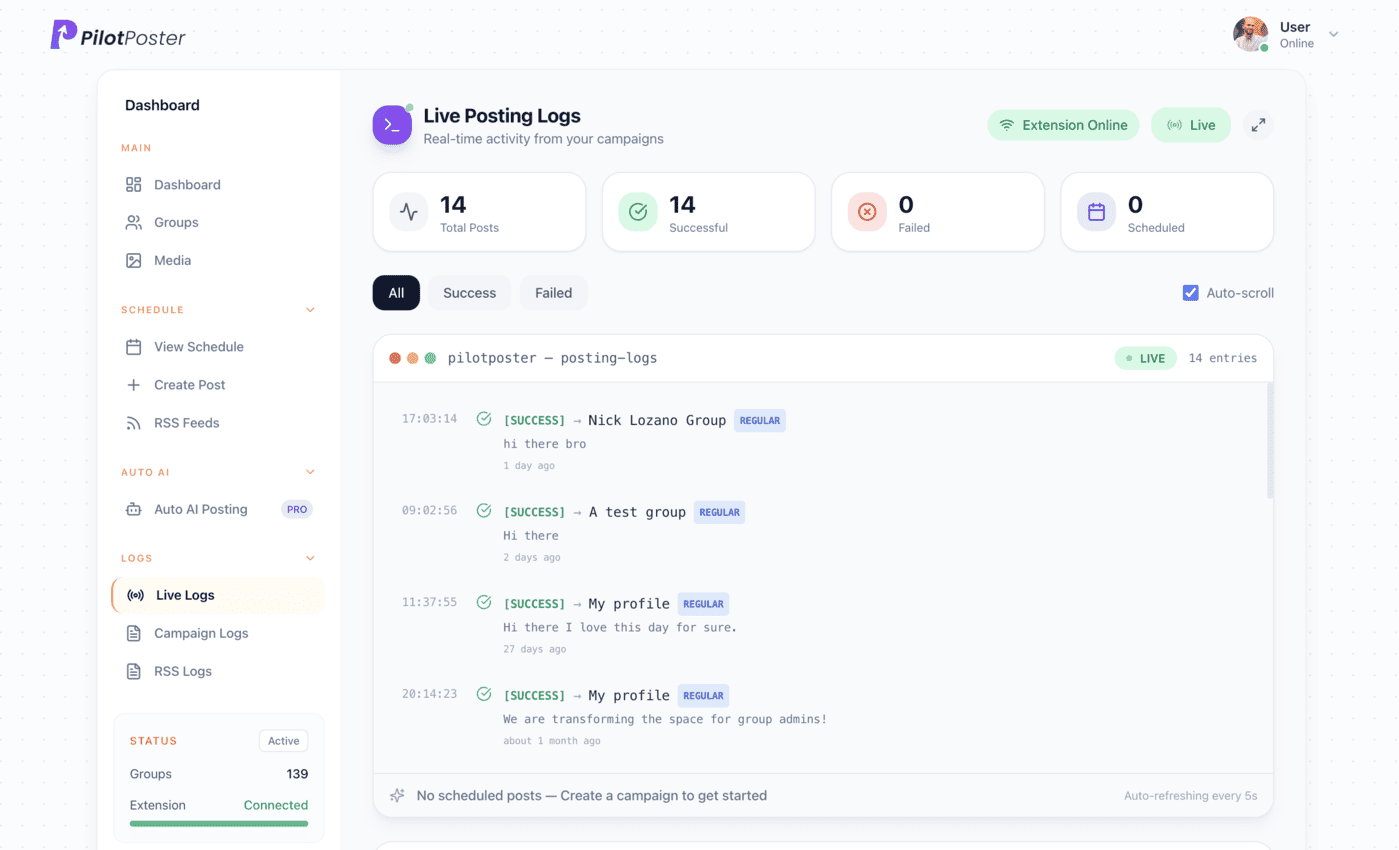
Live posting logs: every post, the group it went to, and when.
Does Medium have an RSS feed?
Yes. Profiles have a feed at medium.com/feed/@username, publications at medium.com/feed/publication-name, and tags inside a publication at medium.com/feed/publication-name/tagged/tag-name. Any of them can go into a PilotPoster RSS campaign to share new stories to your Facebook groups. Open the URL in a browser first to make sure it loads.
Will member-only stories work?
Stories behind Medium’s paywall appear in your feed like any other, and readers who tap them see Medium’s own access rules. For group sharing, your free stories usually earn more reads and follows, so publish some openly when you want group members to reach the whole piece.
Can I share only stories on one topic?
If your stories live in a publication, use its tagged feed, such as medium.com/feed/your-publication/tagged/design, to share only stories with that tag. Connect it to a campaign with a group list for that topic, and each group gets only relevant stories.
How quickly will a new story appear in my groups?
PilotPoster checks your feed every 5 minutes. Once your story is in the feed, it starts going out to your groups one at a time, with the gap you set between them. Your RSS Logs show the group, the time and the result for every share.
Keep exploring
Related pages
- Facebook group post ideas Start conversations, not just link drops.
- Get leads and clients in groups Turn readers into clients.
- AI content per group A fresh rewrite for every group.
- Autopost Blogger to groups Share new Blogger posts, or one label, to your hobby and community groups.
- Autopost Ghost to groups Share new Ghost posts, or one tag, to the groups your members come from.





4.5 on the Chrome Web Store
Put your new stories in front of every group
Connect it once, and everything new you publish reaches the groups you picked, on autopilot.