Autopost · Ghost
Auto post Ghost to Facebook groups
Ghost builds a feed for your whole site at /rss/ and for every tag and author too. Connect one to PilotPoster and each new post is shared to the Facebook groups where your next members already spend time.
4.5 on the Chrome Web Store · Featured 1-day trial for $0 Cancel anytime
How do I auto post my Ghost site to Facebook groups?
Add /rss/ to your site address and paste it into a new RSS campaign in PilotPoster. Each new post is shared to the Facebook groups you selected, one group at a time. Tag feeds like /tag/local/rss/ let you send only one topic.
Who shares Ghost posts in Facebook groups
Independent publishers and membership businesses: local news sites, trade newsletters, niche analysts and creators who sell memberships. Their next members are in Facebook groups about the same city or industry. A local news site sharing each story to its town’s community groups becomes the name residents trust. A trade newsletter sharing to industry groups earns sign-ups from people who would never find it in search. RSS autoposting does that sharing for every post.
Use a tag feed for your public posts
If you publish both public and members-only posts, a tag feed keeps your groups on the public ones. Add a tag such as "free" or "community" to the posts anyone can read in full, then connect /tag/free/rss/. Group members who tap through get the whole story, which is what turns them into subscribers. Use a separate tag feed for each topic and pair it with its own saved group list.
How often to post
Daily local news can go out daily, while analysis and newsletters do well weekly. PilotPoster shares the newest post each time it checks, so for busy news sites a tag feed for your top story of the day works better than the full firehose. Pace large group lists with a longer Time Between Posts, and use Safety Autopilot limits so your daily volume stays in a healthy range. Add a recurring member pitch with spintax and the sign-up link in the first comment.
How to autopost Ghost to Facebook groups
Four steps, about five minutes. Connect the feed once, and your new posts share themselves from then on.
-
Step 1: Choose your Ghost feed
Your main feed is
https://yoursite.com/rss/. A tag feed ishttps://yoursite.com/tag/tag-slug/rss/and an author feed ishttps://yoursite.com/author/author-slug/rss/. Ghost documents these in its help center. -
Step 2: Check that the feed is public
Open the URL in your browser. If your site is in Private Site Mode, the public feed is off; Ghost shows a private feed URL under Settings, General instead.
-
Step 3: Paste the feed into a new RSS campaign
In the PilotPoster dashboard, open RSS Campaigns and click New RSS Feed. Paste the feed URL, pick a saved group list and set the Time Between Posts (anywhere from 5 minutes to 6 hours). Turn on Include Description to add your post excerpt under the link, or leave it off for title and link only. Then start the campaign.
-
Step 4: Publish, then check the RSS Logs
PilotPoster checks the feed every 5 minutes. When a new item shows up, it goes to your groups one at a time from your own Chrome browser, and each share lands in RSS Logs with the group and the result. Publish your next post and watch it go out.
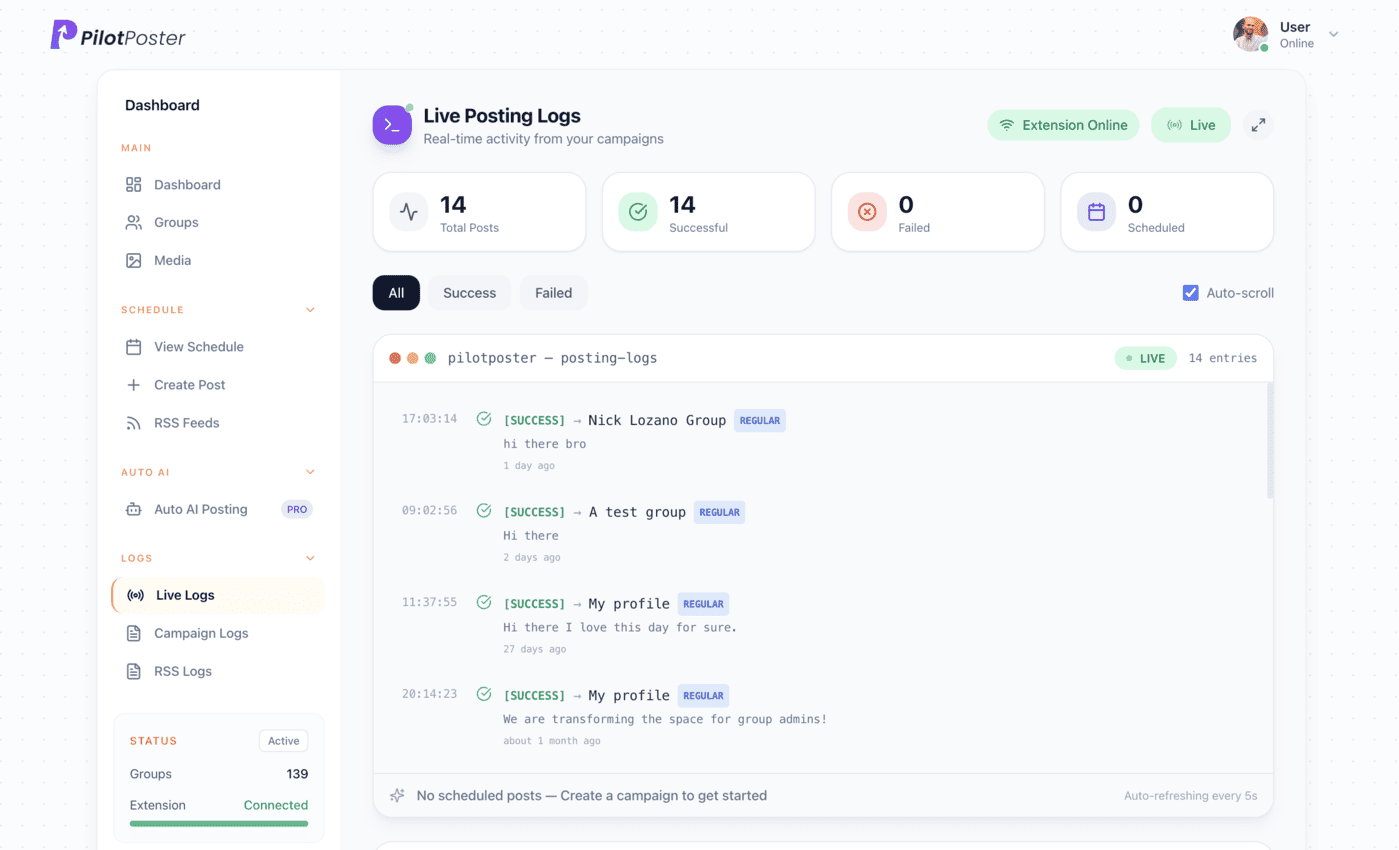
Live posting logs: every post, the group it went to, and when.
Where is my Ghost RSS feed?
Add /rss/ to your site address, for example yoursite.com/rss/. Tags and authors have their own feeds too, such as yoursite.com/tag/news/rss/. Open the URL in your browser to make sure it loads, then paste it into a new RSS campaign in PilotPoster.
My site is in Private Site Mode. Can I still use it?
Private sites turn off the public feed, but Ghost gives you a private RSS URL in Settings, General. You can use that URL in PilotPoster. The posts it shares link to a private site, though, so most publishers open their site before sharing to groups.
Can I share only some of my posts?
Yes. Tag the posts you want shared and connect that tag’s feed, such as /tag/community/rss/. Only posts with that tag go to your groups. You can run several campaigns, one per tag, each going to a different saved group list.
How do I stop sharing for a while?
Pause the campaign from the RSS Campaigns page. PilotPoster stops sharing until you resume it, which is handy for holidays or a publishing break. Resume it when you are ready and new posts start going out to your groups again.
Keep exploring
Related pages
- Grow with Facebook groups Why groups beat Pages for reach.
- Safety Autopilot Posting limits that keep volume healthy.
- Facebook groups for local business Win your town’s groups.
- Autopost Squarespace to groups Share new blog posts from your Squarespace site to local and niche groups.
- Autopost Wix to groups Share each new Wix blog post to the local groups your customers use.





4.5 on the Chrome Web Store
Put your new posts in front of every group
Connect it once, and everything new you publish reaches the groups you picked, on autopilot.