Autopost · Wix
Auto post your Wix blog to Facebook groups
Wix Blog publishes a feed of your newest posts at yoursite.com/blog-feed.xml. Connect it to PilotPoster and each new post is shared to the local Facebook groups where your customers ask for recommendations.
4.5 on the Chrome Web Store · Featured 1-day trial for $0 Cancel anytime
How do I auto post my Wix blog to Facebook groups?
Paste yoursite.com/blog-feed.xml into a new RSS campaign in PilotPoster and pick your groups. Each new Wix blog post is then shared to those Facebook groups as its title and link, one group at a time, from your own browser.
Who shares Wix posts to Facebook groups
Local service businesses run on Wix: cleaners, salons, contractors, personal trainers, dog groomers, tutors and cafes. A blog post like "5 signs your AC needs a tune-up" or "what to pack for your first lesson" is just the kind of helpful content local groups welcome, and it puts your name in front of neighbors who need you. RSS autoposting shares each one for you. Pair the feed with our guide to promoting a business in groups and you have a steady local presence.
One feed, so write for your whole group list
Wix gives you one blog feed and no category feeds, so every post goes to the same groups. That suits a local business well: write posts that fit all the groups on the list, such as town community groups and local buy and sell groups. If you serve two very different audiences, use a saved group list for the feed and run hand-written recurring posts for the second audience.
How often to post
One or two blog posts a week keeps a local business visible without crowding anyone. PilotPoster shares the newest post each time it checks, so publish one at a time and let it reach every group before the next. For your evergreen offer, schedule a weekly post with spintax for variety and your booking link in the first comment.
How to autopost Wix to Facebook groups
Four steps, about five minutes. Connect the feed once, and your new blog posts share themselves from then on.
-
Step 1: Find your Wix blog feed
Add
/blog-feed.xmlto your site address:https://www.yoursite.com/blog-feed.xml. You can also add Wix’s RSS button to your site and click it to see the feed URL (Wix Help). -
Step 2: Open it in your browser
You should see your most recent posts, newest first. Wix includes up to 20 of them. If the page doesn’t load, check that your site and blog are published.
-
Step 3: Paste the feed into a new RSS campaign
In the PilotPoster dashboard, open RSS Campaigns and click New RSS Feed. Paste the feed URL, pick a saved group list and set the Time Between Posts (anywhere from 5 minutes to 6 hours). Leave Include Description off for most Wix blogs: Wix sends a short snippet, and title plus link makes the cleaner post. Then start the campaign.
-
Step 4: Publish, then check the RSS Logs
PilotPoster checks the feed every 5 minutes. When a new item shows up, it goes to your groups one at a time from your own Chrome browser, and each share lands in RSS Logs with the group and the result. Publish your next post and watch it go out.
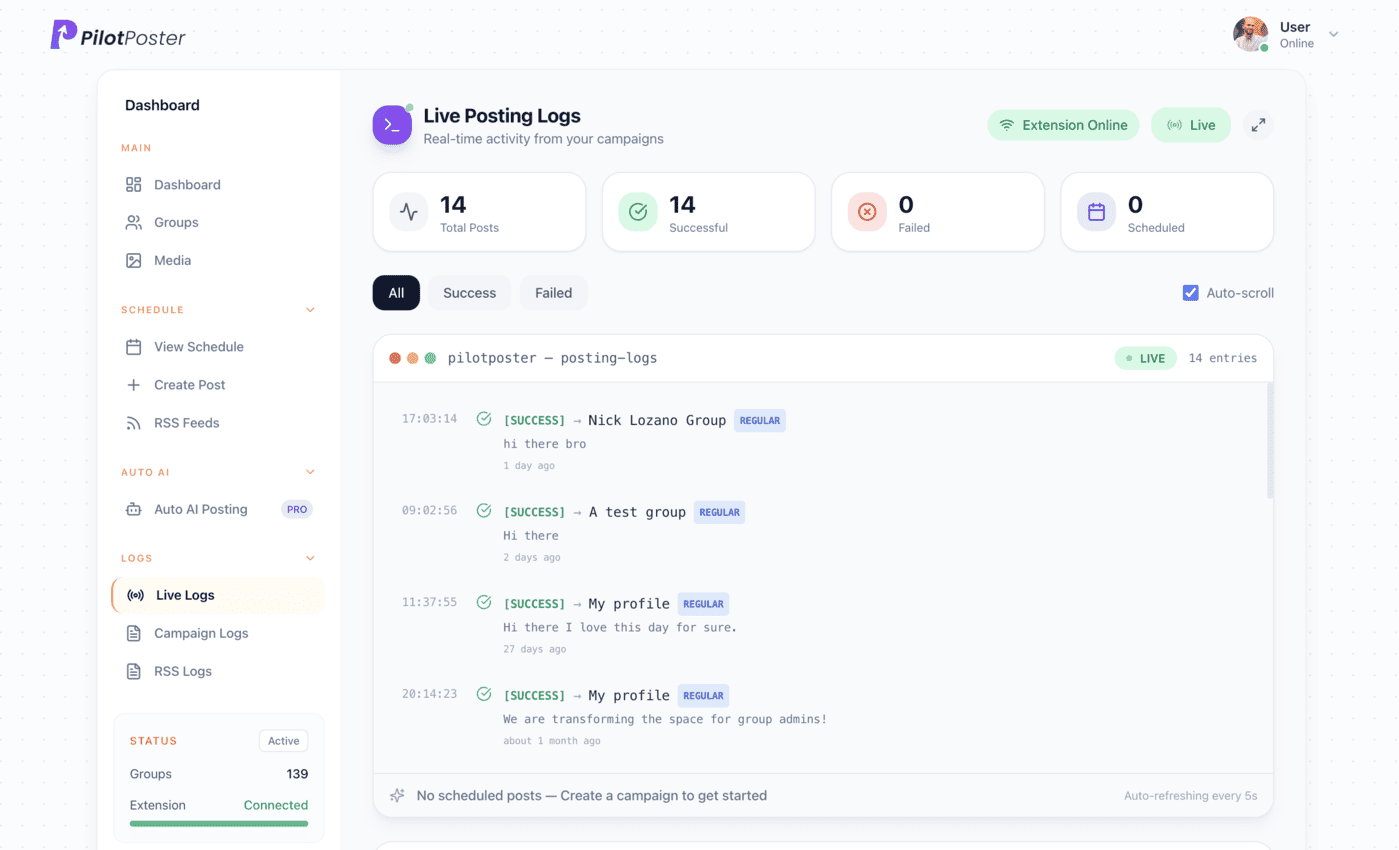
Live posting logs: every post, the group it went to, and when.
What is my Wix blog RSS feed URL?
It is your site address plus /blog-feed.xml, for example www.yoursite.com/blog-feed.xml. You can also add the Wix RSS button to your site and click it to see the URL. Paste it into a new RSS campaign in PilotPoster to start sharing.
Can I get a feed for one Wix blog category?
Wix does not offer category feeds; the blog feed covers your 20 most recent posts across all categories. Write posts that suit every group on your list, or share category-specific posts by hand with a regular scheduled campaign and its own group list.
What will my group post look like?
It is your post title followed by its link, and Facebook usually adds a preview card with your cover image. If you want a friendlier lead-in for a particular post, schedule it as a regular post with your own intro and the link in the first comment.
Is PilotPoster safe for posting in local groups?
Yes, when you post the right way. PilotPoster posts from your own browser, one group at a time, with a gap you set between each. Safety Autopilot adds posting limits and pauses groups that keep failing, so your activity stays natural.
Keep exploring
Related pages
- Promote your business in Facebook groups Get known in local groups.
- Is auto posting safe? The habits that keep it safe.
- Recurring group posts Keep your evergreen offer running.
- Autopost Podcast RSS to groups Share every new episode to the groups that care about your show’s topic.
- Autopost Etsy to groups Share each new Etsy listing to the craft and buy and sell groups you joined.





4.5 on the Chrome Web Store
Put your new blog posts in front of every group
Connect it once, and everything new you publish reaches the groups you picked, on autopilot.