Autopost · Podcast RSS
Auto post new podcast episodes to Facebook groups
Your podcast already runs on an RSS feed. Connect that same feed to PilotPoster and each new episode is shared to the Facebook groups where listeners talk about your topic, so every episode finds new ears.
4.5 on the Chrome Web Store · Featured 1-day trial for $0 Cancel anytime
How do I share new podcast episodes to Facebook groups automatically?
Copy your show’s RSS feed URL from your podcast host and paste it into a new RSS campaign in PilotPoster. Each new episode is shared to the Facebook groups you picked, one group at a time, with the episode title and its link.
Who shares podcast episodes in Facebook groups
Podcasters with a clear niche get the best results: a show for small business owners, a true crime podcast, a gardening show, a faith or parenting podcast, a local history show. Each has Facebook groups full of people who already love the topic. Coaches and consultants with a show use it to turn listeners into clients. One well-chosen group can bring more new listeners than weeks of Page posts, and RSS autoposting shares every episode there for you.
Lead with the topic, not the show
Group members click on a topic they care about, not a show name. Title episodes the way a listener would ask: "How to price your first wedding cake" beats "Episode 47". Because the episode title is the first line of your group post, a clear title does the selling for you. For your best episodes, schedule a recurring post that asks the group a question about the topic, written with an AI rewrite for each group, with the episode link in the first comment.
How often to share
A weekly show is a natural fit: one new post per group per week. PilotPoster shares the newest episode each time it checks, every 5 minutes. If you release a batch, such as a three-part series on one day, space them a few hours apart so each gets its turn. Video podcasts on YouTube can use the YouTube feed instead.
How to autopost Podcast RSS to Facebook groups
Four steps, about five minutes. Connect the feed once, and your new episodes share themselves from then on.
-
Step 1: Copy your RSS feed from your host
Every podcast host shows your show’s RSS feed URL in its settings or distribution page, because it is the same feed you submitted to Apple Podcasts and Spotify. Copy it exactly.
-
Step 2: Check what each episode links to
Open the feed in your browser and look at the newest episode. Each episode should have a link to an episode page, which is what goes in your group post. Most hosts add one; if yours doesn’t, set a website or episode URL in your host. Apple’s podcast RSS feed requirements explain the feed’s structure.
-
Step 3: Paste the feed into a new RSS campaign
In the PilotPoster dashboard, open RSS Campaigns and click New RSS Feed. Paste the feed URL, pick a saved group list and set the Time Between Posts (anywhere from 5 minutes to 6 hours). Leave Include Description off if your show notes are long; turn it on if they open with a tight one-line summary. Then start the campaign.
-
Step 4: Publish, then check the RSS Logs
PilotPoster checks the feed every 5 minutes. When a new item shows up, it goes to your groups one at a time from your own Chrome browser, and each share lands in RSS Logs with the group and the result. Publish your next episode and watch it go out.
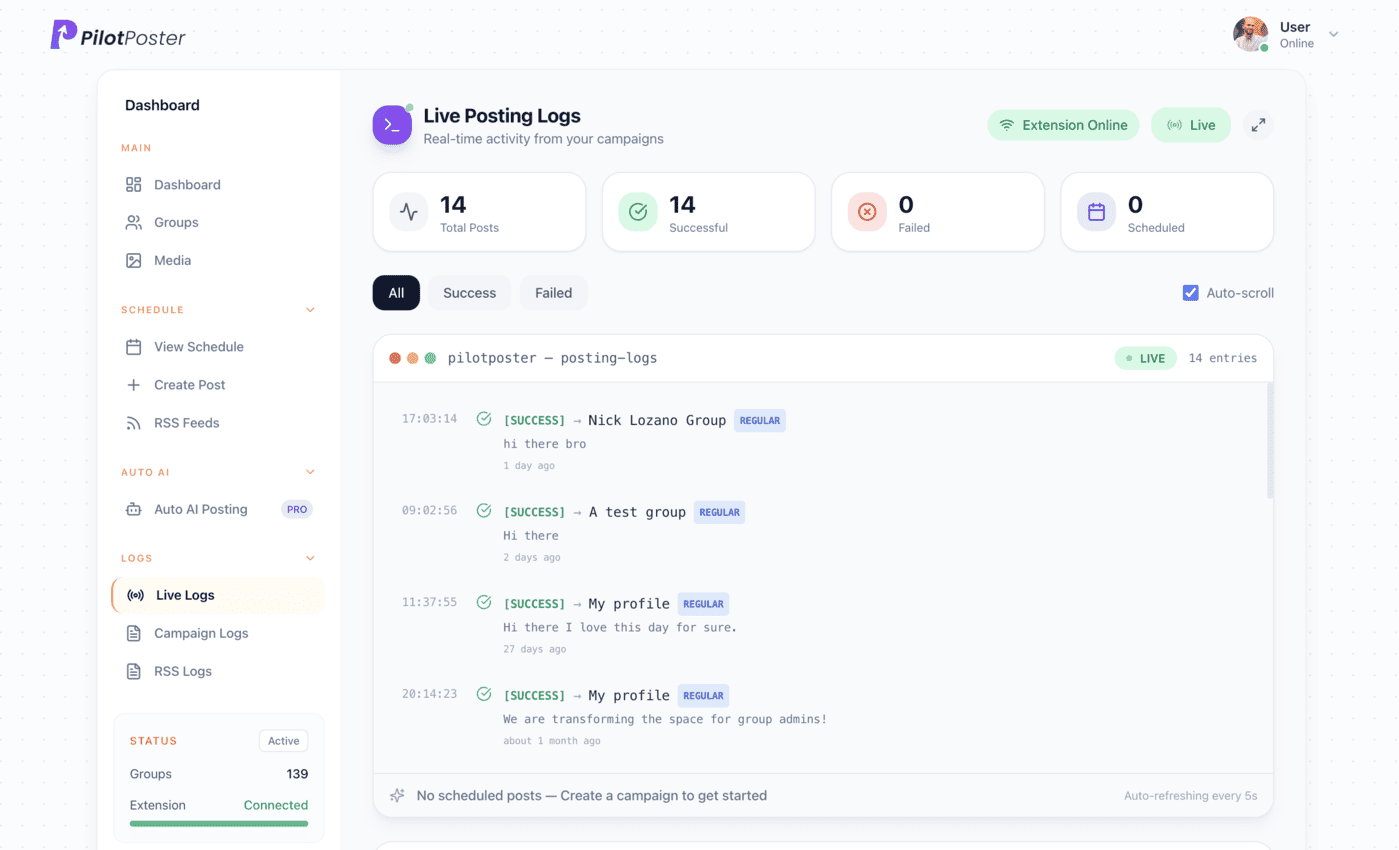
Live posting logs: every post, the group it went to, and when.
Where do I find my podcast RSS feed?
In your podcast host’s dashboard, usually under settings, distribution or directories. It is the same feed you submitted to Apple Podcasts and Spotify. Copy that URL into a new PilotPoster RSS campaign and choose the Facebook groups that fit your show.
What will the group post include?
The episode title and the episode’s link, so a clear, topic-led title matters. Turn on Include Description to add your show notes under the link instead of the title. Facebook usually shows a preview card from the episode page the link points to.
Will my whole back catalog get posted?
No. PilotPoster starts from your newest episode at the moment you connect the feed and shares only episodes released after that. To bring older favorites back, schedule them as regular recurring posts, with a unique version for every group and the episode link in the first comment.
Can I post episodes to groups I don’t run?
Yes. PilotPoster posts to any Facebook group you have joined, as long as members can post. Many hobby and industry groups welcome relevant episodes; check each group’s rules on self-promotion, and some have a weekly promo thread where episode shares belong.
Keep exploring
Related pages
- Facebook group post formats Formats that get listeners to click.
- PilotPoster for coaches Turn listeners into clients.
- Auto post YouTube to groups For video podcasts.
- Autopost Etsy to groups Share each new Etsy listing to the craft and buy and sell groups you joined.
- Autopost Facebook Page to groups Repost every new Page post, with its photos and videos, to your groups.





4.5 on the Chrome Web Store
Put your new episodes in front of every group
Connect it once, and everything new you publish reaches the groups you picked, on autopilot.