Autopost · Squarespace
Auto post Squarespace to Facebook groups
Every Squarespace blog page has its own feed: the page URL with ?format=rss on the end. Connect it to PilotPoster and each new post is shared to the local and niche groups where your clients already ask for recommendations.
4.5 on the Chrome Web Store · Featured 1-day trial for $0 Cancel anytime
How do I auto post my Squarespace blog to Facebook groups?
Add ?format=rss to your blog page URL, for example yoursite.com/blog?format=rss, and paste it into a new RSS campaign in PilotPoster. Each new blog post is then shared to the Facebook groups you chose, one group at a time.
Who shares Squarespace posts to Facebook groups
Squarespace is a favorite of visual businesses: photographers, wedding planners, florists, interior designers, studios, restaurants and boutique hotels. Their blogs show real work, like a recent wedding, a kitchen makeover or a seasonal menu, and that is exactly what local groups enjoy seeing. A photographer sharing each new session to local parent and wedding groups stays top of mind for the next booking, and RSS autoposting does the sharing for every post. Read how local businesses win in Facebook groups.
Filter by category for each group
Squarespace lets you narrow a feed to one blog category, so a wedding photographer can send the "weddings" category to wedding planning groups and the "family" category to local parent groups. Squarespace’s guide shows the filter format. Put each filtered feed in its own campaign with its own saved group list. Squarespace feeds include your 20 most recent posts, and PilotPoster only ever needs the newest one.
How often to post
For a visual business, one strong post a week is a great rhythm: a project, a client story, a seasonal idea. PilotPoster shares the newest post each time it checks, every 5 minutes, so publish one at a time. Between posts, keep a recurring offer running, written with an AI rewrite for each group and the booking link in the first comment.
How to autopost Squarespace to Facebook groups
Four steps, about five minutes. Connect the feed once, and your new blog posts share themselves from then on.
-
Step 1: Build your Squarespace feed URL
Take your blog page URL and add
?format=rss:https://yoursite.com/blog?format=rss. If your blog page has a different slug, such as /journal, use that instead. Squarespace covers this, plus category and tag filters, in Finding your RSS feed URL. -
Step 2: Confirm the site is live
Feeds only work on a public, paid site, on a blog page (not a layout page) that has no password. Open the URL in a browser and check that your newest post is first.
-
Step 3: Paste the feed into a new RSS campaign
In the PilotPoster dashboard, open RSS Campaigns and click New RSS Feed. Paste the feed URL, pick a saved group list and set the Time Between Posts (anywhere from 5 minutes to 6 hours). Leave Include Description off unless your posts open with a short summary; Facebook builds the preview from your post’s image and title. Then start the campaign.
-
Step 4: Publish, then check the RSS Logs
PilotPoster checks the feed every 5 minutes. When a new item shows up, it goes to your groups one at a time from your own Chrome browser, and each share lands in RSS Logs with the group and the result. Publish your next post and watch it reach your groups.
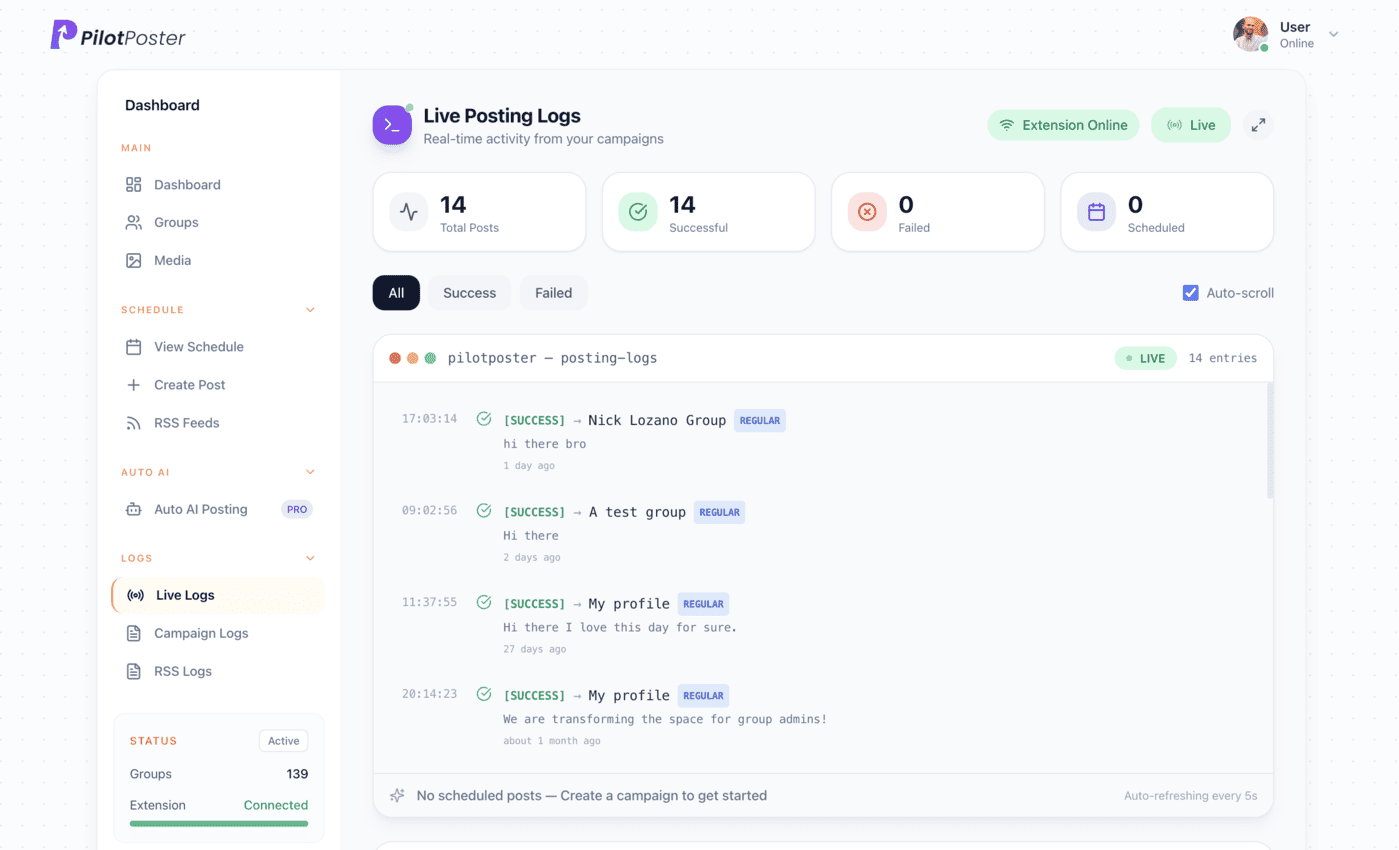
Live posting logs: every post, the group it went to, and when.
Does Squarespace have an RSS feed?
Yes. Every blog page has one: add ?format=rss to the blog page URL, such as yoursite.com/blog?format=rss. It works on your squarespace.com address and on your custom domain. The feed lists your 20 most recent posts, newest first, and PilotPoster only needs the newest one.
Why does my Squarespace feed not load?
Check that the site is public and on a paid plan, the blog page is enabled and has no password, and the URL points at the blog page itself. Feeds only work on collection pages like a blog, not on layout pages.
Can I share only one blog category?
Yes. Squarespace lets you filter the feed by category or tag by adding a parameter before format=rss, as shown in its help article. Use the filtered URL in its own PilotPoster campaign so that category goes only to the groups that fit it.
Does my computer need to be on?
Yes. Feed campaigns run through Chrome on your computer, so PilotPoster watches your feed while Chrome and the extension are running. Publish during your working hours, and every new post goes out to your groups at the pace you set.
Keep exploring
Related pages
- Facebook groups for local business Win your town’s groups.
- Facebook group marketing examples What good group posts look like.
- PilotPoster for photographers Book more sessions from local groups.
- Autopost Wix to groups Share each new Wix blog post to the local groups your customers use.
- Autopost Podcast RSS to groups Share every new episode to the groups that care about your show’s topic.





4.5 on the Chrome Web Store
Put your new blog posts in front of every group
Connect it once, and everything new you publish reaches the groups you picked, on autopilot.