Autopost · WordPress
Auto post WordPress to Facebook groups
Every WordPress site already publishes a feed at yoursite.com/feed/. Connect it to PilotPoster once, and each new article is shared to the Facebook groups where your readers and customers spend their day.
4.5 on the Chrome Web Store · Featured 1-day trial for $0 Cancel anytime
How do I auto post WordPress articles to Facebook groups?
Copy your feed URL (your site address plus /feed/) and paste it into a new RSS campaign in PilotPoster. It checks the feed every 5 minutes and shares each new article to the Facebook groups you chose, one group at a time, from your own browser.
Who auto posts WordPress to Facebook groups
Mostly people whose blog is a sales tool, not a hobby. A roofer writes "how to spot hail damage" after a storm. A realtor posts a Friday market update. A recipe blogger publishes a new slow cooker dinner. In each case the people who would love the post are already in local, trade or hobby Facebook groups, and a share there reaches far more of them than a Page post would. The articles that do best in groups answer one question clearly: a checklist, a local guide, a before and after, a price breakdown. RSS autoposting gets every one of them in front of those groups without you copying a link by hand.
Use category feeds to match posts to groups
This is the WordPress advantage. Every category and tag has its own feed, so you can run one campaign per topic with its own saved group list. Send /category/recipes/feed/ to your cooking groups and /category/local/feed/ to your town groups, and each group only sees what fits it. Group admins notice, and on-topic posts get far more clicks. The format is documented in WordPress.com’s feeds guide and works the same on self-hosted sites.
How often to publish
One to three articles a week suits most groups. PilotPoster shares the newest item each time it checks, so give each article time to reach every group before the next one goes live: 20 groups at 10 minutes apart takes a little over three hours. Between new articles, keep your best evergreen posts circulating with a recurring campaign, written with spintax so each group gets its own wording, and with the link in the first comment. Our guide on writing group posts that convert covers the intro lines that earn the click.
How to autopost WordPress to Facebook groups
Four steps, about five minutes. Connect the feed once, and your new articles share themselves from then on.
-
Step 1: Find your WordPress feed URL
Add
/feed/to the end of your site address, for examplehttps://yoursite.com/feed/. To share only one category, usehttps://yoursite.com/category/recipes/feed/, and for a tag,https://yoursite.com/tag/local/feed/. This works on self-hosted WordPress and on WordPress.com. -
Step 2: Open it in your browser
You should see a page of code with your newest post at the top. If you get an error instead, a plugin may have switched feeds off, so turn feeds back on before you connect it.
-
Step 3: Paste the feed into a new RSS campaign
In the PilotPoster dashboard, open RSS Campaigns and click New RSS Feed. Paste the feed URL, pick a saved group list and set the Time Between Posts (anywhere from 5 minutes to 6 hours). Leave Include Description off for a clean title and link, or turn it on to add your post excerpt under the link. Then start the campaign.
-
Step 4: Publish, then check the RSS Logs
PilotPoster checks the feed every 5 minutes. When a new item shows up, it goes to your groups one at a time from your own Chrome browser, and each share lands in RSS Logs with the group and the result. Publish your next article and watch it go out.
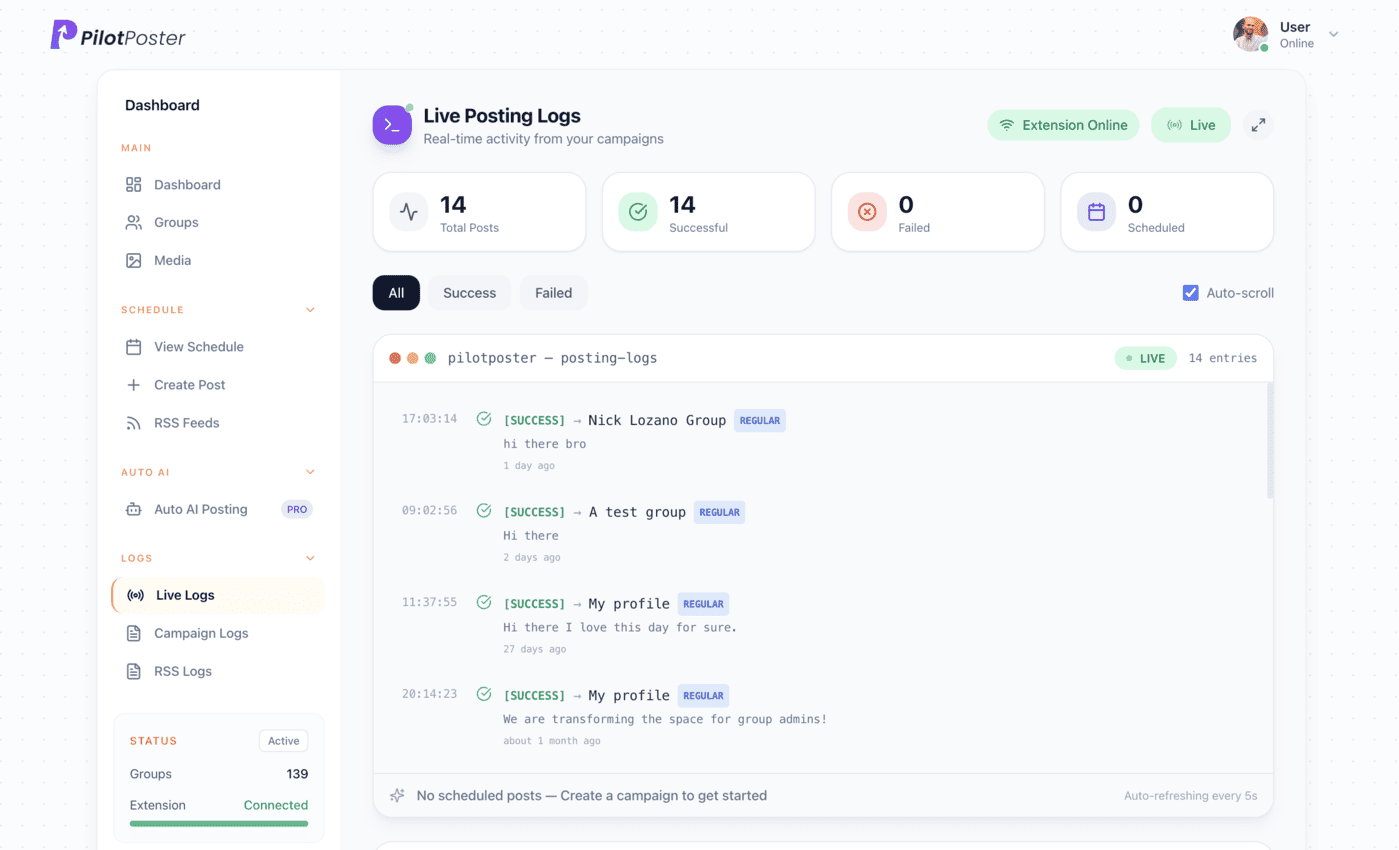
Live posting logs: every post, the group it went to, and when.
Does this work with WordPress.com and self-hosted WordPress?
Yes. Both publish a standard feed at your site address plus /feed/, along with feeds for each category and tag. Paste any of them into a new RSS campaign in PilotPoster and every new post in that feed is shared to the Facebook groups you selected.
Will my old WordPress posts flood my groups when I connect the feed?
No. PilotPoster starts from the newest post in the feed at the moment you connect it and only shares articles published after that. Your back catalog stays put. If you want older articles in your groups, schedule them as regular recurring posts instead.
What does the group post look like?
By default it is the article title followed by its link, and Facebook usually turns the link into a preview card with your featured image. Turn on Include Description to put the link first with your post excerpt underneath, which works well for longer, story-style articles.
Can I send different categories to different groups?
Yes. Create one RSS campaign per category feed, such as /category/recipes/feed/, and pick a different saved group list for each. Your cooking groups then get only recipes and your town groups get only local posts, so every share is on topic.
Do I need to be an admin of the groups?
No. PilotPoster posts to any Facebook group you have joined as a member, as long as the group lets members post. Check each group’s rules on links and promotion, and use the RSS Logs to see where every article landed.
Keep exploring
Related pages
- RSS and Page autoposting How feed campaigns work in PilotPoster.
- Write group posts that convert Intro lines that earn the click.
- Facebook marketing for local businesses Turn local groups into customers.
- Autopost Shopify to groups Share new products from a collection feed, or new blog posts, to buying groups.
- Autopost YouTube to groups Share every new upload, or one playlist, to the groups that love your topic.





4.5 on the Chrome Web Store
Put your new articles in front of every group
Connect it once, and everything new you publish reaches the groups you picked, on autopilot.