Autopost · Substack
Auto post Substack to Facebook groups
Your Substack has a feed at yourname.substack.com/feed. Connect it to PilotPoster and every new issue is shared to the Facebook groups where your future subscribers already talk about your topic.
4.5 on the Chrome Web Store · Featured 1-day trial for $0 Cancel anytime
How do I share my Substack posts to Facebook groups automatically?
Paste your publication’s feed, yourname.substack.com/feed (or your custom domain plus /feed), into a new RSS campaign in PilotPoster. Each new post is shared to the Facebook groups you chose, with its subtitle if you turn on Include Description.
Who shares Substack posts in Facebook groups
Writers who want free subscribers from outside Substack. A local news newsletter shares each issue to its town’s community groups. A parenting writer posts to parenting groups. A finance or real estate analyst shares market notes to investor groups. Facebook groups are full of people who would subscribe if they saw one good issue, and RSS autoposting puts every issue in front of them without you posting by hand.
What to share: your free posts
A group member who taps a link and hits a paywall rarely subscribes. Your free posts are the ones that win new readers, so make sure your publishing mix includes regular free issues, and write their subtitles to stand alone. If most of your issues are paid, a weekly free roundup or "best of" post gives your groups something they can read in full and a reason to sign up.
How often to post
Most newsletters publish once or twice a week, which is a comfortable pace for groups. PilotPoster shares the newest post each time it checks, every 5 minutes, so one issue at a time is ideal. Space your sharing with a longer Time Between Posts if you are in many groups. To keep a sign-up pitch running between issues, schedule a recurring post with spintax for a different version in each group, and your subscribe link in the first comment.
How to autopost Substack to Facebook groups
Four steps, about five minutes. Connect the feed once, and your new issues share themselves from then on.
-
Step 1: Copy your Substack feed URL
Add
/feedto your publication address:https://yourname.substack.com/feed. If you use a custom domain, it ishttps://yourdomain.com/feed. Substack confirms the format in its help center. -
Step 2: Check your subtitles
Open the feed in your browser. Substack puts each post’s subtitle in the feed, so a strong subtitle becomes a strong group post. Write it as one sentence that tells a reader what they will get.
-
Step 3: Paste the feed into a new RSS campaign
In the PilotPoster dashboard, open RSS Campaigns and click New RSS Feed. Paste the feed URL, pick a saved group list and set the Time Between Posts (anywhere from 5 minutes to 6 hours). Turn on Include Description to share the link with your subtitle underneath, which reads like a personal note instead of a bare link. Then start the campaign.
-
Step 4: Publish, then check the RSS Logs
PilotPoster checks the feed every 5 minutes. When a new item shows up, it goes to your groups one at a time from your own Chrome browser, and each share lands in RSS Logs with the group and the result. Publish your next issue and watch it reach your groups.
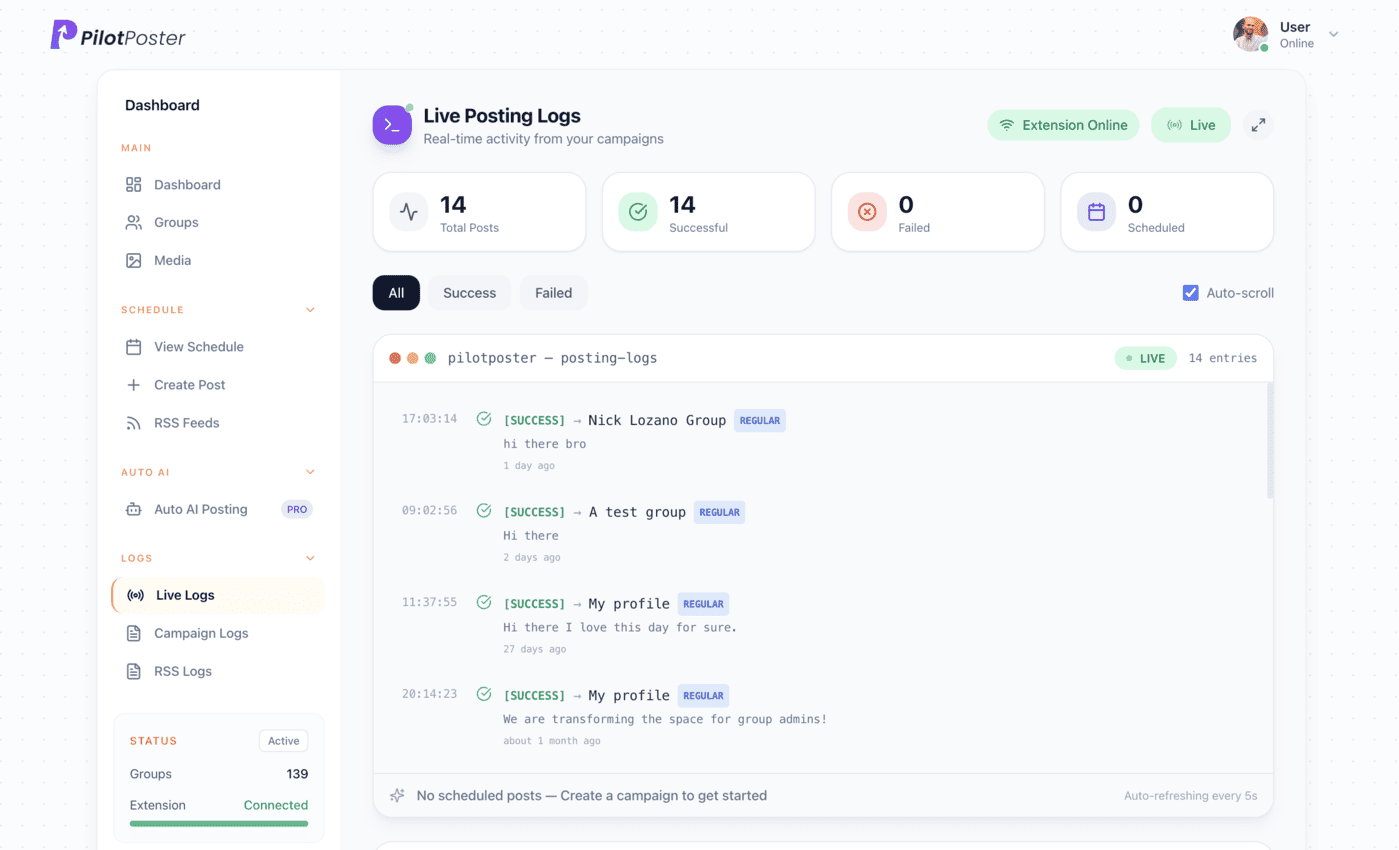
Live posting logs: every post, the group it went to, and when.
What is my Substack RSS feed URL?
It is your publication address plus /feed, for example yourname.substack.com/feed. With a custom domain, use yourdomain.com/feed. Open it in your browser to confirm it loads, then paste it into a new RSS campaign in PilotPoster and pick the groups it should go to.
Can PilotPoster include my subtitle in the group post?
Yes. Substack places each post’s subtitle in the feed’s description field. Turn on Include Description in your campaign and the group post shows the link first, with the subtitle underneath. Leave it off and the post is the title plus the link.
Will paid posts be shared too?
Every post that appears in your public feed can be shared. Readers who tap a paid post will see Substack’s paywall, so make sure your groups also get plenty of free issues. Free posts are what turn group members into subscribers.
Does it work in groups I don’t run?
Yes. PilotPoster posts to any Facebook group you have joined, as long as members can post there. Read each group’s rules on sharing links; many welcome useful articles but limit self-promotion to certain days. Your RSS Logs show where each issue landed.
Keep exploring
Related pages
- Facebook marketing without ads Grow an audience for free.
- Facebook group rules guide Share links where they are welcome.
- Spintax for group posts A different version for every group.
- Autopost Medium to groups Share your new stories, or a whole publication, to professional groups.
- Autopost Blogger to groups Share new Blogger posts, or one label, to your hobby and community groups.





4.5 on the Chrome Web Store
Put your new issues in front of every group
Connect it once, and everything new you publish reaches the groups you picked, on autopilot.